Biometric authentication now available in LoginTC Apps
February 24, 2026 •

At LoginTC, we’re continuously looking for ways to strengthen authentication without adding friction for users. We’re excited to announce that biometric authentication is now supported in the LoginTC iOS and Android apps for our cloud MFA platform.
This enhancement adds device-native biometric verification, such as fingerprint and facial recognition, to push authentication approvals, providing stronger assurance that the individual approving a request is physically present.
Continue reading to learn how biometric authentication strengthens push-based MFA across your LoginTC cloud deployment.
How can I use biometric authentication in LoginTC?
Biometric authentication is now supported in:
- LoginTC iOS app
- LoginTC Android app
Supported biometric methods include:
- Face ID and Touch ID (iOS)
- Android fingerprint and supported face authentication

When a user receives a push notification, the LoginTC iOS or Android app will prompt for biometric verification before approving the request.
If biometrics are unavailable or fail, the system securely falls back to PIN verification.
This enhancement applies to LoginTC cloud MFA deployments and requires only that users update their apps to the latest version.
Why we added biometric authentication
We’ve introduced biometric authentication for two primary reasons: improved security, and improved user experience.
Improved Security
Push fatigue and accidental approvals are real risks in modern authentication environments. Simply tapping “Approve” isn’t always enough.
Biometric verification adds a confirmation of user presence:
- Ensures the individual holding the device is the legitimate user
- Reduces risk of unauthorized approvals if a device is left unlocked
- Helps defend against MFA fatigue-style attacks
- Strengthens push authentication without adding extra workflow steps
Importantly, biometric data never leaves the device. LoginTC does not store or process fingerprint or facial templates. All biometric matching happens locally using the operating system’s secure framework.
Improved User Experience
Security improvements shouldn’t slow users down.
Biometric authentication is:
- Faster than entering a PIN
- Familiar to users across devices
- Seamlessly integrated into native OS flows
- Invisible from a deployment perspective, as no additional hardware is required
For users authenticating multiple times per day, from VPN access, to web logins, to Windows prompts, that small improvement reduces friction in a meaningful way.
How It Works
In the LoginTC Administrator panel, under Policies in the left-hand sidebar, Create or Edit an Authentication Policy.
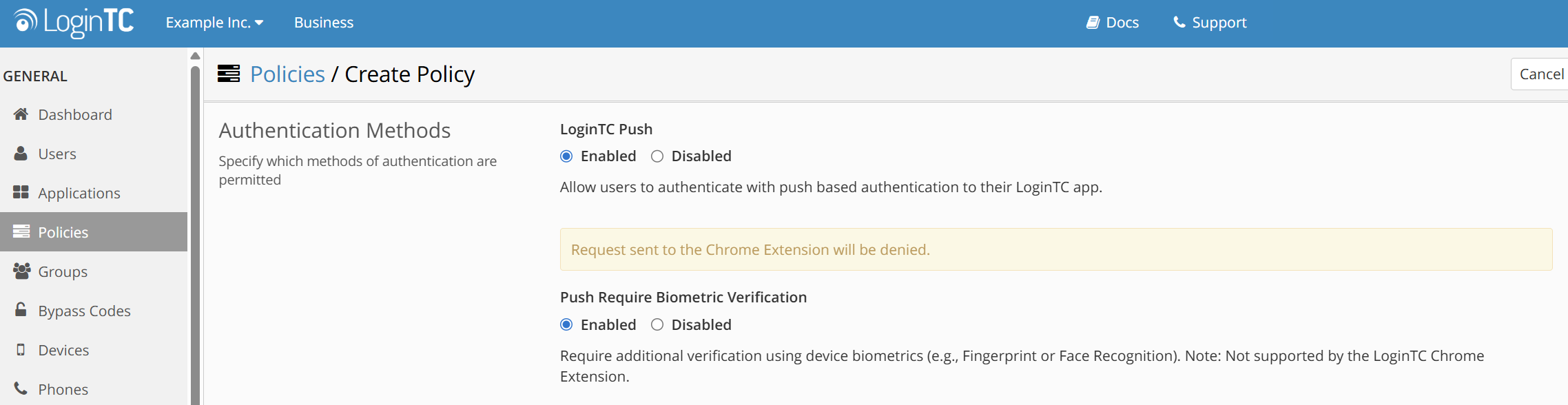
Select Enabled under “Push Require Biometric Verification” and Save the policy.
From this point, the workflow remains straightforward:
- User initiates login to a protected resource.
- LoginTC sends a push notification.
- The user opens the LoginTC app and clicks “Approve”.
- The device prompts for biometric verification (Face ID, fingerprint, etc.).
- Upon successful match, the authentication request is approved.
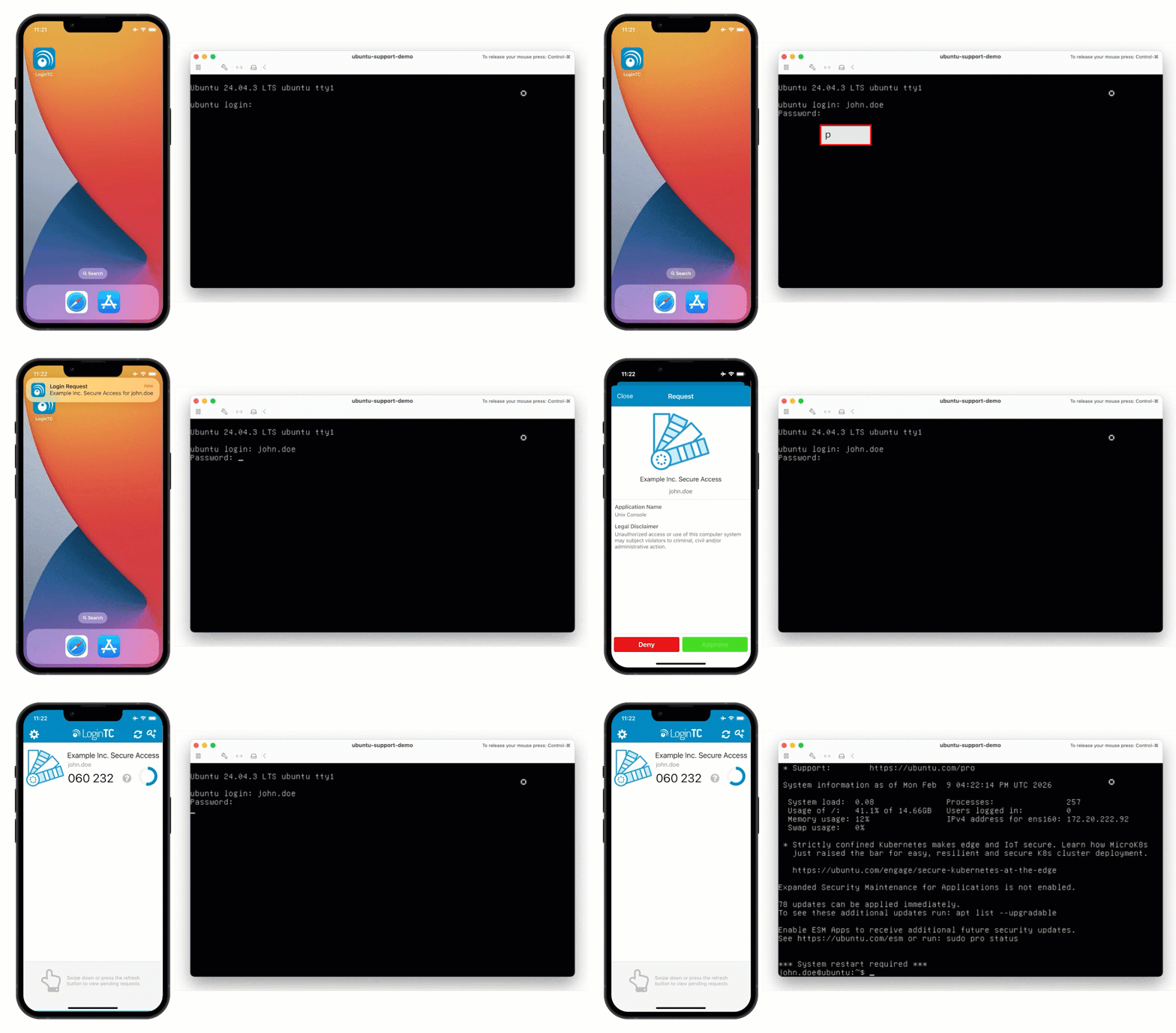
If biometric verification fails or is disabled, the user can authenticate using their LoginTC PIN as usual. This preserves both usability and reliability, while strengthening assurance.
Deployment & Availability
Biometric authentication is now available for LoginTC cloud MFA environments.
- No infrastructure changes required
- No additional hardware needed
- Works with existing SAML, OIDC, and RADIUS integrations
- Compatible with current policy configurations
For most customers, enabling biometrics is as simple as ensuring users update their LoginTC iOS or Android mobile app to the latest version.
Administrators retain full control over authentication policies as part of their broader MFA configuration.
How to get biometric authentication
This update is about tightening security without introducing complexity. By combining push-based MFA with device-native biometric verification, LoginTC adds an additional layer of assurance while keeping authentication fast and user-friendly.
We’ll continue to improve the security experience in ways that are practical to deploy and simple for users to adopt.
To get started, update your LoginTC apps to the latest version and enable a biometric authentication policy.
If you’re looking to add simple, biometric multi-factor authentication to your organization today, start a free trial with LoginTC.