LoginTC’s user-focused MFA solution in action
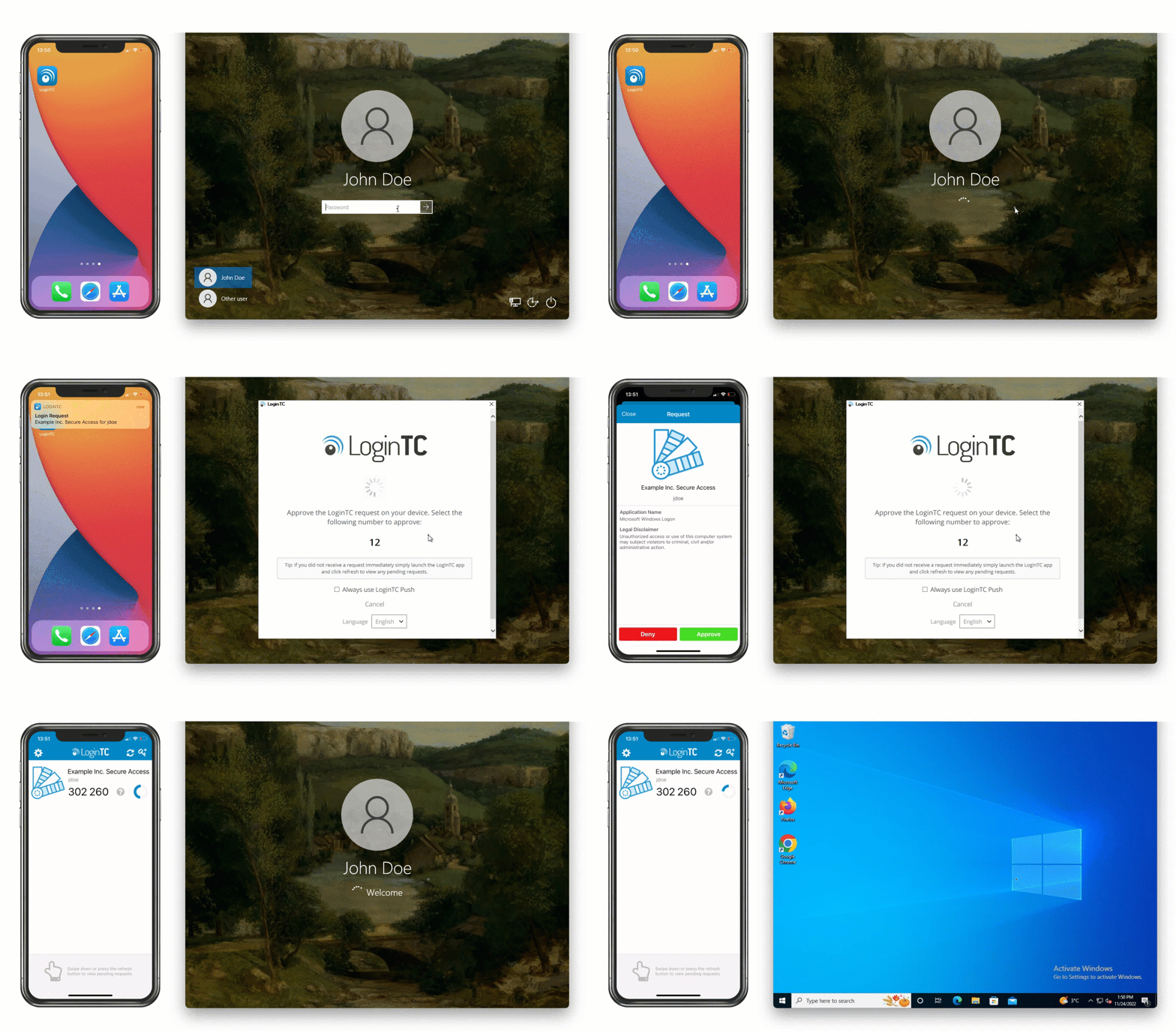
LoginTC is a multi-factor authentication (MFA) platform that adds 2FA to RDP, Windows logon, VPNs, Office 365, ADFS, OWA, RADIUS, and more than 40 other applications.
LoginTC supports 15+ authentication methods including push number matching, FIDO2 security keys, hardware tokens, and offline methods and more. Deploy in the cloud, on-premises, hybrid, or in air-gapped environments.
Whatever your Multi-Factor Authentication (MFA) needs are, LoginTC can meet them.

Easily protect your critical infrastructure with LoginTC MFA. Our comprehensive cloud-based offering delivers a streamlined, strong multi-factor authentication solution.
Suitable for businesses of all sizes in any industry.

Take full control of your cybersecurity with LoginTC Managed. Our on-premises MFA solution is easy to deploy, flexible, and gives you complete peace of mind.
Built for high-security environments and data compliance requirements.

Security is hard, but we make it easy. Our comprehensive solution and flexible design keeps you ahead of cyber threats to your business.
Our range of deployment, connector, and authentication options are ready for your organization’s unique needs.

Unlike other MFA solutions that take days or weeks to install, LoginTC can be implemented with the help of our hands-on experts in just one hour.
LoginTC is built with features to ensure a smooth deployment to your end-users, and our cybersecurity experts are always on hand to answer your questions.

At LoginTC, we believe that simply logging in to systems and applications doesn’t need to be complicated in order to be secure.
We’re committed to finding the right deployment options, authentication methods, and organization policies that don’t interfere with existing daily processes.

At LoginTC, we believe administrators are users too.
With countless configurations, centralized policy management tools, staggered roll-out options, and integrations directly to Active Directory, IT departments don’t have to worry about LoginTC adding to their workload.

 ISO 27001 Certified
 Ensure your data is protected by ISO 27001, the world’s highest information security standard.
Get no-nonsense security Superior offline capabilities
 Reliable MFA, even without reliable internet. Explore LoginTC’s ‘Always-On’ offline authentication.
Unique offline authentication Next-level MFA everywhere
 Connect FIDO2 keys to any application or service for strong, phishing-resistant security.
Explore FIDO2 with LoginTC Options for every use case
 No matter your situation, LoginTC has a solution that works for your organization’s unique needs.
Find your use case A partner that works for you
 Our MSP partners get hands-on service, tailored product features, pricing discounts and more.
Explore a partnership with LoginTC Making a difference for customers
 Learn how LoginTC has made a difference for our customers in every industry, for every use case.
Read customer testimonials





Not sure where to start?
Talk to one of our MFA experts to get started with a LoginTC solution that works for you.

LoginTC is a multi-factor authentication platform from Cyphercor that adds 2FA to RDP, Windows logon, VPNs, Office 365, ADFS, OWA, RADIUS, and more than 40 other applications. It supports push, FIDO2 passkeys, hardware tokens, and offline codes, and can be deployed in cloud, on-premises, hybrid, or air-gapped environments.
Multi-factor authentication (MFA) is a security method that requires users to verify their identity using two or more factors — something they know (like a password), something they have (like a phone), or something they are (like a fingerprint) — before gaining access to an application or system. LoginTC makes it easy to add MFA to your organization without disrupting your users’ workflow.
Two-factor authentication (2FA) uses exactly two verification steps, while multi-factor authentication (MFA) can use two or more. In practice, the terms are often used interchangeably. LoginTC supports multiple authentication methods, including push notifications, OTP tokens, and hardware keys, so you can choose the right combination for your supported integrations.
Passwords alone are vulnerable to phishing, credential stuffing, and brute-force attacks. MFA adds a critical second layer of defense, significantly reducing the risk of unauthorized access. It’s also increasingly required by cyber insurance providers and compliance frameworks like PCI-DSS, HIPAA, and SOC 2. See how LoginTC helps businesses meet these requirements on our compliance page or explore customer case studies.
After a user enters their username and password, LoginTC prompts them to verify their identity through a second factor authentication method — such as a one-tap push notification on the LoginTC mobile app, a one-time passcode, or a hardware token. The process takes just seconds and can be deployed across VPNs, cloud apps, Windows logon, RDP, and more. Browse the full list of supported connectors.
LoginTC integrates with a wide range of systems including Windows Logon and RDP, RADIUS-based VPNs (Cisco, Fortinet, Palo Alto, SonicWall, and more), LDAP, SAML/SSO applications, and custom apps via our API. Visit our step-by-step deployment guides in our documentation.
Most organizations can deploy LoginTC in under an hour. Our step-by-step documentation walks you through setup for each connector. For larger rollouts, our team offers hands-on onboarding support.
LoginTC MFA offers transparent, per-user pricing with no hidden fees and a free trial so you can test it with your team before committing. There are no setup costs, and you can scale up or down as your organization grows. View full details on our pricing page.