How to use FIDO2 in Air-Gapped Environments
March 26, 2026 •
If you’ve ever tried to deploy FIDO2 in an air-gapped environment, you already know the frustration. FIDO2 hardware security keys are widely regarded as the gold standard of phishing-resistant multi-factor authentication, but the dominant ecosystem around them assumes your infrastructure has a persistent, reliable internet connection.
The moment you introduce an air-gapped network, one physically or logically isolated from the public internet, nearly every major FIDO2 deployment guide falls apart. Attestation lookups fail. Cloud-based identity providers become unreachable. Licensing servers time out. And your users are left staring at an authentication error with no obvious fix.
This post breaks down exactly why FIDO2 is so difficult to implement in air-gapped environments, what most solutions get wrong, and why LoginTC Managed is the rare platform that actually makes it work without the complexity you’d expect.
What Is FIDO2 and Why Does It Matter for Air-Gapped MFA?
FIDO2 is an open authentication standard developed by the FIDO Alliance and the World Wide Web Consortium (W3C). It consists of two specifications: WebAuthn (Web Authentication API) and CTAP2 (Client to Authenticator Protocol). Together, they enable users to authenticate using a hardware security key, biometric device, or platform authenticator without transmitting a shared secret over the network.
FIDO2 is the only widely adopted authentication standard that is cryptographically phishing-resistant by design.
Unlike TOTP (Time-Based One-Time Passwords) or SMS-based OTP, FIDO2 tokens bind the authentication ceremony to a specific relying party origin. A credential issued for login.yourdomain.com will refuse to authenticate against any other domain — eliminating credential theft via phishing entirely. For organizations in regulated industries such as defense, utilities, healthcare, and government, this level of assurance is increasingly mandatory, not optional.
The U.S. Cybersecurity and Infrastructure Security Agency (CISA) and the NSA have both identified phishing-resistant MFA — specifically FIDO2-class authentication — as a critical security control for high-value systems. Many of those same high-value systems live behind air gaps.
What Makes an Environment “Air-Gapped”?
An air-gapped network is a system or group of systems that are physically or logically isolated from unsecured external networks, including the internet. Air gaps are common in operational technology (OT) environments, industrial control systems (ICS), classified government networks, financial clearing systems, and critical infrastructure. Some organizations implement a “soft” air gap using strict firewall rules, while others enforce a complete physical separation: no external cable, no wireless, no exceptions.
The challenge is that modern identity platforms were not built with air-gapped networks as a primary use case. They were built for cloud-first enterprises with always-on connectivity.
Why Standard FIDO2 Deployments Break in Air-Gapped Networks
The difficulty of deploying FIDO2 in air-gapped environments is not a single problem, it is a stack of interconnected dependencies, each of which assumes internet access. Understanding where the chain breaks helps you evaluate whether any given solution will actually hold up.
Attestation Verification Requires External Lookups
When a FIDO2 security key is registered, the relying party (your authentication server) ideally verifies the device’s attestation certificate — a cryptographic proof that the key hardware is genuine and from a legitimate manufacturer. This process typically involves checking against the FIDO Metadata Service (MDS), a cloud-hosted repository maintained by the FIDO Alliance.
In an air-gapped environment, your authentication server cannot reach the FIDO MDS, which means attestation verification either fails or must be disabled.
Disabling attestation is a valid trade-off in some scenarios, but it removes a layer of supply chain assurance that security-sensitive organizations often require. Pre-loading attestation metadata locally is technically possible but operationally complex. It requires a process for initial seeding, periodic updates delivered via a secure transfer mechanism, and a server capable of consuming and using that metadata without any outbound connection.
Cloud Identity Providers Are Unreachable
The most popular platforms for FIDO2 MFA deployment, including Microsoft Entra ID (Azure AD), Okta, Duo, and Google Workspace, are cloud-hosted services. Their FIDO2 registration and authentication flows require the client device to communicate with cloud-hosted endpoints. In a true air-gapped environment, those endpoints are simply unreachable.
Some organizations attempt to solve this by deploying on-premises versions of these tools, but many cloud-native identity platforms do not offer a fully self-contained on-premises variant. Microsoft’s on-premises Active Directory, for example, does not natively support WebAuthn/FIDO2 authentication without Azure AD and internet connectivity for certain operations.
Licensing, Telemetry, and Update Checks
Even authentication products marketed as “on-premises” often phone home for license validation, telemetry reporting, or threat intelligence updates. In an air-gapped environment, these background connections fail, sometimes silently, sometimes by breaking authentication entirely after a grace period expires. IT admins deploying MFA into classified or operationally isolated environments have been burned by this pattern more than once.
Certificate Authority and PKI Complexity
FIDO2 over HTTPS requires a valid TLS certificate. In an air-gapped environment, you will be running your own internal Certificate Authority (CA). Configuring your authentication server to trust an internal CA, provisioning certificates for your relying party, and ensuring all client devices trust the same CA chain adds meaningful operational overhead, especially in environments with strict change management processes.
The Current Landscape: What Solutions Exist (and Where They Fall Short)
Faced with these challenges, IT admins in air-gapped environments have historically had a few options,none of them particularly clean.
Roll Your Own WebAuthn Server
Open-source WebAuthn server libraries exist in most major programming languages. Projects like py_webauthn, java-webauthn-server, and SimpleWebAuthn allow technically capable teams to build a FIDO2 relying party from scratch. This approach can be fully air-gap compatible because you control every dependency.
The downside is significant: you are building and maintaining authentication infrastructure yourself. Authentication is a security-critical system where implementation errors have catastrophic consequences. Unless you have a dedicated security engineering team, this approach introduces more risk than it eliminates.
On-Premises Alternatives with Partial FIDO2 Support
Some legacy on-premises identity solutions have added FIDO2 support as an add-on or extension. The quality and completeness of that support varies widely. Many of these platforms were built around RADIUS, LDAP, or SAML architectures that predate WebAuthn by decades. Bolting FIDO2 onto a RADIUS-first architecture is possible but typically results in a degraded user experience and limited protocol compliance.
VPN Bridging to a Connected Environment
Some organizations create a carefully controlled one-way data bridge, which is a system that synchronizes authentication data from an internet-connected environment into the air-gapped network. This is operationally complex, introduces a potential attack surface at the bridge itself, and is explicitly prohibited in some classified or regulated environments. It also defeats much of the purpose of the air gap.
The honest truth is that before LoginTC Managed, there was no mainstream, purpose-built solution for deploying FIDO2 hardware security keys in a genuinely air-gapped environment with a polished, low-complexity setup.
How LoginTC Managed Solves FIDO2 Authentication in Air-Gapped Environments
LoginTC takes a fundamentally different approach to this problem. Rather than being a cloud-first platform that attempts to stretch into air-gapped scenarios, LoginTC’s air-gapped MFA solution is built to operate completely offline and FIDO2 hardware security key support is a first-class citizen within that architecture.
A Self-Contained Authentication Server That Needs No Internet
LoginTC Managed deploys as a self-contained appliance or virtual machine within your network perimeter. All authentication operations, including FIDO2 registration, challenge generation, response verification, and user management, happen entirely within your environment. There are no outbound calls to cloud licensing servers, no telemetry endpoints, no metadata lookups to the FIDO MDS that would require internet access.
LoginTC Managed is designed from the ground up to operate in environments with zero internet connectivity, making it one of the only platforms that fully supports FIDO2 security keys in a true air-gapped network.
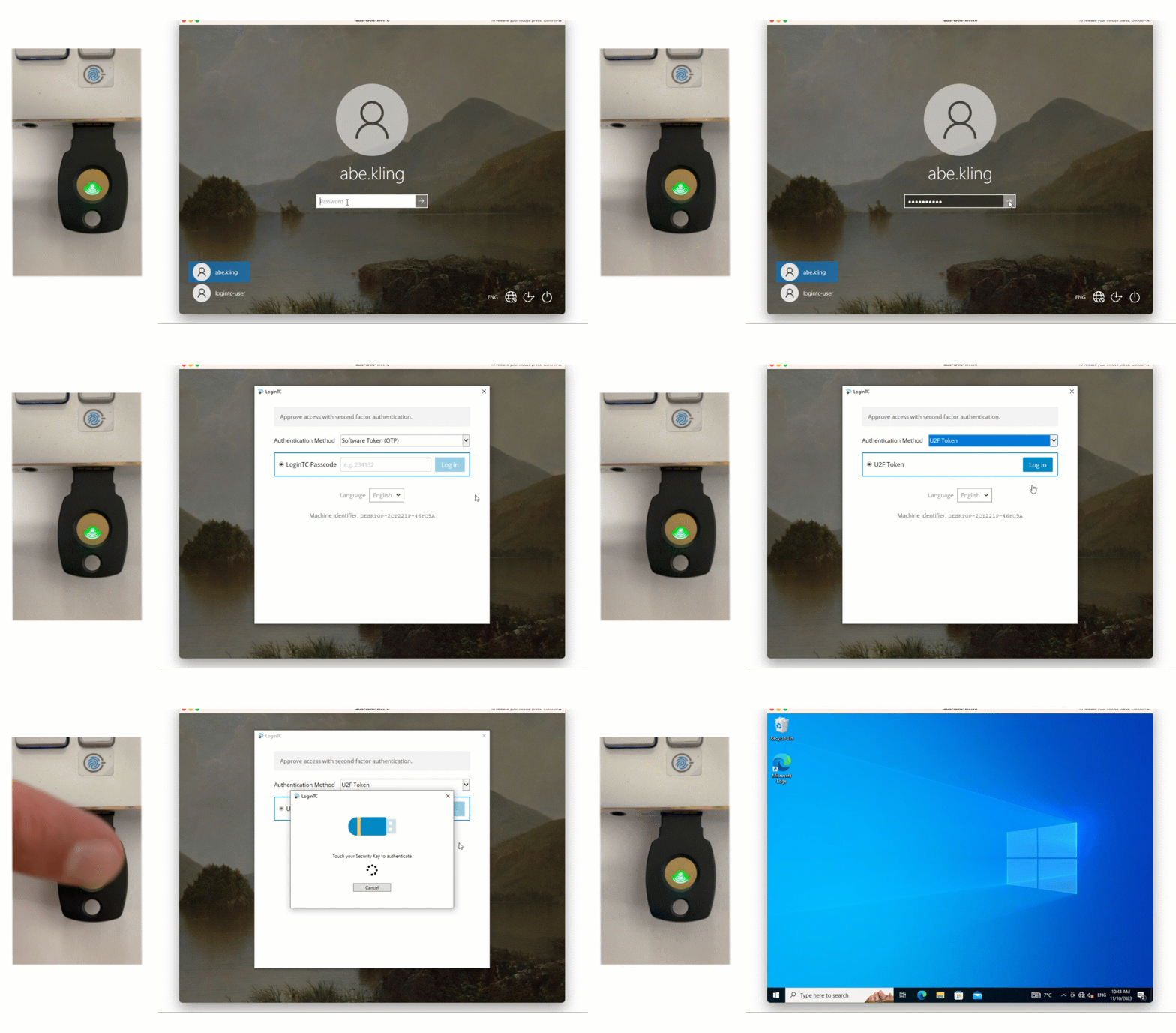
For organizations that need hardware-backed, phishing-resistant authentication on isolated networks, this is not a minor feature, it is the entire value proposition. You can explore the specifics of LoginTC’s FIDO2 security key authentication to see how it handles key registration, credential binding, and multi-protocol support.
Easy Setup Without the Usual Air-Gap Complexity
One of the most common complaints from IT admins who have attempted air-gapped MFA deployments is the operational complexity. PKI configuration, manual metadata seeding, network policy exceptions for specific components — the list grows quickly.
LoginTC Managed is intentionally designed to minimize that burden. The deployment process involves:
- Deploying the LoginTC Managed appliance within your network (virtual machine or hardware appliance)
- Configuring your directory integration (Active Directory or LDAP) over your internal network
- Registering FIDO2 security keys for your users through the admin console
- Integrating with your target systems via RADIUS, SAML, or LDAP proxy — all supported protocols that work entirely within your perimeter
There is no requirement to open firewall rules to external endpoints. There is no cloud account to provision. There is no licensing server to reach. The system works because it was designed to work in exactly this scenario, not adapted to it.
Supporting Multiple Authentication Methods on a Single Platform
Not every user on an air-gapped network will immediately have a FIDO2 hardware security key. LoginTC Managed supports multiple authenticator types on the same platform, including software tokens, hardware OTP tokens, and FIDO2 security keys, allowing organizations to run a phased rollout. High-privilege users and administrators can be moved to FIDO2 security keys first, while general users transition over time.
This flexibility matters in air-gapped environments where procurement cycles for hardware tokens can be long and where not all systems may immediately support WebAuthn-based authentication flows.
Best Practices for Deploying FIDO2 in Air-Gapped Environments
Whether you are evaluating LoginTC or architecting a solution independently, the following best practices apply to any FIDO2 deployment in an air-gapped or restricted network.
Pre-Load Attestation Metadata Before Cutting the Connection
If your security policy requires attestation verification, download and cache the FIDO Alliance MDS metadata before the system goes offline. Establish a formal process for periodically refreshing that metadata via your secure transfer procedures (e.g., a clean removable media process). Document the metadata version in your system configuration records.
Use an Internal Certificate Authority with Long-Validity Certificates
Your WebAuthn relying party must be served over HTTPS. Deploy an internal CA, issue a certificate with a validity period appropriate to your certificate management cadence, and push the CA root certificate to all client devices through your internal software deployment tooling. Plan your renewal process before the initial deployment. Certificate expiry in an air-gapped authentication system is an outage risk that is entirely preventable.
Test Key Registration and Recovery Flows Offline
Before going live, run full end-to-end tests of FIDO2 key registration, authentication, and key loss recovery entirely within the air-gapped environment. FIDO2 recovery flows, i.e. what happens when a user loses their security key, are often overlooked during initial deployment planning. In an air-gapped environment, you cannot rely on cloud-based account recovery mechanisms. You need a documented, tested, administrator-initiated recovery procedure.
Document Your Dependency Map
Create an explicit map of every network call your authentication infrastructure makes. For LoginTC Managed, this map is minimal by design. For other solutions, you may discover hidden dependencies on NTP servers, OCSP responders, or external DNS. Each dependency is either a configuration task or a potential point of failure in your air-gapped deployment.
Plan for Firmware Updates on Hardware Security Keys
FIDO2 hardware security keys occasionally receive firmware updates that address security vulnerabilities. In an air-gapped environment, you need a process for pushing these updates — or for accepting the risk of running an older firmware version. Work with your hardware vendor to understand the update mechanism and whether it requires connectivity.
Frequently Asked Questions
Can FIDO2 hardware security keys work without internet access?
Yes. The FIDO2 authentication ceremony itself is entirely local. The hardware key communicates with the client device, which communicates with the relying party server. No internet connection is required for the authentication transaction itself. The challenge arises with supporting infrastructure (attestation lookups, identity provider connectivity) that assumes internet access. A properly configured on-premises relying party like LoginTC Managed resolves this completely.
What is the difference between FIDO2 and TOTP in an air-gapped environment?
TOTP (Time-Based One-Time Passwords) is easier to deploy in air-gapped environments because it only requires time synchronization, which can be handled by an internal NTP server. However, TOTP is susceptible to real-time phishing attacks, an attacker can intercept a TOTP code in transit and use it immediately. FIDO2 is phishing-resistant by design because the credential is cryptographically bound to a specific domain, making it a significantly stronger control despite the higher deployment complexity.
Does LoginTC Managed support FIDO2 security keys in air-gapped environments?
Yes. LoginTC Managed is purpose-built for offline and air-gapped environments and includes full support for FIDO2 hardware security keys. The platform deploys as a self-contained appliance with no outbound internet dependencies, making it one of the few MFA solutions that supports FIDO2 tokens in a genuinely isolated network.
What protocols does LoginTC Managed support for integration in air-gapped environments?
LoginTC Managed supports RADIUS, SAML, and LDAP proxy integrations, all of which operate entirely within your internal network perimeter. This means you can protect VPN gateways, remote desktop environments, web applications, and other infrastructure without requiring any internet connectivity on the authentication server.
How does FIDO2 attestation verification work when there is no internet access?
Attestation verification normally involves querying the FIDO Alliance Metadata Service (MDS) to confirm the authenticity of a hardware key. In an air-gapped environment, this lookup is impossible unless the metadata has been pre-loaded locally. Organizations can seed the MDS metadata before cutting connectivity and establish a periodic refresh process. Alternatively, for lower-sensitivity deployments, attestation verification can be disabled without affecting the phishing-resistance of the core FIDO2 authentication mechanism.
Is FIDO2 compliant with government and defense security requirements for air-gapped networks?
FIDO2-class authentication aligns with the phishing-resistant MFA requirements outlined by CISA, NIST SP 800-63B (AAL3 with hardware tokens), and various defense information assurance frameworks. Whether a specific deployment is compliant depends on the full implementation, including key management, attestation handling, and audit logging, all of which need to be evaluated against the applicable framework. LoginTC Managed provides the audit logging and administrative controls needed to support these compliance conversations.
Conclusion: Deploy FIDO2 Where It’s Actually Needed
Air-gapped environments protect your most critical systems. It is a genuine irony that those same environments have historically been the hardest places to deploy the most effective authentication technology. The conventional wisdom has been to accept a weaker authenticator, because FIDO2 was “too hard” to make work offline.
That trade-off is no longer necessary.
LoginTC Managed eliminates the core dependencies that make FIDO2 difficult in air-gapped environments. No cloud. No internet. No hidden callbacks. Just a self-contained, easy-to-deploy authentication platform that supports FIDO2 hardware security keys alongside other authenticator types, fully operational behind your network perimeter.
If you are responsible for securing an air-gapped or restricted network and you have been putting off phishing-resistant MFA because it seemed too complex to deploy offline, it is worth taking a closer look at LoginTC’s air-gapped MFA platform and the FIDO2 security key support it provides.
Contact our team for more information about FIDO2 and Air-Gapped Environments.