How to maintain MFA in Citrix NetScaler after recent updates
January 28, 2026 •
Multi-factor authentication (MFA) is a critical layer of security for Citrix NetScaler environments, but recent updates have left many administrators facing unexpected challenges.
Security patches, stricter browser content policies, and the deprecation of iframe-based prompts by some third-party MFA vendors have disrupted traditional login flows, making it seem like MFA is breaking or being forced into new models.
Understanding why these issues are happening and how to maintain a stable, flexible MFA deployment is essential for organizations that rely on Citrix for secure, on-premises or hybrid access.
What is MFA for Citrix?
Multi-factor authentication (MFA) for Citrix adds an essential layer of security to Citrix environments by requiring users to verify their identity using more than just a username and password.
Whether accessing Citrix Gateway, Citrix Virtual Apps and Desktops, or other Citrix infrastructure, MFA ensures that only authorized users can gain access—even if their primary credentials are compromised. By requiring multiple identity factors (something you know, something you have, or something you are), MFA significantly reduces the risk of unauthorized access and protects sensitive resources delivered through Citrix platforms.
Why are MFA deployments suddenly “breaking” in upgraded Citrix environments?
Recently many Citrix customers have reported that some MFA prompts, especially iframe-based prompts, are no longer appearing, appear blank, or fail intermittently after NetScaler upgrades. From the outside, this looks like Citrix “removing” MFA functionality or forcing customers onto different authentication models.
What’s actually happening is more subtle, and more disruptive.
The Citrix ecosystem has undergone several overlapping changes at once:
- NetScaler firmware updates introduced stricter default Content Security Policies (CSP).
- Browser vendors have become increasingly restrictive about cross-domain iframe behavior.
- Several MFA vendors have chosen to deprecate iframe-rendered authentication prompts in favor of externally hosted or redirect-based experiences.
Individually, each of these changes is defensible from a security or modernization standpoint. Together, they create a breaking point for legacy MFA designs that relied on embedded UI elements inside NetScaler.
The result is a wave of customer confusion: MFA is still “enabled,” licenses still exist, but authentication no longer works the way it used to.
The industry shifts in MFA support
It’s important to be precise here: Citrix has not announced the removal of MFA support from NetScaler. NetScaler still supports multi-factor authentication through nFactor, RADIUS, SAML, and other mechanisms.
What has changed is how MFA is expected to be delivered. Many MFA vendors have moved away from iframe-based prompts toward:
- Hosted “universal prompt” experiences
- OAuth or OIDC-based authentication flows
- Redirect-centric login models managed entirely outside the gateway
These newer approaches reduce reliance on embedded third-party scripts, simplify vendor updates, and avoid browser-level iframe restrictions. For vendors pursuing cloud-first identity platforms, this direction makes sense.
However, in Citrix environments, particularly on-premises deployments, iframe MFA wasn’t a workaround. It was a deliberate architectural choice:
- No external redirects
- No dependency on browser pop-ups
- A consistent login experience across thick clients, thin clients, and web access
When MFA vendors deprecate iframe delivery, Citrix administrators are effectively forced to redesign authentication flows, often under pressure from security advisories or emergency upgrades. That’s why this change feels abrupt and forced, even when it’s technically announced in advance.
Does LoginTC MFA offer full Citrix support?
LoginTC’s approach recognizes that Citrix environments are diverse. Some organizations want modern, redirect-based MFA flows, while others need tightly controlled, embedded authentication that works across legacy and constrained clients. Many need both.
All MFA options including iframe, challenge, and challenge interactive remain supported and actively maintained within LoginTC.
In practical terms, that gives Citrix administrators:
- Stability across NetScaler upgrades
- More control over login behavior
- A clear upgrade path on their timeline, not one imposed by upstream deprecations
Continue reading to see all the ways LoginTC can be integrated with Citrix.
How can LoginTC MFA be used with Citrix?
LoginTC MFA can be added to any Citrix deployment that uses the RADIUS protocol. That includes, but is not limited to:
- Citrix Netscaler
- Citrix Access Gateway
- Citrix Secure Private Access
- Any Citrix appliance that uses the RADIUS protocol
If you’re not sure whether LoginTC MFA can be used with your Citrix appliance, feel free to contact us for further information.
LoginTC offers a wide range of flexible ways that administrators can secure Citrix with MFA. Our solutions are built on the idea that as an IT administrator, you know what’s best for your organization. LoginTC puts control back in your hands to decide things like what type of deployment, which authentication methods, and how you want them displayed to your end users.
Explore the many ways that LoginTC can be implemented below.
Iframe
One of the most common ways to authenticate into Citrix appliances is using Iframe authentication.
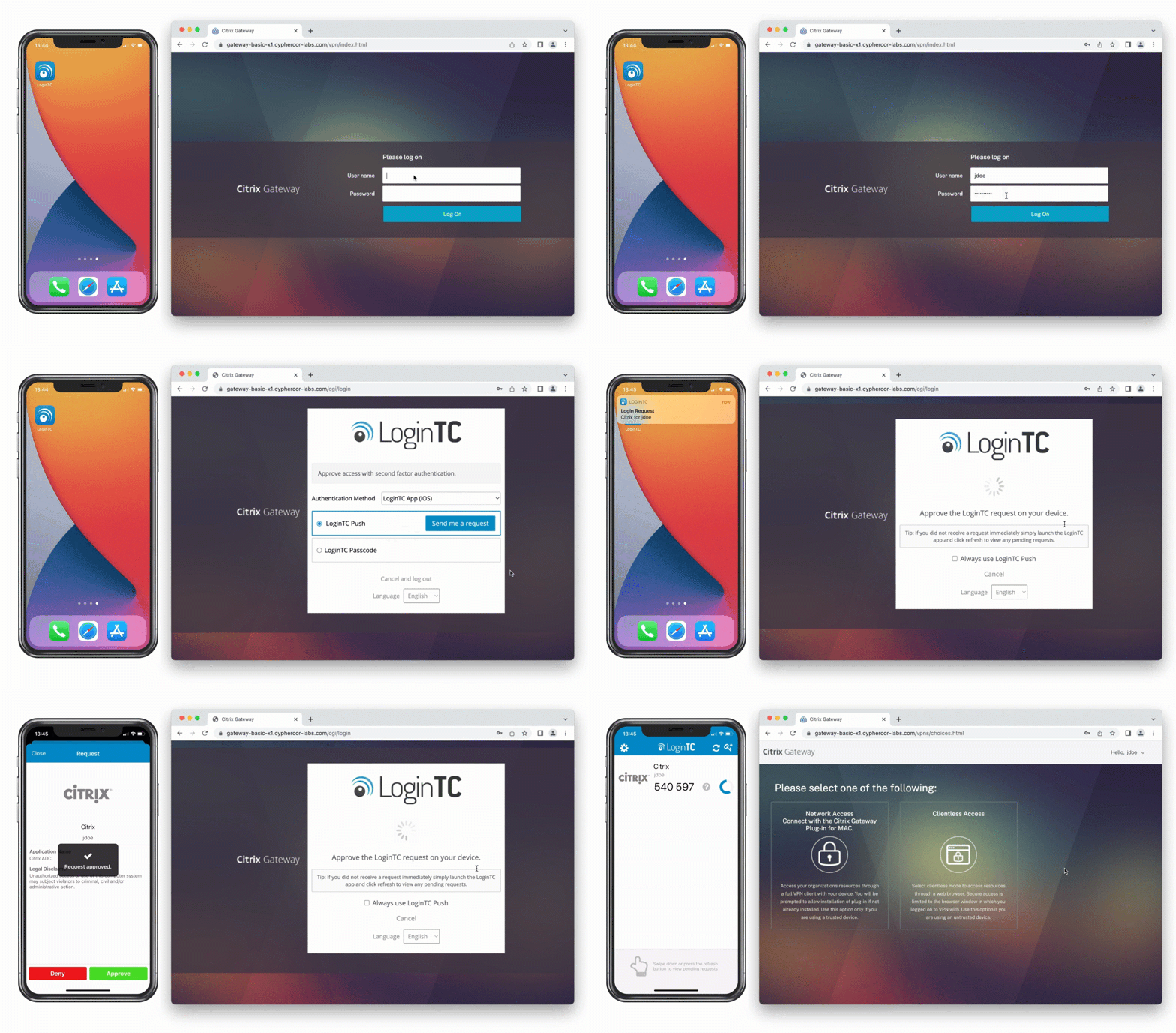
Iframe authentication involves a pop-up window appearing that shows possible authentication methods that the end-user can select from.
Below is an example of a user selecting the push notification authentication method, receiving a push notification to their device, and tapping Accept.
LoginTC offers a wide range of authentication methods that work with Iframe-based authentication, including:
- Push-Number Matching
- Push Normal
- Software OTP
- SMS OTP
- Phone Call
- Phone Call OTP
- Email OTP
- Bypass code
- U2F
- Hardware Token
- Passcode grid
- Authenticator App
Challenge and Challenge Interactive Mode
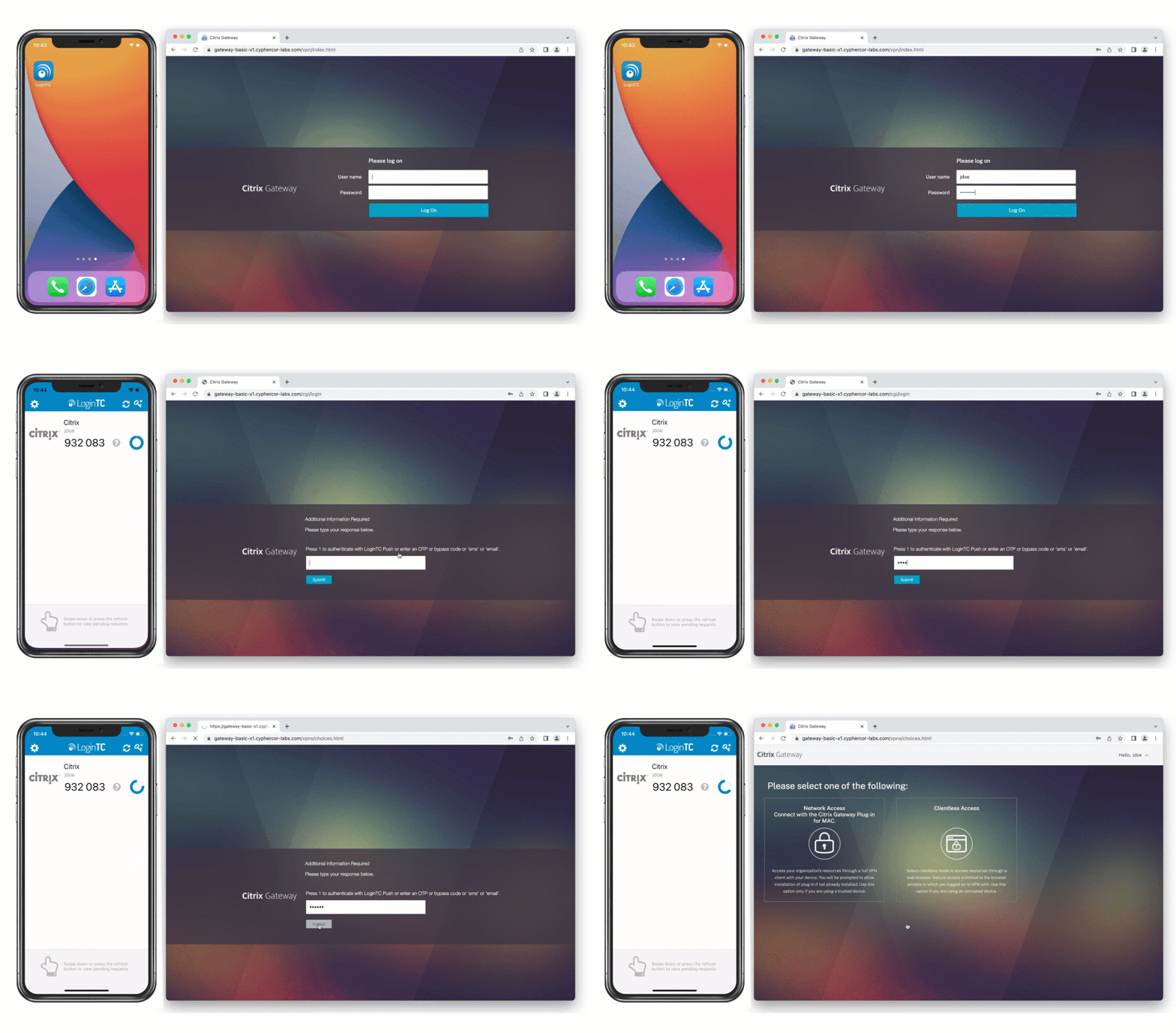
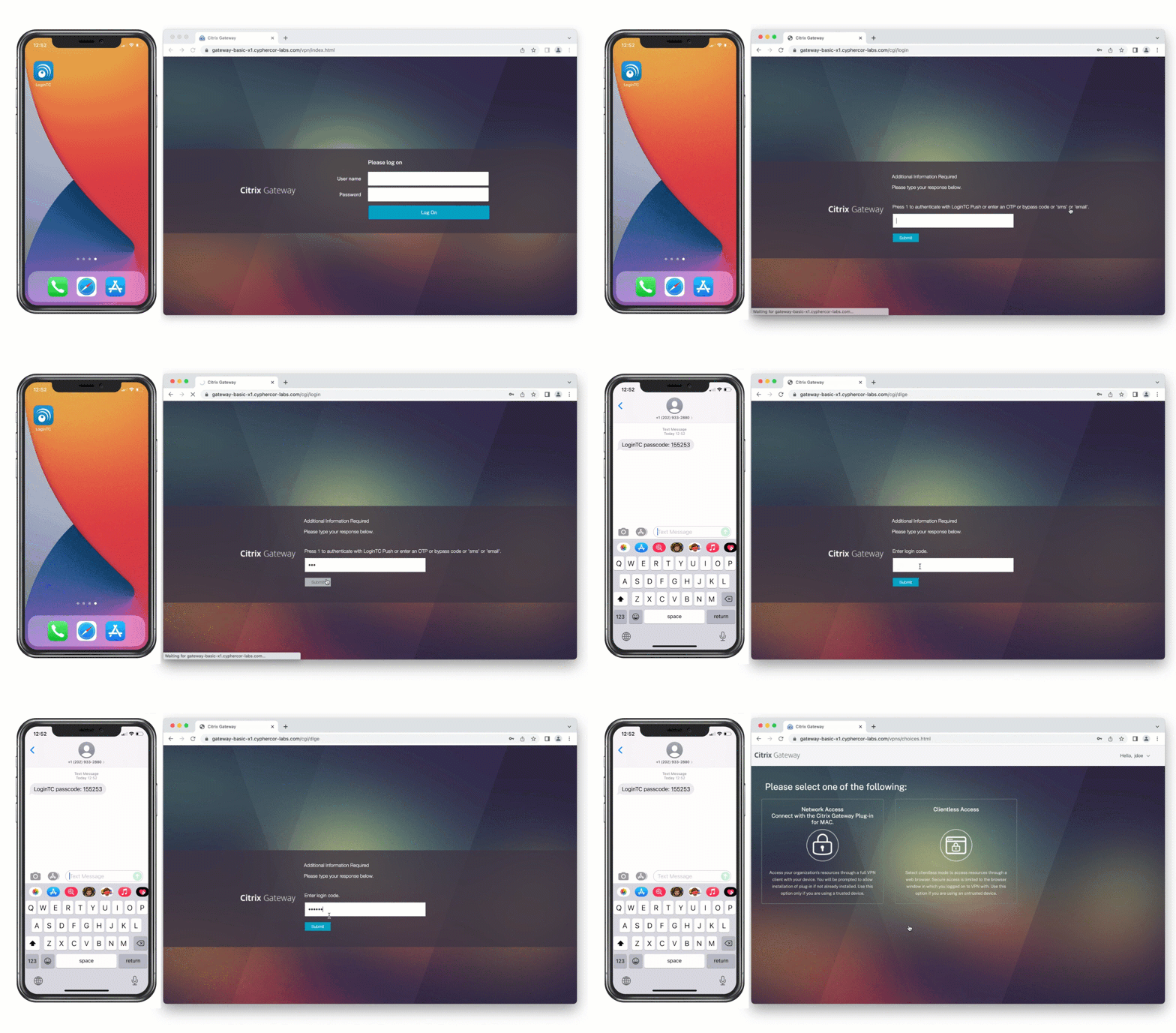
With Challenge and Challenge Interactive modes, after inputting their username and password, the end user will be prompted to choose an authentication mode, which the user will choose by inputting a text-based answer, prompting the second form of authentication.
Watch how challenge mode works with the Software OTP method below:
Watch how challenge interactive mode works with multiple prompts and allows users to seamlessly use SMS or Email OTP methods:
Users can authenticate with challenge mode using the following methods:
- Authenticator App
- Push number matching
- Push normal
- Software OTP
- Software Hardware Token
- Bypass Code
- Passcode grid
- Interactive Email
- SMS OTP
- Interactive Phone Call OTP
- Interactive Phone Call One-step
Direct Mode
End users can also authenticate using Direct Mode. With this format, after typing in their password, the end user inputs the response to the second-factor challenge directly into the same field.
Below is this mode in action using Software OTP method.
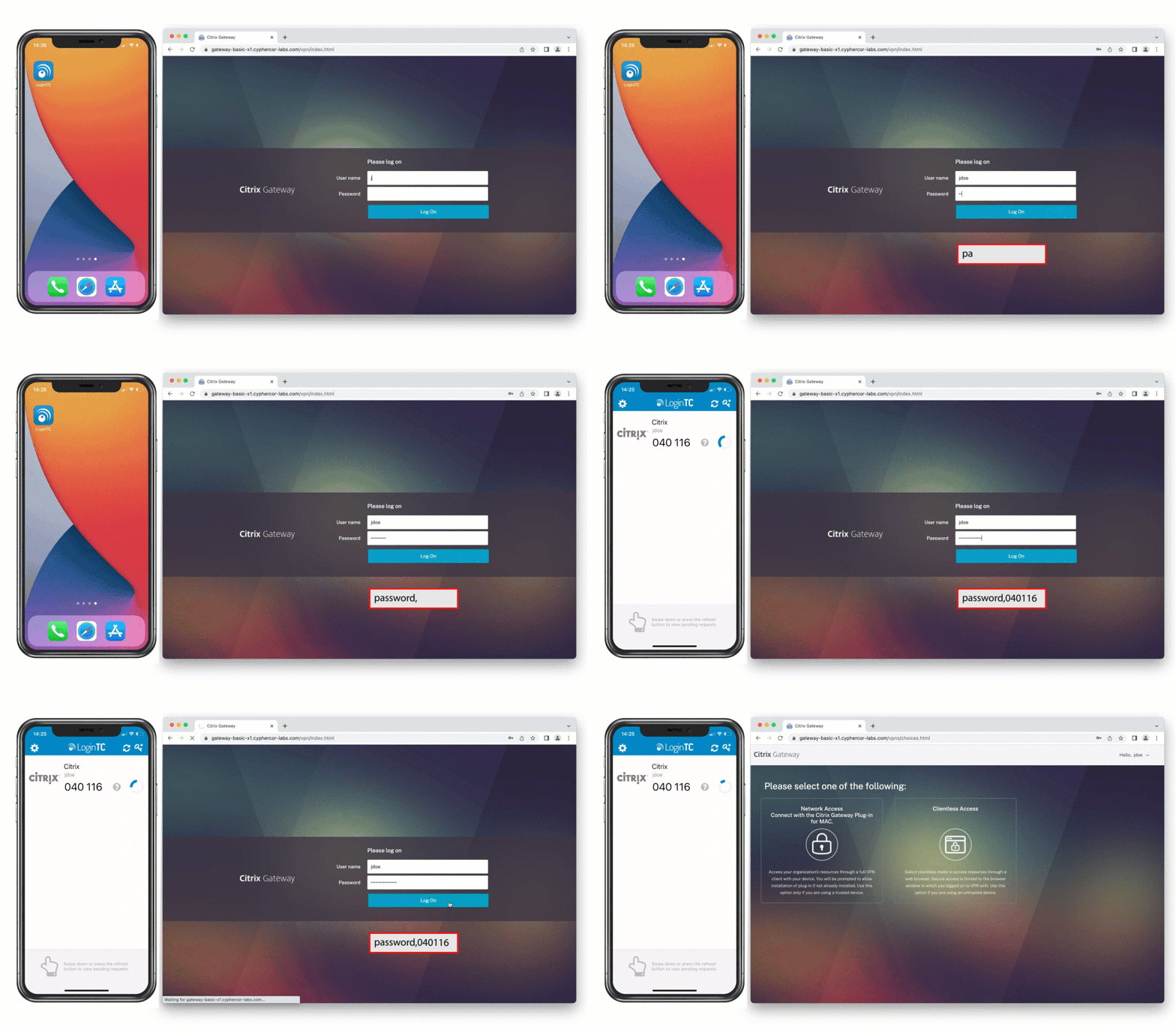
Direct mode can also be used with the following authentication methods:
- Authenticator App
- Push normal
- Software OTP
- Software Hardware Token
- Bypass Code
- Phone Call
On-premises deployment
Deploying Citrix on-premises offers an additional level of security for administrators looking to avoid reliance on an external cloud.
Using LoginTC Managed, administrators can take full control over their Citrix MFA operations, without sacrificing on usability and choice.
With an on-premises deployment, end users can authenticate using the following methods:
- Software token
- Hardware token
- Passcode grid
- Email passcode
- Bypass codes
- Security key
- Authenticator app
- SMS passcode
MFA flexibility matters more than ever in Citrix environments
The challenges Citrix customers are experiencing with MFA today are less about any single product decision and more about timing and convergence. NetScaler security updates, stricter content security policies, evolving browser behavior, and third-party MFA vendors deprecating iframe-based prompts are all happening at once. The result is a wave of broken login flows and forced redesigns that many organizations didn’t anticipate and, in some cases, don’t want.
For Citrix administrators, this moment highlights an important reality: MFA isn’t just a checkbox feature, it’s an architectural dependency. When an MFA provider removes support for a delivery model your environment relies on, the impact can ripple across access gateways, client compatibility, and operational stability. What’s framed as “modernization” can quickly become an unplanned migration.
That’s why flexibility matters. LoginTC continues to support iframe-based MFA alongside more modern authentication approaches, giving Citrix customers control over how and when they evolve their MFA architecture. Instead of forcing change through deprecation, LoginTC allows organizations to strengthen security while preserving the login experience and infrastructure models that already work.
Next Steps
LoginTC MFA for Citrix provides a versatile and secure solution for organizations seeking to enhance their Citrix environments. With a wide array of authentication methods and deployment options, LoginTC empowers administrators to tailor their security measures to their specific needs.
Whether choosing Iframe, Challenge, or Direct Mode, or opting for an on-premises deployment, LoginTC offers flexibility and control. This ensures a robust multi-factor authentication system that protects sensitive resources while maintaining usability for end users.
Start your free trial today and experience the benefits of enhanced Citrix security with LoginTC.
Want to see it first?