Faster access and better visibility in the latest Windows Logon MFA connector
January 20, 2026 •
At LoginTC, we believe that security should never come at the cost of productivity. Our goal is to make the jump from a standard password login to a secure, multi-factor authentication (MFA) workflow as seamless as possible for both the administrator and the end user.
Based on recent R&D findings and valuable feedback from our administrator community, we are excited to announce a performance-focused update to the LoginTC Windows Logon and RDP Connector. This update significantly improves load speeds and introduces new visual feedback to ensure a smoother login journey.
Why Visibility Matters in Authentication UX
In the world of IT security, a “silent” system can often be mistaken for a “broken” system. When a user enters their credentials and the MFA prompt doesn’t appear instantly, their first instinct is often to assume the application has frozen or the network has dropped.
This uncertainty leads to:
- User frustration: Repeatedly clicking “Sign In” or refreshing the session.
- Increased help desk tickets: Users reporting that the “MFA isn’t loading.”
- Shadow IT workarounds: Users attempting to bypass security protocols to get their work done.
Ensuring that user-facing interfaces act as expected and perform quickly is essential to providing a gold-standard user experience that LoginTC prides itself on.
Performance improvements: Built for speed
The core of this update is a series of under-the-hood optimizations designed to reduce the time it takes for the LoginTC credential provider to initialize.
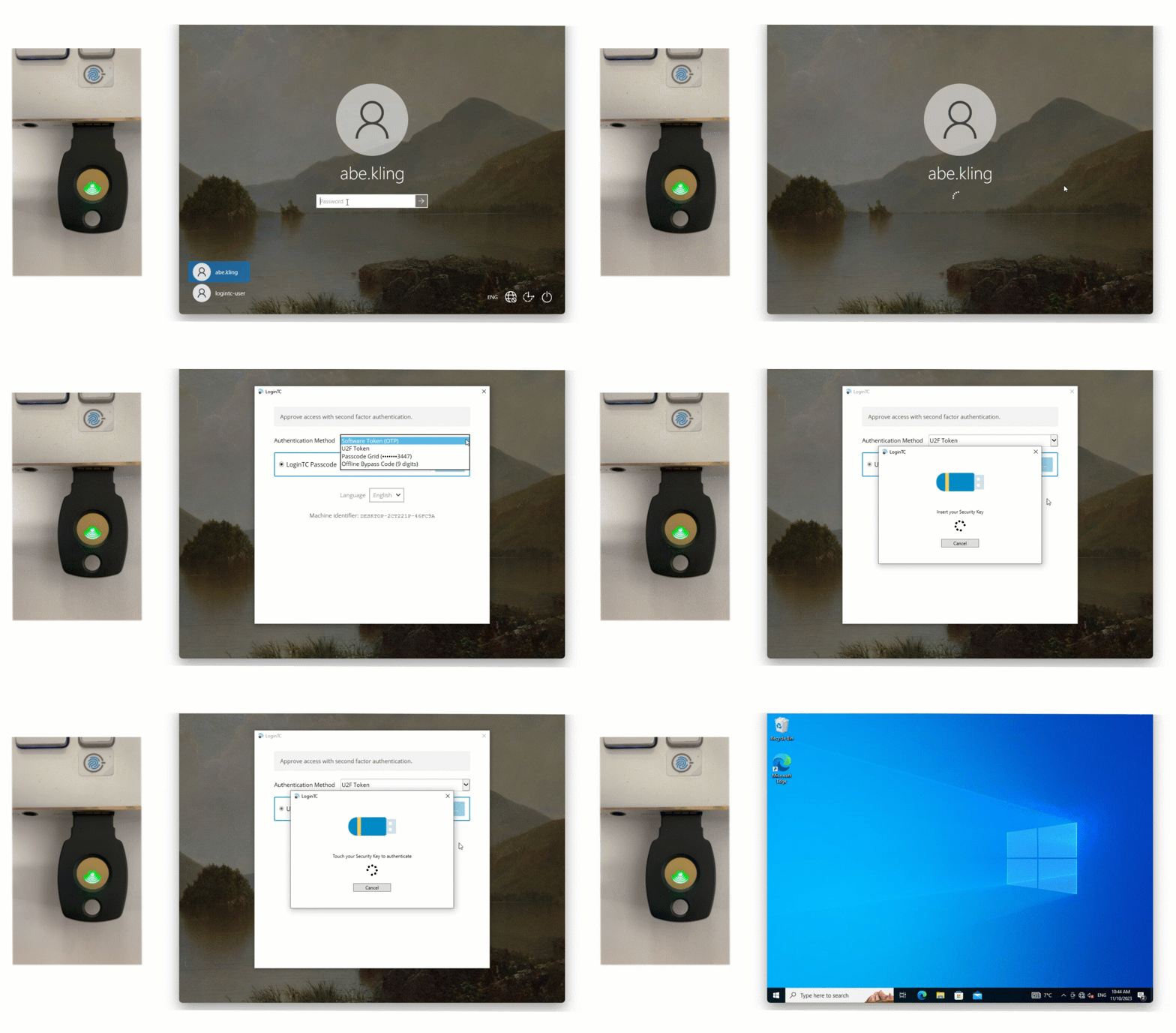
Our engineering team has streamlined how the connector communicates with local and cloud services during the initial load phase. For organizations managing high-traffic RDP servers or remote workforces on varied network speeds, these seconds saved add up to significant productivity gains across the entire enterprise.
What’s new:
- Optimized initialization: Faster transition from the Windows Credential UI to the LoginTC MFA window.
- Reduced latency: Improved handling of backend calls to ensure the authentication prompt appears without delay. Secure and Reliable MFA for Windows
This update reinforces the LoginTC Windows Logon and RDP Connector as a premier solution for securing Windows environments. Whether your team is logging in locally to a desktop or accessing a server via Remote Desktop (RDP), LoginTC provides a robust second layer of defense.
The Windows Logon and RDP Connector supports:
- Local and remote logins: Protect both physical workstations and virtual servers.
- Offline authentication: Secure logins even when an internet connection isn’t available via QR Scan or Passcode Grids.
- UAC protection: Add MFA challenges to “Run as Administrator” functions for heightened internal security.
- Broad compatibility: Support for Windows 10, Windows 11, and Windows Server 2012 R2 through 2025.
Next Steps
The latest version of the Windows Logon and RDP Connector is available now. We recommend all administrators update their deployments to take advantage of these speed and usability improvements.
How to get the update:
- Existing Customers: Download the latest installer from the LoginTC Downloads page or reach out to our team at support@logintc.com.
- New to LoginTC? Book a demo today to see how easy it is to secure your Windows infrastructure.