How to Add MFA for Windows Logon
February 19, 2026 •
Your Windows login screen is the front door to your entire network. In an age of sophisticated phishing attacks and rampant credential theft, leaving that door protected by only a password is a significant risk. Implementing strong mfa for windows logon is no longer an optional upgrade; it’s a foundational security measure for any organization. This simple, powerful layer of security ensures that even if a user’s credentials are compromised, unauthorized access to your workstations and servers is stopped cold.
But the path to implementation can feel complex. Should you use native Windows features or a dedicated third-party solution? How do you ensure remote and traveling users can still log in securely when they’re offline? Cybersecurity can be hard, but we make securing your endpoints easy. This guide cuts through the confusion, providing a clear, step-by-step process to add robust multi-factor authentication to your Windows environment. You will gain the knowledge to choose the right solution and the confidence to deploy it, achieving the peace of mind that comes from knowing your network’s most critical entry points are protected.
Key Takeaways
- Understand why the standard Windows login is a primary target for attackers and how MFA provides a critical layer of defense.
- Discover a vendor-agnostic, 5-step framework for successfully planning and deploying mfa for windows logon in any IT environment.
- Learn the essential features your solution must have, from offline access to flexible authentication methods, to ensure a secure and user-friendly rollout.
- Compare the limitations of native Windows security with the comprehensive protection offered by dedicated third-party MFA solutions.
Why Your Windows Login is the Most Critical Security Checkpoint
Your Windows login screen is more than just a welcome message, it’s the front door to your entire digital infrastructure. Every critical application, sensitive file, and network resource sits behind this single point of entry. In today’s threat landscape, relying on a password alone is like leaving that door secured with a simple latch. A single compromised credential can grant an attacker initial access, opening the door to devastating data breaches and ransomware attacks.
Modern cyber threats are designed to bypass traditional password defenses. The solution is to fortify this critical checkpoint. Implementing strong mfa for windows logon means that even if a cybercriminal steals a valid password, they are stopped cold. By requiring a second layer of verification such as a push notification, a one-time code, or a hardware token multi-factor authentication ensures that only authorized users can gain access. It’s a simple, strong defense for your most vulnerable entry point.
The Anatomy of a Credential-Based Attack
Attackers use sophisticated techniques to steal user credentials. Once they have a valid username and password, they can log into a workstation as if they were the legitimate user. From there, they begin moving laterally across your network, escalating privileges and searching for high-value data. Common methods include:
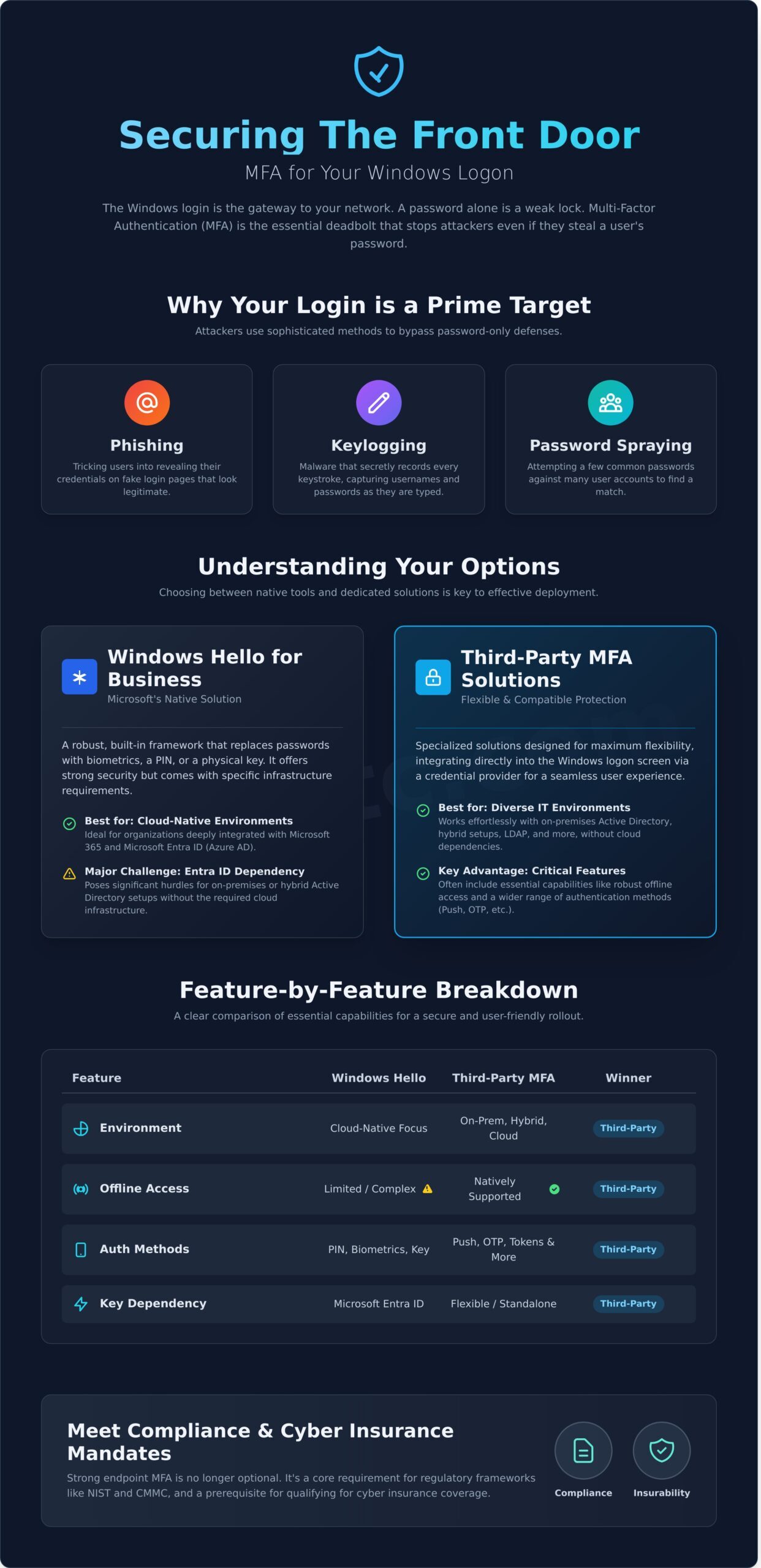
- Phishing: Tricking users into revealing their passwords on fake login pages.
- Keylogging: Using malware to secretly record every keystroke on an infected machine.
- Password Spraying: Trying common, weak passwords against many different user accounts.
Meeting Compliance and Cyber Insurance Requirements
Strengthening endpoint security is no longer just a best practice; it’s a requirement. Regulatory frameworks like NIST and CMMC now mandate MFA for all system access to protect sensitive information. Furthermore, cyber insurance providers increasingly require organizations to have comprehensive MFA deployed, including mfa for windows logon, to qualify for coverage or avoid significant premium increases. Implementing this foundational security control is a critical step toward achieving compliance and insurability, giving your organization true peace of mind.
Understanding Your Options: Native Windows Security vs. Third-Party MFA
When securing your endpoints, a common question arises: Can Windows handle MFA for logon natively? The answer is yes, but with important caveats. Implementing strong mfa for windows logon typically involves one of two approaches: using the native Windows Hello for Business or integrating a specialized third-party solution. The right choice is not universal; it depends entirely on your existing IT infrastructure, security policies, and operational needs. As emphasized by the Cybersecurity and Infrastructure Security Agency (CISA) on MFA, adding this layer is a critical defense, so understanding your options is the first step toward effective implementation.
Option 1: Windows Hello for Business
Windows Hello for Business is Microsoft’s built-in framework for strong authentication. It replaces passwords with a user’s PIN, biometric data (fingerprint or facial recognition), or a physical security key. While a robust form of MFA, its primary requirement is deep integration with Microsoft Entra ID (formerly Azure AD). This makes it an excellent choice for cloud-native organizations heavily invested in the Microsoft 365 ecosystem, but it can present significant challenges for on-premises or hybrid Active Directory environments without the necessary cloud infrastructure.
Option 2: Third-Party MFA Credential Providers
Third-party solutions are designed for flexibility. They integrate directly into the Windows logon screen via a credential provider, offering a seamless user experience. Their key advantage is broad compatibility, working effortlessly with on-premises Active Directory, LDAP, and other directory services without requiring a cloud identity provider. These solutions often provide critical features like offline access for disconnected devices and support a wider range of authentication methods. This category is where solutions like LoginTC’s on-premises MFA provide comprehensive control and security for diverse IT environments.
Comparison Table: Windows Hello vs. Third-Party MFA
| Feature | Windows Hello for Business | Third-Party MFA Solutions |
|---|---|---|
| Environment | Primarily Microsoft Entra ID (Cloud-native) | On-premises AD, Hybrid, Cloud, LDAP |
| Offline Mode | Limited; relies on cached credentials | Robust offline modes are a common feature |
| Auth Methods | PIN, Biometrics, Security Keys | Push Notifications, OTP, SMS, Tokens, Biometrics, and more |
| Management | Managed via Intune and Group Policy | Centralized admin dashboard (on-prem or cloud) |
| Ideal Use Case | Organizations fully committed to the Microsoft cloud ecosystem | Businesses needing flexible mfa for windows logon across hybrid or on-prem environments |
A 5-Step Framework for Deploying MFA on Windows Logons
Implementing strong security shouldn’t be a complex, drawn-out process. A successful deployment of mfa for windows logon is built on a methodical plan that minimizes disruption and maximizes adoption. This vendor-agnostic framework breaks the project into five manageable stages, providing a clear path from initial assessment to a fully protected environment. Following these best practices ensures your organization gains the full security benefit of multi-factor authentication.
Steps 1 & 2: Assess Your Needs and Choose a Solution
The first step is a thorough evaluation of your technical and operational landscape. A clear understanding of your requirements is the foundation for selecting the right solution. Before you begin, define your specific needs:
- Your Environment: Do your endpoints connect to an on-premises Active Directory, a cloud-based directory like Entra ID (formerly Azure AD), or are they standalone machines?
- Access Requirements: Will users need to log in while offline? Ensure your chosen solution supports offline authentication to maintain productivity.
- Authentication Methods: Determine which second factors are best for your users. Options range from push notifications and TOTP codes on a mobile app to physical security keys.
- Management Platform: Decide if an on-premises or a cloud-based management console better fits your security posture and administrative workflow.
Steps 3 & 4: Install Agents and Configure Policies
Once you’ve selected a solution, the technical implementation begins. This involves deploying a lightweight agent, often called a credential provider, to each Windows endpoint you wish to protect. This agent integrates with the Windows logon screen to prompt for the second factor. After deployment, you will create and assign security policies. This is where you define who needs mfa for windows logon and when. Best practice is to start with a pilot group of IT staff or tech-savvy users to test the workflow before a company-wide rollout. You can explore different MFA solutions to find a flexible policy engine that fits your needs.
Step 5: User Enrollment and Communication
The final stage is focused on your users. A smooth rollout depends on clear communication and an intuitive enrollment process. Provide simple, step-by-step instructions for users to register their chosen second factor, such as scanning a QR code to activate a mobile app. Proactive communication that explains why this change is happening and how it benefits them is crucial. As the Cybersecurity and Infrastructure Security Agency (CISA) explains MFA is one of the most effective security controls, framing it as a protective measure for both the company and the individual helps drive positive adoption. Offer brief training sessions or guides to ensure every user feels confident and secure.
Key Features Your Windows Logon MFA Solution Must Have
You’ve decided to implement MFA for your Windows environment. The next critical step is choosing the right solution. Not all platforms are created equal. The best tool doesn’t just add a second factor, it strengthens your security posture without creating unnecessary friction for users or administrators. Look for these non-negotiable features to ensure you select a solution that delivers real value and peace of mind.
Robust Offline Access
Your team’s productivity shouldn’t stop when their internet connection does. For laptops and remote workstations, offline access is not a luxury; it’s a requirement. A powerful MFA solution for Windows provides secure offline authentication, typically using a one-time passcode (OTP) generated on a user’s device. This ensures your team can log in to their Windows machines anytime, anywhere, keeping your business moving forward without compromising security.
Flexible Authentication Methods
A one-size-fits-all approach to authentication creates frustration and slows adoption. To empower your users, your solution must support a variety of methods. This flexibility allows you to match the right authenticator to the right user, from tech-savvy developers to frontline workers. Look for support for:
- Push Notifications: Simple, one-tap approvals from a smartphone.
- TOTP Authenticators: Software and hardware tokens for offline access.
- Hardware Security Keys: Phishing-resistant options like YubiKey.
- Biometrics: Frictionless fingerprint or facial recognition.
Centralized Administration and Reporting
Security is complex, but managing it shouldn’t be. An effective mfa for windows logon solution must provide a single, intuitive administrative panel. We believe administrators are users too. Your IT team deserves a “single pane of glass” to efficiently manage users, deploy policies, and monitor activity. Insist on detailed audit logs for compliance and streamlined incident response. An effortless admin experience saves time and reduces configuration errors.
On-Premises Deployment for Maximum Control
For many organizations, especially in finance, healthcare, and government, keeping security infrastructure in-house is critical. An on-premises deployment gives you complete control over your data and authentication processes, helping you meet strict data sovereignty and compliance mandates. This approach allows for direct, secure integration with your local Active Directory, creating a self-contained and highly resilient security environment. A solution like LoginTC is built to provide this level of control.
LoginTC: Simply Strong MFA for Your Windows Environment
Securing your Windows environment against modern threats doesn’t have to be a complex or disruptive process. LoginTC provides a simply strong multi-factor authentication solution designed to directly address the challenges of protecting local and remote Windows logins. We deliver enterprise-grade security with the speed and simplicity your organization demands, providing comprehensive peace of mind without compromising productivity.
Deploy in Under an Hour, Not Days
Cybersecurity is hard, but implementation shouldn’t be. Unlike other MFA solutions that require days or weeks of configuration, LoginTC can be fully deployed in under an hour. Our lightweight Windows Logon and RDP connector installs in minutes, allowing you to immediately enforce strong mfa for windows logon across your entire fleet-from workstations to servers-without requiring lengthy professional services engagements.
LoginTCs Connectors Work Everywhere
Whether you want to add MFA for Windows Logon, Entra ID, and more places like VPNs, firewalls, and web apps, LoginTC’s comprehensive MFA solution can do it all. Enable end users to login to multiple applications and services, including windows logon, with a single authentication token that protects user accounts with MFA.
On-Premises Control Meets User-Friendly Security
For organizations that require absolute control over their security infrastructure, the LoginTC on-premises product offers the ultimate solution. Keep all your user data and authentication processes securely within your own network perimeter. This approach delivers maximum control without sacrificing a modern, user-friendly experience, featuring:
- Robust Offline Access: Ensures users can log in to their Windows devices securely, even without an internet connection, critical for traveling employees.
- Flexible Authentication: Support for a wide range of methods including push notifications, software OTPs, hardware tokens, and security keys.
Built for Administrators and End-Users
Our philosophy is simple: administrators are users too. The LoginTC management panel is designed to be as intuitive for your IT team as the authentication process is for your end-users. Effortlessly create and manage access policies, enroll users in bulk, and monitor activity through a streamlined interface. This dual focus on a frictionless experience for everyone involved is what makes LoginTC the ideal solution for your Windows environment.
Ready to see how simple strong security can be? Explore LoginTC and contact us for more information.
Simply Strong Security for Your Windows Logons
Securing your Windows login is the foundational layer of your organization’s defense. As we’ve covered, understanding your options and following a clear framework are crucial for success. Implementing effective mfa for windows logon is an essential measure to protect your critical data and infrastructure from unauthorized access.
LoginTC makes this essential step straightforward. Our business is protecting your business with a solution that is both powerful and intuitive. We offer an ISO 27001 Certified Security framework that can be deployed in as little as one hour, ensuring you get robust protection without the typical complexity. You get effortless administration and a streamlined user experience, all backed by hands-on support from our cybersecurity experts.
Ready to experience the peace of mind that comes with strong, simple security? Start your free trial and secure your Windows logons today. Take the decisive step toward a more secure and resilient IT environment.
Frequently Asked Questions
Can I use Microsoft Authenticator for Windows logon without Entra ID?
Microsoft Authenticator’s native integration for Windows sign-in is designed specifically for environments connected to Microsoft Entra ID (formerly Azure AD). For organizations using on-premises Active Directory or hybrid setups without that specific cloud dependency, a third-party MFA solution is required. These solutions provide the necessary connectors and flexibility to secure Windows endpoints regardless of your directory infrastructure, ensuring comprehensive protection where native tools may not apply.
How does MFA for Windows logon work without an internet connection?
Robust security shouldn’t stop when you’re offline. Leading solutions for mfa for windows logon support offline authentication through methods like one-time passcodes (OTP). The agent on the local machine can validate the code without needing to contact a server. This provides seamless and secure access for users who are traveling or have an unstable internet connection, ensuring productivity is never compromised by a lack of connectivity. Your business stays protected, anywhere.
What happens if a user loses their phone or second factor?
User-proofing is a core part of any strong security strategy. If a user loses their second factor, administrators have immediate and simple options. Through a central management console, you can quickly issue a temporary bypass code, reset the user’s authentication method, or enroll a new device. This streamlined process minimizes user downtime and helpdesk tickets, allowing your team to resolve the issue in minutes while keeping the account secure and your business moving.
Is it difficult to deploy MFA to hundreds of remote computers?
Deploying MFA to a large, remote workforce is simpler than you think. Modern solutions are designed for effortless, at-scale deployment. Using a lightweight agent, you can push the software to hundreds of machines using standard tools like Group Policy (GPO) or Microsoft Intune. Centralized policies ensure consistent enforcement, turning a potentially complex project into a manageable and streamlined security upgrade for your entire organization in a short amount of time.
Can MFA be enforced for local administrator accounts on Windows?
Yes, and protecting local administrator accounts is a critical security best practice. A comprehensive MFA solution secures all interactive login prompts, including those for privileged local accounts. This effectively hardens your endpoints against lateral movement and privilege escalation attacks that target these powerful credentials. By enforcing MFA on every entry point, you close a common vulnerability and add a vital layer of protection to your most sensitive assets.
How does pricing for Windows logon MFA solutions typically work?
Pricing for Windows logon MFA is typically straightforward and designed to scale with your organization. Most providers offer a subscription model based on the number of users, billed annually or monthly. This per-user pricing provides predictable costs and usually includes access to technical support, software updates, and all authentication methods. This approach makes strong security accessible and cost-effective, eliminating large upfront capital expenditures and ensuring you only pay for what you need.