What is RADIUS Authentication?
February 17, 2026 •
Your VPN and Wi-Fi are the front doors to your organization’s network. If they’re secured with only a password, those doors may not be as strong as you think, leaving you exposed to modern threats and struggling to meet compliance requirements. For many organizations, the key to controlling this access lies in a long-standing but critical protocol: RADIUS authentication. It has been the workhorse for network access control for decades, but relying on its original, password-based form is a significant security risk.
Securing your network doesn’t have to be complex. This guide is designed to give you clarity and control. We will break down exactly what the RADIUS protocol is, how it functions, and where vulnerabilities often hide in legacy implementations. Most importantly, you will discover a straightforward, practical path to fortifying your RADIUS infrastructure with strong multi-factor authentication (MFA). The result? A network that is both powerfully secure and intuitively accessible for your users, delivering true peace of mind.
Key Takeaways
- Understand how RADIUS provides centralized Authentication, Authorization, and Accounting (AAA) to control user access across your entire network.
- Follow the step-by-step communication flow to see exactly how a user is authenticated and granted secure network access.
- Discover why the radius authentication protocol remains a critical component for securing modern network hardware like VPNs, firewalls, and switches.
- Address the primary vulnerability of RADIUS by learning how to seamlessly integrate multi-factor authentication (MFA) without replacing your existing infrastructure.
What is RADIUS? The Fundamentals Explained
RADIUS, which stands for Remote Authentication Dial-In User Service, is a networking protocol that provides a centralized and scalable framework for managing user access to a network. Despite its legacy name suggesting dial-up connections, the RADIUS protocol has evolved into a cornerstone of modern network security, commonly used to protect Wi-Fi networks, VPNs, and wired switches.
Its enduring relevance comes from its straightforward client/server model and its focus on a critical security concept: AAA. This model allows network access devices to offload the complex task of identity verification to a single, authoritative server. This streamlines administration and ensures your organization applies consistent security policies across all points of entry, creating a robust system for radius authentication.
The Three Pillars of RADIUS: Understanding AAA
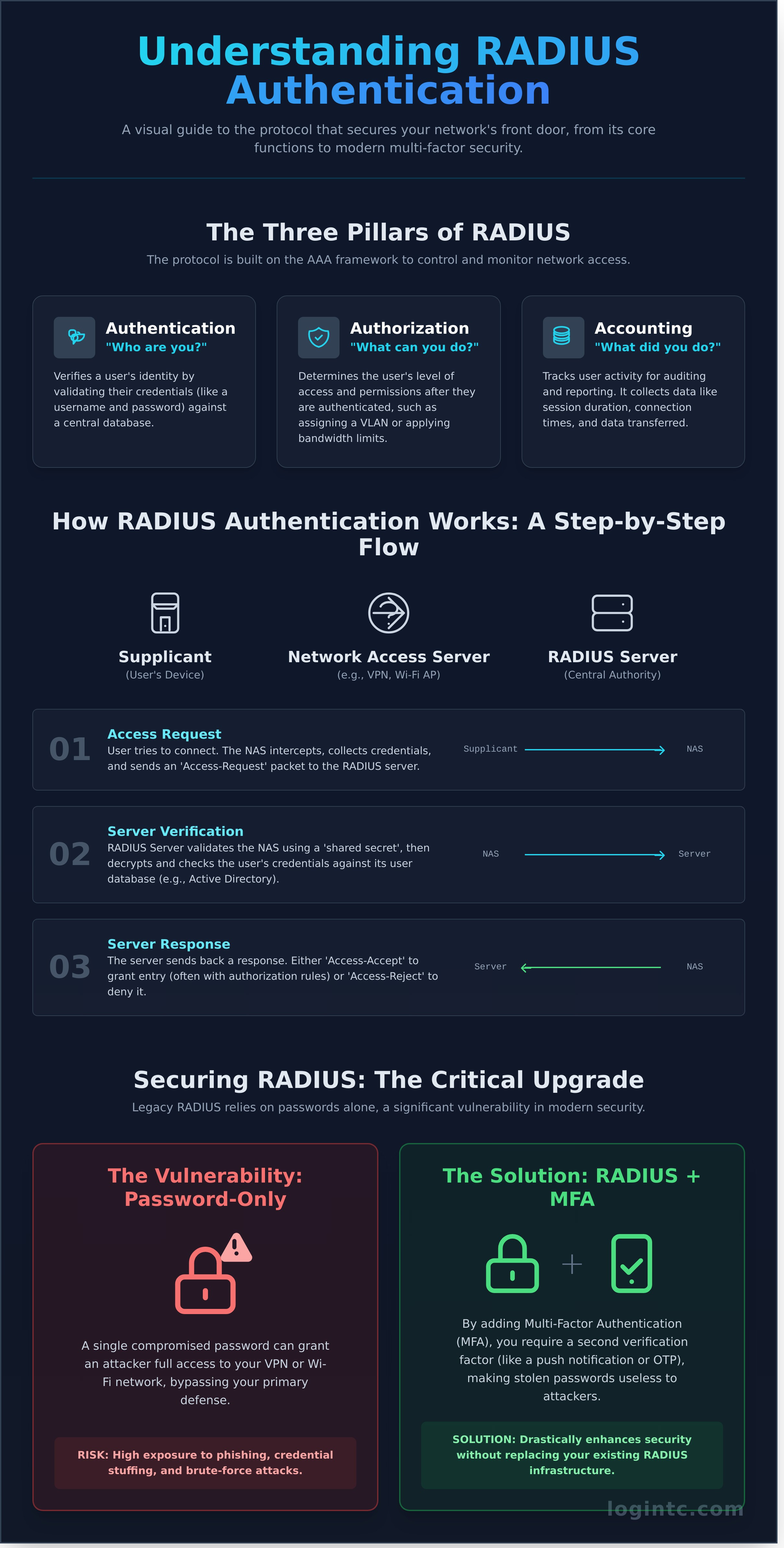
At the heart of RADIUS functionality are the three pillars of network security, collectively known as AAA. This framework ensures that only the right users get access, with the right permissions, and that their activity is properly logged for security and compliance.
- Authentication: This is the first step-verifying a user’s identity. It answers the question, “Who are you?” A user provides credentials, such as a username and password or a digital certificate, which the RADIUS server validates against its database.
- Authorization: Once a user is authenticated, this step determines their level of access. It answers, “What are you allowed to do?” This could mean assigning them to a specific VLAN, applying bandwidth limits, or granting access to certain network resources.
- Accounting: This final pillar tracks user activity for auditing, billing, or reporting purposes. It answers, “What did you do?” RADIUS collects valuable data like session duration, connection times, and the amount of data transferred during a session.
Key Components in a RADIUS Environment
A typical RADIUS deployment involves three main components working in concert to secure your network perimeter. Understanding their distinct roles is key to grasping how the system protects your business.
- The Supplicant: This is simply the end-user’s device attempting to connect to the network. It can be a corporate laptop, a smartphone, a tablet, or any other client device that needs secure network access.
- The Network Access Server (NAS): Acting as a gatekeeper, the NAS is the device the supplicant connects to, such as a Wi-Fi access point or VPN concentrator. The NAS is a RADIUS client; it doesn’t make security decisions but instead forwards the user’s credentials to the RADIUS server for verification.
- The RADIUS Server: This is the centralized brain of the entire operation. It receives the authentication request from the NAS, checks the credentials, and sends back a definitive response: either an Access-Accept message (often with authorization rules) or an Access-Reject message.
How Does RADIUS Authentication Work? A Step-by-Step Flow
The RADIUS protocol provides a streamlined and secure framework for authenticating users onto a network. It operates on a client-server model involving three core components: the user’s device (the Supplicant), the network gateway (the Network Access Server or NAS), and the central RADIUS server. The entire communication process is a structured, methodical dialogue designed to verify identity before granting access, providing your organization with strong, centralized control.
Step 1: The Access Request
The journey begins the moment a user attempts to connect to a protected network, such as your corporate Wi-Fi or company VPN. The NAS-which could be a wireless access point, a switch, or a VPN concentrator-intercepts this attempt and prompts the user for credentials. It then creates an Access-Request packet containing the username, an encrypted password, and information about the NAS itself. This packet is then sent securely across the network to the designated RADIUS server.
Step 2: Server Verification
When the RADIUS server receives the Access-Request, it performs two critical checks. First, it validates the NAS itself by verifying a “shared secret”-a pre-configured key known only to the server and that specific NAS. This secure handshake, detailed in technical guides like Tech Target’s explanation of How RADIUS Authentication Works, ensures that only trusted network devices can communicate with your server. Once the NAS is authenticated, the server decrypts the user’s password and validates the credentials against its configured user database, such as Active Directory, LDAP, or an internal user list.
Step 3: The Server Response
After verifying the user’s identity, the server sends a definitive response packet back to the NAS. The entire radius authentication flow culminates in one of three clear outcomes:
- Access-Accept: The credentials are valid. The server grants access and can include authorization attributes, such as assigning the user to a specific VLAN or applying access control lists (ACLs). The NAS then connects the user to the network.
- Access-Reject: The credentials are invalid. The server instructs the NAS to deny the connection, and the user is blocked from accessing network resources.
- Access-Challenge: The first factor was successful, but more information is needed. This is essential for implementing strong Multi-Factor Authentication (MFA). The server sends a challenge, prompting the user for a one-time password (OTP) or push notification approval to complete the authentication.
Why RADIUS is Still Critical for Modern Network Security
In cybersecurity, age does not always mean obsolescence. While the RADIUS protocol has been around for decades, it remains the backbone of modern network access control. Its strength lies in its universality; nearly every piece of enterprise-grade network hardware supports it out of the box. This widespread adoption makes it the de facto standard for unifying access policies, providing a streamlined and centralized approach to radius authentication for your entire infrastructure.
By centralizing authentication logic, RADIUS gives administrators a single point of control to manage user access rights across disparate systems. This eliminates configuration drift and ensures policies are applied consistently, providing peace of mind and strong security posture. Here are the most critical use cases where RADIUS continues to provide immense value today.
Securing Wireless Networks (802.1X)
Corporate Wi-Fi is a primary entry point to your network. RADIUS secures it. By enabling WPA2/WPA3-Enterprise authentication (802.1X), you move beyond insecure, shared passwords. Instead, each user connects with their unique corporate credentials. This not only strengthens security but also allows for powerful controls like dynamically assigning users to specific VLANs based on their role, effectively segmenting your network traffic and limiting lateral movement.
Controlling VPN and Remote Access
Securing your remote workforce is non-negotiable. RADIUS centralizes user authentication for your corporate VPN, ensuring every remote connection is validated against a single, authoritative source. This approach enforces consistent security policies for all users, regardless of their location. It integrates seamlessly with leading VPN providers, including Cisco, Fortinet, and Palo Alto Networks, making it a flexible and reliable solution for protecting your network perimeter.
Authenticating Network Devices
Unauthorized access to your core network infrastructure can be catastrophic. RADIUS is used to lock down administrative access to switches, routers, and firewalls. Instead of relying on disparate local device passwords, administrators must authenticate against a central server. This process prevents unauthorized configuration changes and provides a clear, centralized audit trail of who accessed which device and when, giving you complete visibility and control.
Securing RADIUS: The Urgent Need for Multi-Factor Authentication (MFA)
While RADIUS provides a powerful framework for centralized authentication, its traditional reliance on a single factor-the password-creates a significant security gap in today’s threat landscape. A compromised password is no longer a possibility; it’s an inevitability. This makes multi-factor authentication (MFA) an urgent and essential upgrade to protect your critical network infrastructure, from VPNs and Wi-Fi to network devices.
Key Vulnerabilities in Password-Only RADIUS
A password alone is a fragile defense. Cybercriminals use automated and sophisticated techniques to exploit this single point of failure, giving them a direct path to your network and sensitive data. Key vulnerabilities include:
- Credential-Based Attacks: High susceptibility to phishing, brute-force attacks, and credential stuffing, where stolen passwords from other breaches are used to gain access.
- Password Reuse: Users often recycle passwords across multiple systems. A breach on a low-security site can directly compromise your secure network.
- Outdated Protocols: Older authentication protocols like PAP transmit credentials with weak protection, and the MD5 hashing algorithm used in CHAP is considered cryptographically broken and insecure.
How MFA Strengthens RADIUS Authentication
MFA adds a simple, strong layer of security that passwords alone cannot provide. By requiring a second form of verification-such as a push notification, a one-time code from a mobile app, or a hardware token-MFA ensures that only authorized users can access your resources. Even if a user’s password is stolen, the attacker is stopped cold without the second factor. This approach transforms your radius authentication process from a liability into a fortress. For organizations that require maximum control over their security infrastructure, exploring on-premises MFA solutions provides a dedicated, self-hosted environment for managing authentication policies.
Meeting Compliance Mandates
Implementing MFA on your RADIUS servers is not just a security best practice; it’s a core business requirement. Modern regulatory frameworks and insurance policies demand robust identity verification to protect sensitive information. Adding MFA helps your organization achieve and maintain compliance with confidence.
- Satisfy Regulatory Requirements: Meet stringent access control mandates for PCI DSS, HIPAA, GDPR, and other industry regulations.
- Qualify for Cyber Insurance: Demonstrates due diligence to insurers, often leading to better policy terms and lower premiums.
- Provide a Clear Audit Trail: Creates a detailed and defensible log of every access attempt, simplifying security assessments and incident response.
How to Implement MFA for RADIUS authentication: A Practical Guide
Strengthening your security with multi-factor authentication doesn’t mean you have to replace your existing infrastructure. The most effective approach is to integrate a modern MFA solution directly with your current RADIUS setup. This process is straightforward and adds a critical layer of security without disrupting your core operations.
The key is a dedicated MFA server that acts as a RADIUS proxy. It sits between your network access server (NAS)-like a VPN or firewall-and your user directory. When planning your project, prioritize a solution designed for rapid and effortless deployment. The goal is to enhance your radius authentication protocol, not complicate it.
Integrating an MFA Server (RADIUS Proxy)
The authentication flow becomes simple and secure. Your NAS is reconfigured to send authentication requests to the MFA server instead of directly to your user directory. The MFA server first validates the user’s password (the first factor) against your directory, such as Active Directory. Upon success, it automatically initiates the second-factor challenge, ensuring only authorized users gain access.
Choosing Your Authentication Methods
A flexible MFA solution allows you to offer a range of authentication methods to fit your users’ needs and your security policies. The best systems provide multiple options, including:
- Push Notifications: The most user-friendly modern method, allowing users to approve or deny access with a single tap on their smartphone.
- One-Time Passwords (OTP): A reliable classic, using codes generated by authenticator apps (like Google Authenticator) or physical hardware tokens.
- Biometrics: Leveraging security already built into a user’s device, such as fingerprints or facial recognition, for a frictionless experience.
The Admin and End-User Experience
Security tools are only effective if they are used. We believe administrators are users, too, which is why a simple, powerful administrative interface is non-negotiable. Likewise, the end-user enrollment process must be fast and intuitive to ensure high adoption rates. A streamlined experience for everyone is critical for a successful MFA deployment. Discover LoginTC’s complete MFA product designed for effortless use from deployment to daily operation.
Strengthen Your RADIUS Security Today
For decades, RADIUS has served as the backbone for network access control, and its role remains critical in today’s IT environments. As we’ve explored, while the protocol is powerful, securing it against modern threats is no longer optional-it’s essential. The single most effective step you can take is to fortify your existing infrastructure with multi-factor authentication (MFA).
Implementing MFA can seem complex, but LoginTC makes it easy. We provide a simply strong MFA solution designed to enhance your radius authentication without the typical complexity. Our business is protecting your business, which is why we offer rapid deployment in as little as one hour, flexible on-premises and air-gapped options for total control, and the peace of mind that comes with our ISO 27001 Certified security.
Ready to take control of your network security? See how LoginTC secures RADIUS authentication and gain the peace of mind you deserve.
Frequently Asked Questions About RADIUS Authentication
What is the difference between RADIUS and TACACS+?
RADIUS and TACACS+ both manage network access, but they operate differently. The primary distinction is that RADIUS combines authentication and authorization into a single process and only encrypts the password. In contrast, TACACS+ separates authentication, authorization, and accounting (AAA) and encrypts the entire body of the packet. This makes TACACS+ a more granular and secure choice for network device administration, while RADIUS is widely used for network access control, including Wi-Fi and VPN.
Is RADIUS authentication still considered a secure protocol?
While the original RADIUS protocol has known vulnerabilities, it remains a secure and trusted standard when implemented with modern security layers. Secure deployments of radius authentication don’t use legacy protocols like PAP or CHAP. Instead, they leverage strong EAP types like PEAP and EAP-TLS, which create an encrypted tunnel to protect credentials. For comprehensive security that provides peace of mind, you should always layer multi-factor authentication (MFA) on top of your RADIUS infrastructure.
What network port does RADIUS typically use?
RADIUS communication typically occurs over two specific UDP ports. The standard port for authentication and authorization requests is UDP/1812. For accounting purposes, such as tracking user session times, RADIUS uses UDP/1813. While these are the modern standards defined in the RFCs, you may occasionally encounter older legacy systems that still use UDP/1645 for authentication and UDP/1646 for accounting. It is crucial to ensure these ports are open on your firewalls.
Can RADIUS authenticate users from Active Directory?
Yes, integrating RADIUS with Active Directory is one of its most powerful and common use cases. A RADIUS server, such as the Network Policy Server (NPS) role on Windows Server, can be configured to act as a RADIUS proxy. It forwards authentication requests from network devices (like VPNs or wireless access points) to your Active Directory domain controllers. This allows you to centralize user management and enforce network access policies based on existing AD user accounts and groups.
How do I add MFA to my existing RADIUS server?
Adding strong MFA to your existing RADIUS setup is a straightforward process. The most common method is to deploy an MFA solution that acts as a RADIUS proxy. This proxy sits between your network appliance and your RADIUS server. It intercepts the initial authentication request, performs the second-factor challenge, and only upon successful MFA verification does it pass the request to your primary server for credential validation. This provides strong security without complex reconfiguration of your infrastructure.
Can RADIUS be used for Wi-Fi authentication?
Absolutely. RADIUS is the core technology that enables WPA2-Enterprise and WPA3-Enterprise Wi-Fi security. Instead of relying on a single, shared pre-shared key (PSK) that is difficult to manage and insecure, radius authentication allows each user to connect to the wireless network using their unique corporate credentials. This provides a far more secure, manageable, and scalable solution for your organization’s Wi-Fi network, giving you granular control over who can access your network.