Introducing HallKey from LoginTC: Phone-Free MFA for Students
October 09, 2026 •
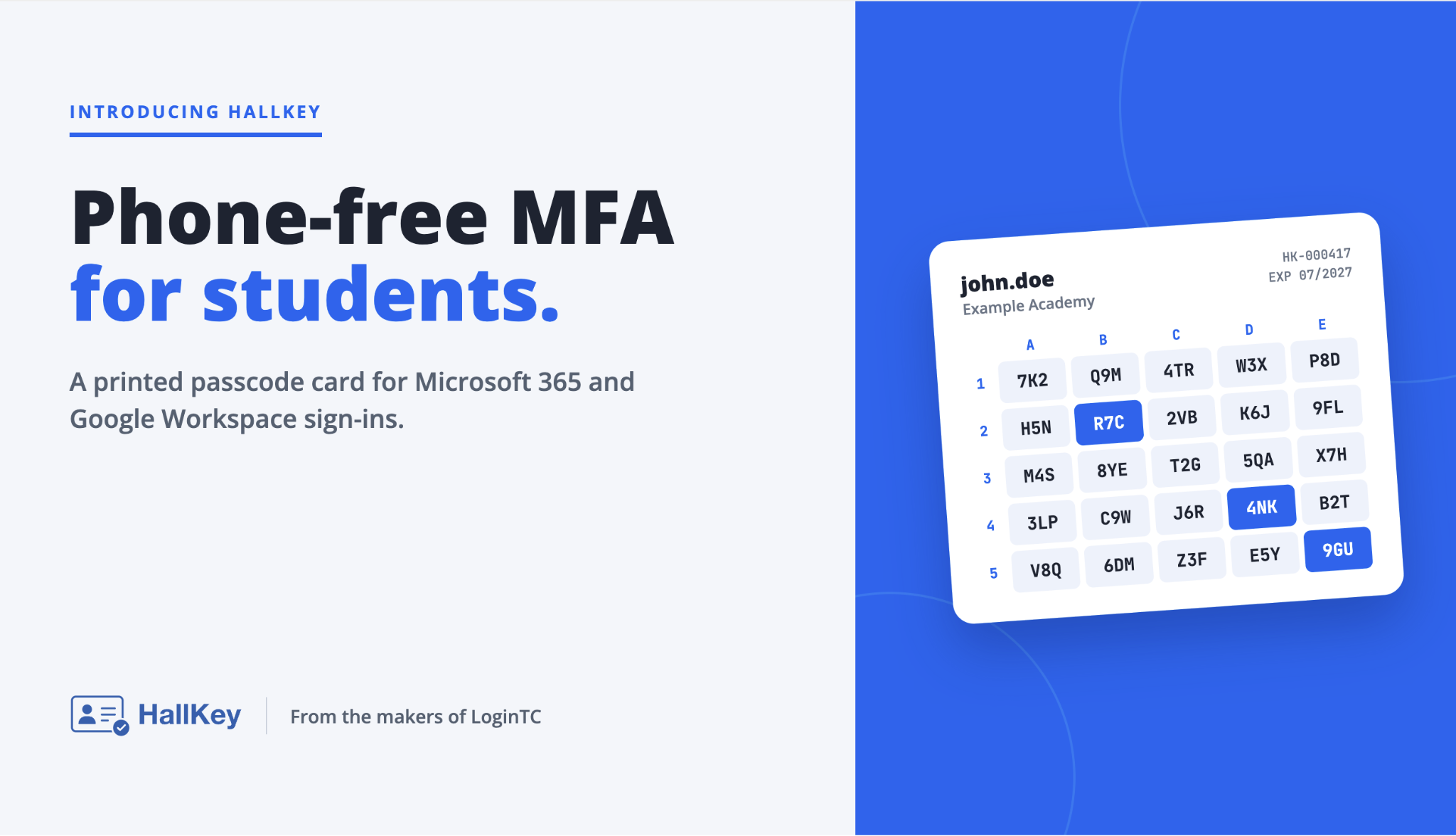
HallKey is phone-free multi-factor authentication (MFA) for students, from the team behind LoginTC. It adds a printed-card check to school sign-ins for Microsoft 365 and Google Workspace. Students keep their existing accounts and passwords, and no smartphone, authenticator app or hardware key is needed. Schools can start with a free guided pilot that includes setup and expert assistance at hallkey.net.
Today we’re launching HallKey
Schools are strengthening their cybersecurity requirements while also restricting student smartphone use, and that makes traditional MFA methods hard to use with students. That’s why we’re excited to announce the launch of HallKey, a new authentication solution from the team behind LoginTC.
HallKey was built for schools. It takes a simple, affordable approach to student authentication that doesn’t require smartphones, apps or hardware security keys.
| Fast rollouts Cards are printed, not shipped, so there are no devices to buy or hand out. |
Simple IT management Works with your existing Microsoft 365 or Google Workspace accounts. |
| Easy for teachers and students Students sign in as usual, then enter three codes from their card. |
No phone required No smartphone, authenticator app or battery to worry about in class. |
From the team behind LoginTC
Building on our experience delivering MFA through LoginTC, we recognized that student authentication presents a distinct set of challenges. Schools need security that can scale to thousands of students without the costs, device dependencies and administrative complexity of traditional MFA.
HallKey is the evolution of our education-focused MFA work at LoginTC. It builds on LoginTC’s proven passcode grid authentication, the approach LoginTC customers already use, on a dedicated platform designed around the operational and budgetary realities of education, with student enrolment and multi-school management built in.
Looking for a device-free MFA option for your school, or eager to test it out? Explore the complete details on the HallKey website or try the hands-on HallKey student demo.
Why student MFA is hard to roll out
Across the United States and the United Kingdom, schools are facing growing pressure to strengthen account security while limiting student smartphone use.
In the US, CISA lists deploying MFA first among the small number of prioritized investments it recommends for K-12 organizations in Protecting Our Future: Partnering to Safeguard K-12 Organizations from Cybersecurity Threats. In England, the Department for Education’s cyber security core standard for schools and colleges requires MFA on staff accounts with access to cloud services or remote access, and on IT administrative accounts.
This creates a practical challenge: how do schools introduce MFA for thousands of students without relying on personal devices or costly hardware tokens?
The methods that work for staff are harder to use with students
| MFA method | Why it’s harder with students |
|---|---|
| Authenticator apps | Not every student has a smartphone, and many schools restrict phones during the school day. See what UK school phone bans mean for IT admins managing MFA. |
| Hardware security keys | They are phishing-resistant, but for a whole student body they mean buying, stocking, distributing and replacing a physical fleet. |
| SMS codes | They need a phone with signal, and NIST’s Digital Identity Guidelines (SP 800-63B-4) class out-of-band authentication over the phone network (SMS or voice) as a “restricted” authenticator. |
| HallKey printed card | No phone, app or hardware. The second factor is a printed card the school or student can print. |
Each of the first three options depends on something students may not have, may not be allowed to bring, or that the school has to supply. HallKey removes that dependency. The second factor is a printed card, which makes the experience familiar and accessible without a personal device.
How HallKey works
Each student is issued a printed card with a unique grid. Because every grid is generated individually, one student’s card can’t be used to pass a HallKey prompt for another student. The approach builds on grid card authentication. For background, read what grid card authentication is and its benefits, or see LoginTC’s passcode grid authentication.
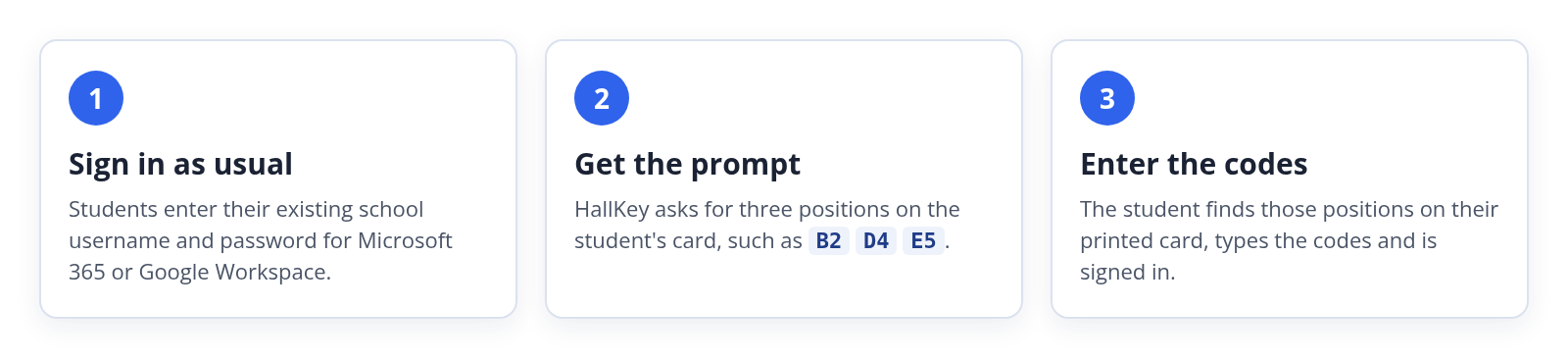
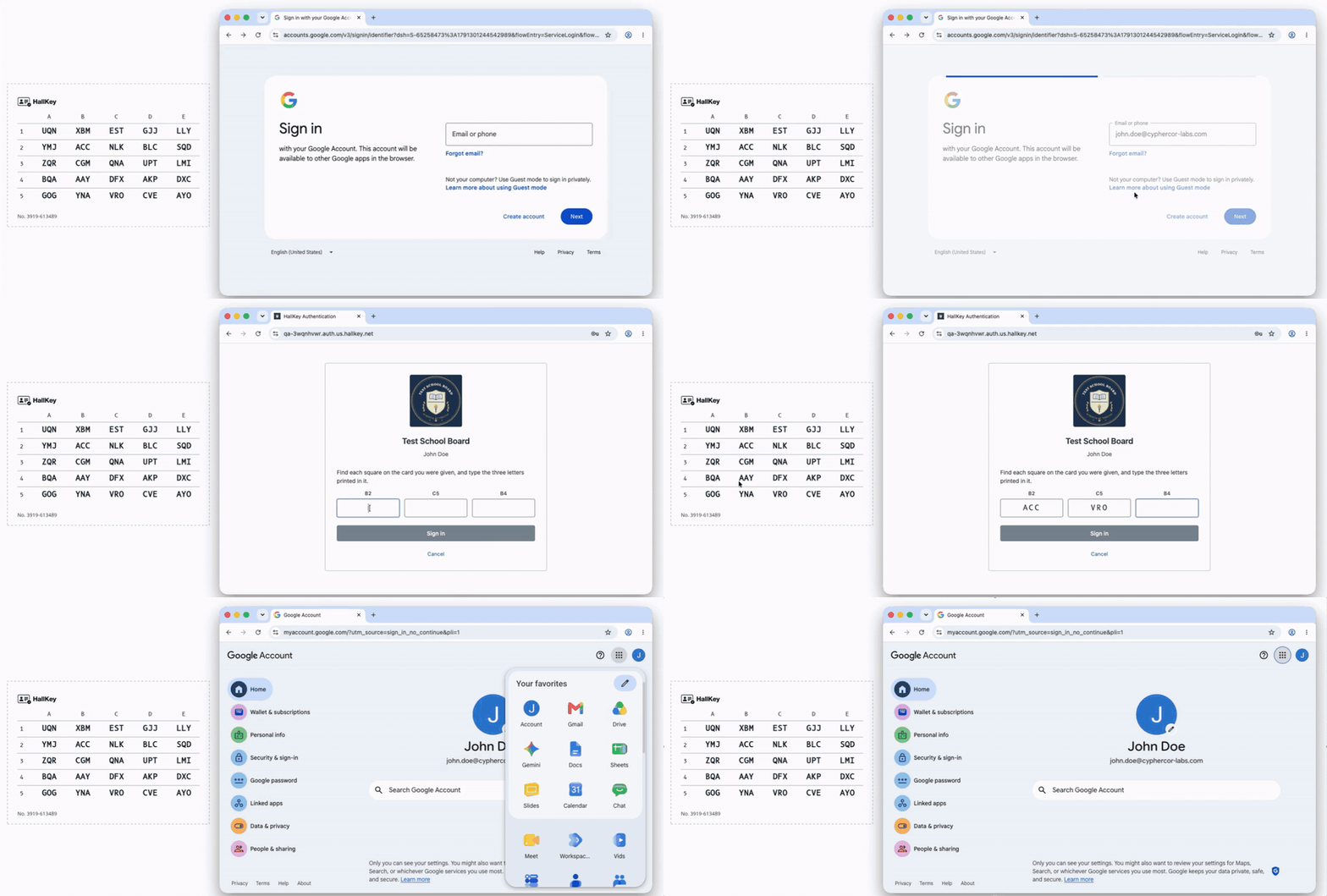
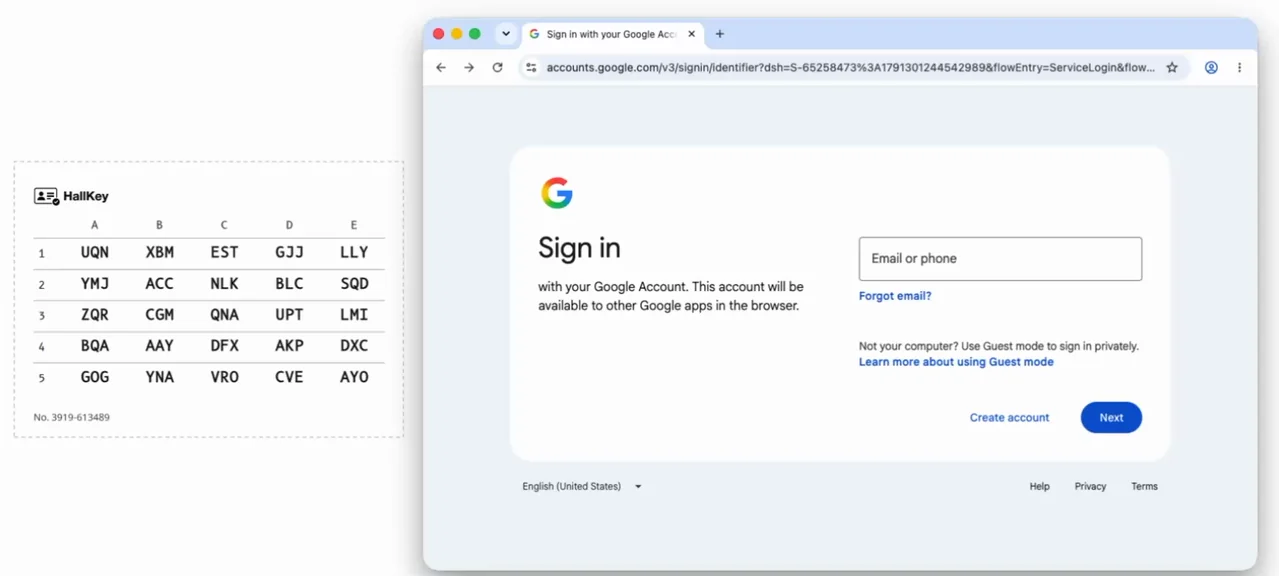
Grid cards are simple to carry and straightforward to use. Signing in takes three quick steps:
- Sign in as usual with the standard school account username and password.
- Read the prompt, which asks for three positions on the printed grid (such as B2, D4 and E5).
- Enter the codes from those positions on the card to complete sign-in.
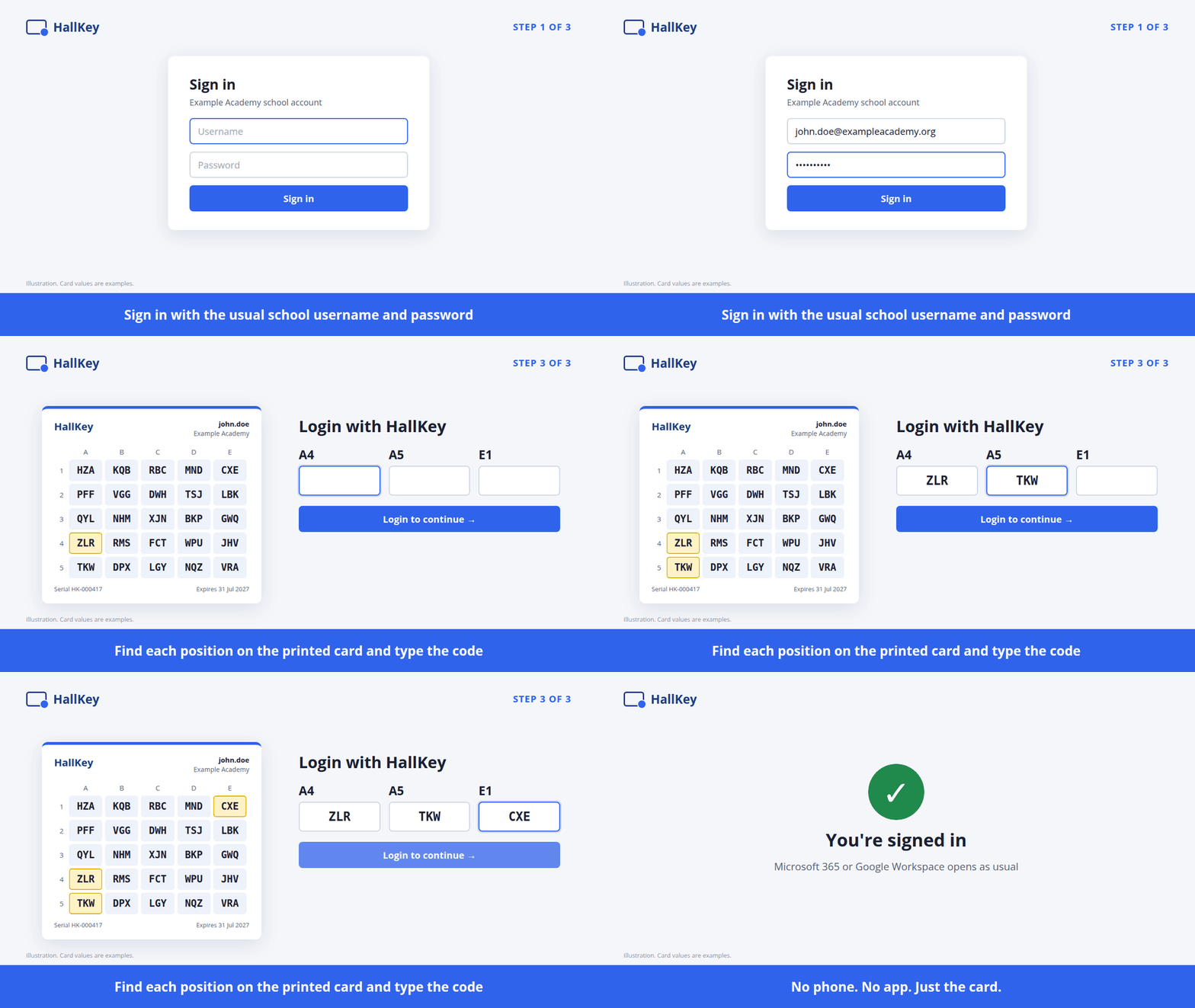
A HallKey sign-in from start to finish. Card values are examples.
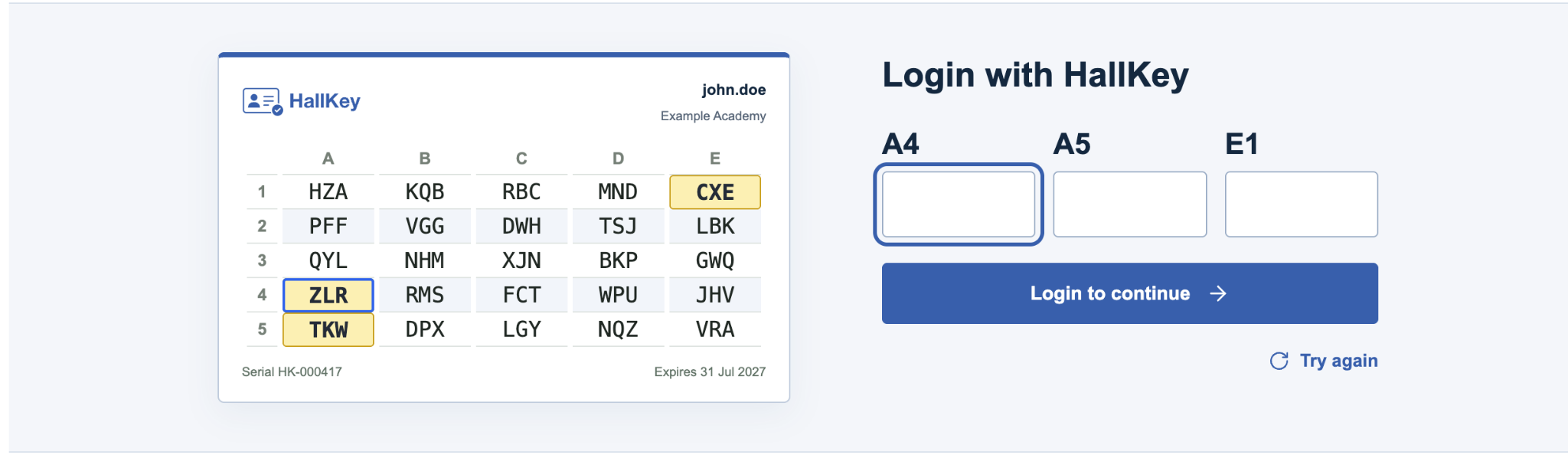
To try the grid card yourself, open the interactive student grid card demo.
Issuing and printing cards
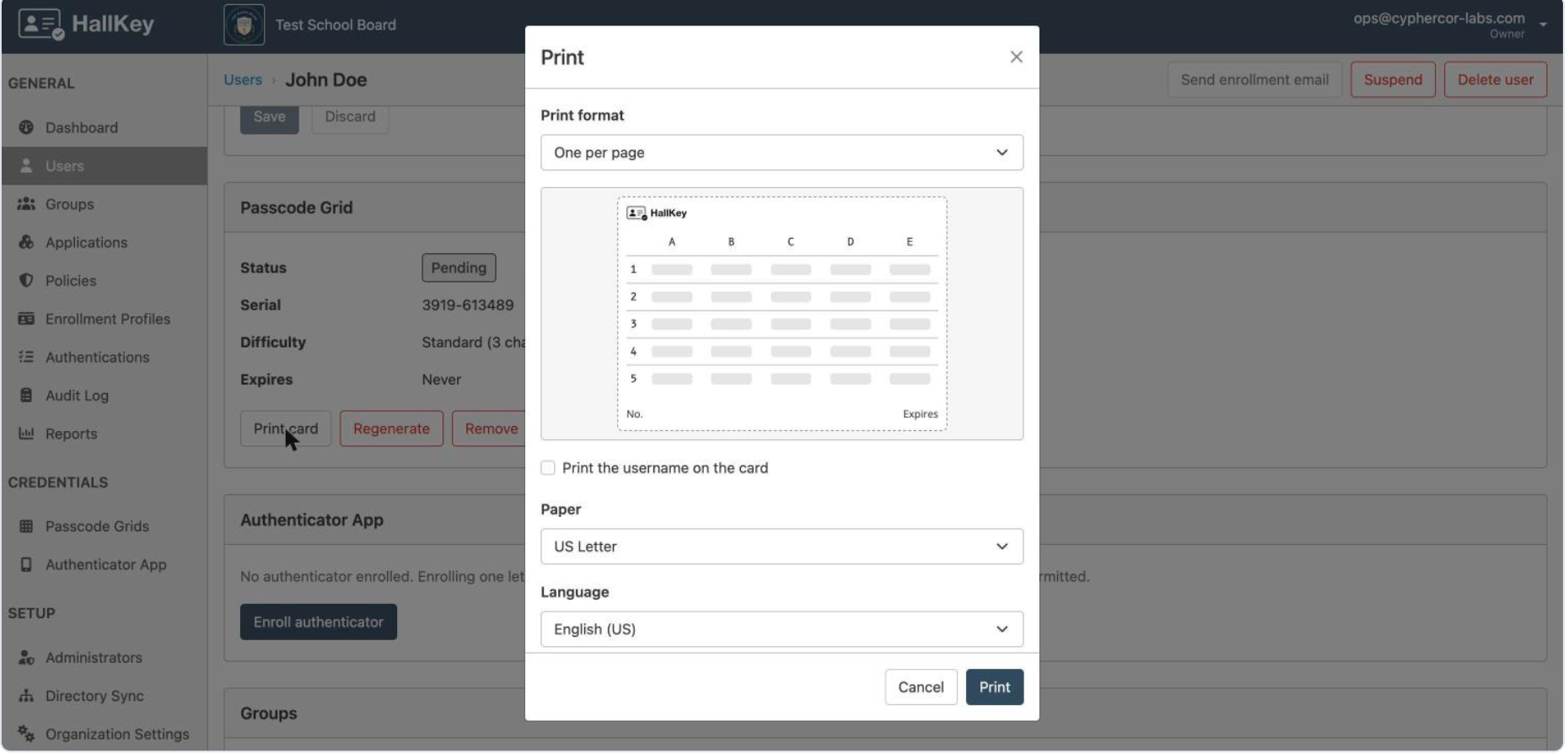
IT issues each student a passcode grid from the HallKey admin console. Cards can be printed at school, or students can receive an enrolment invitation by email and print their card at home.
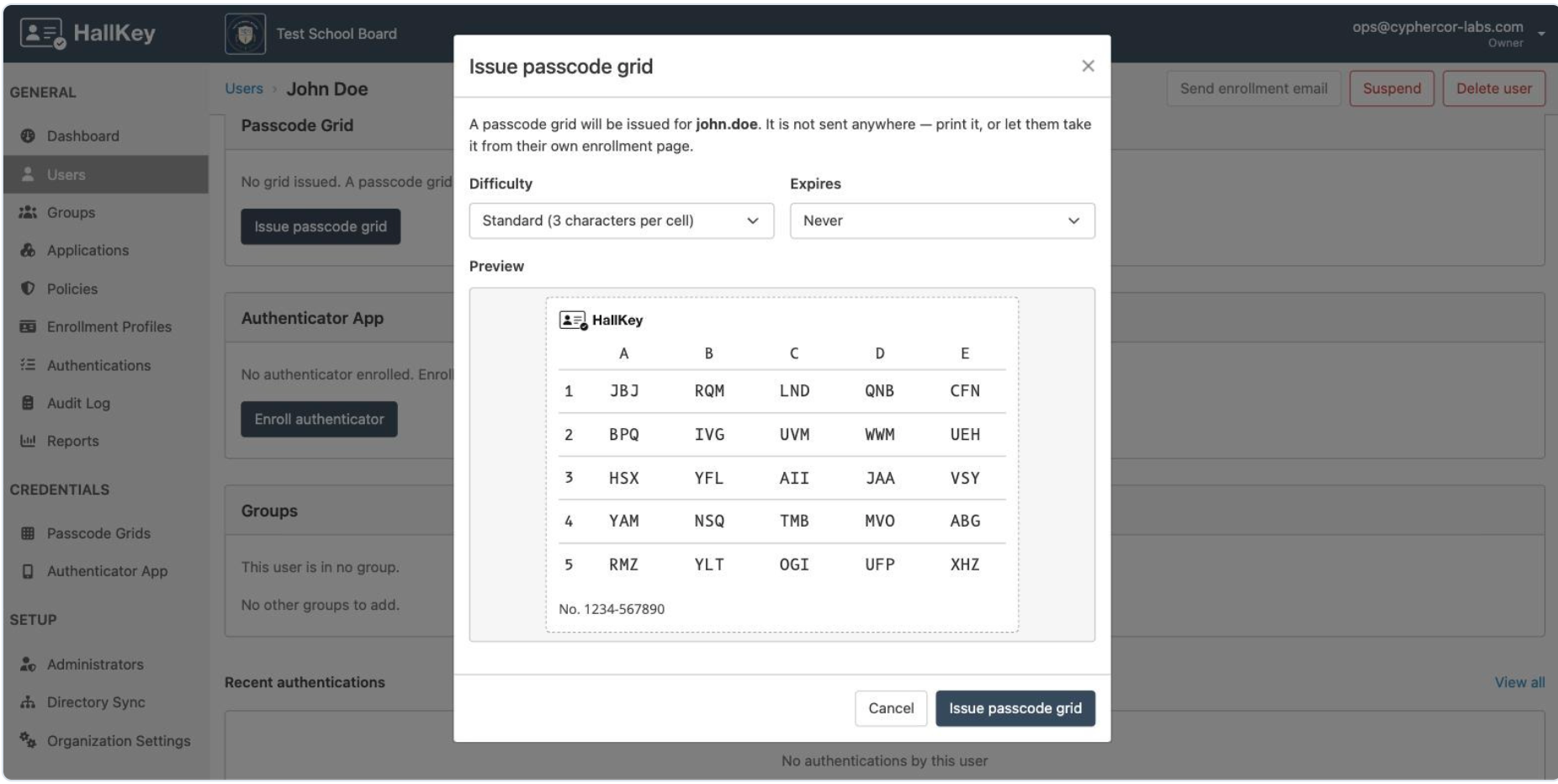
There is no hardware to buy, stock or ship. If a card is lost or exposed, IT revokes it and issues a new grid.
How HallKey fits into your existing setup
HallKey does not introduce a separate student password. Your existing identity platform remains responsible for passwords, and HallKey adds the card check without synchronizing those passwords or replacing your directory.
| What stays the same | What HallKey adds |
|---|---|
| Your directory, users and groups | A printed-card check after the password step, for the students or groups you choose |
| Your password policies and reset process | |
| Your existing sync. No passwords are synced to HallKey |
HallKey supports two identity platforms: Microsoft Entra ID (Microsoft 365) and Google Workspace.
Microsoft 365 and Entra ID
Students keep signing in with Microsoft. Entra ID checks the password, then hands the browser to HallKey for the second factor through an external authentication method (shown in Entra as an external MFA method). HallKey returns a signed response and Entra treats multifactor authentication as complete. A Conditional Access policy decides which students see the card step.
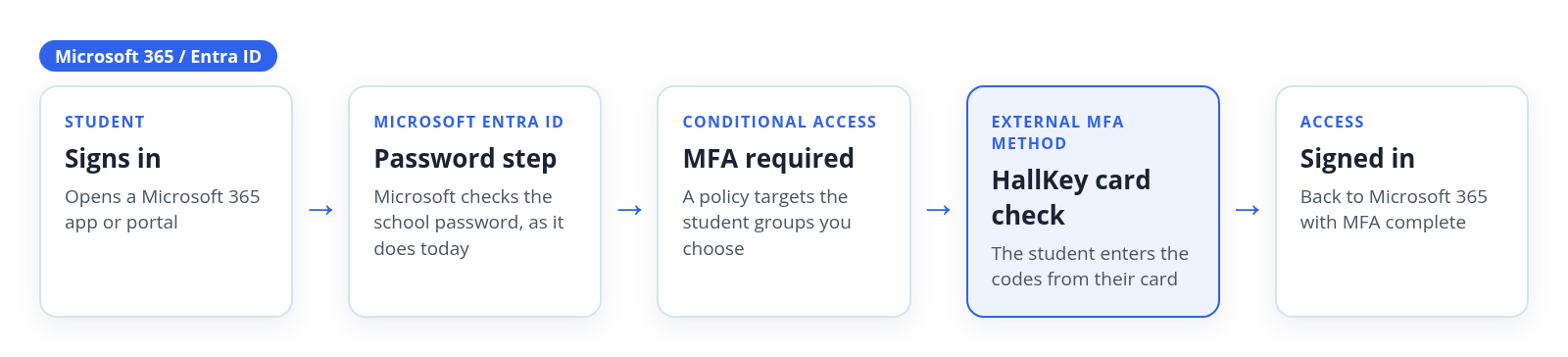
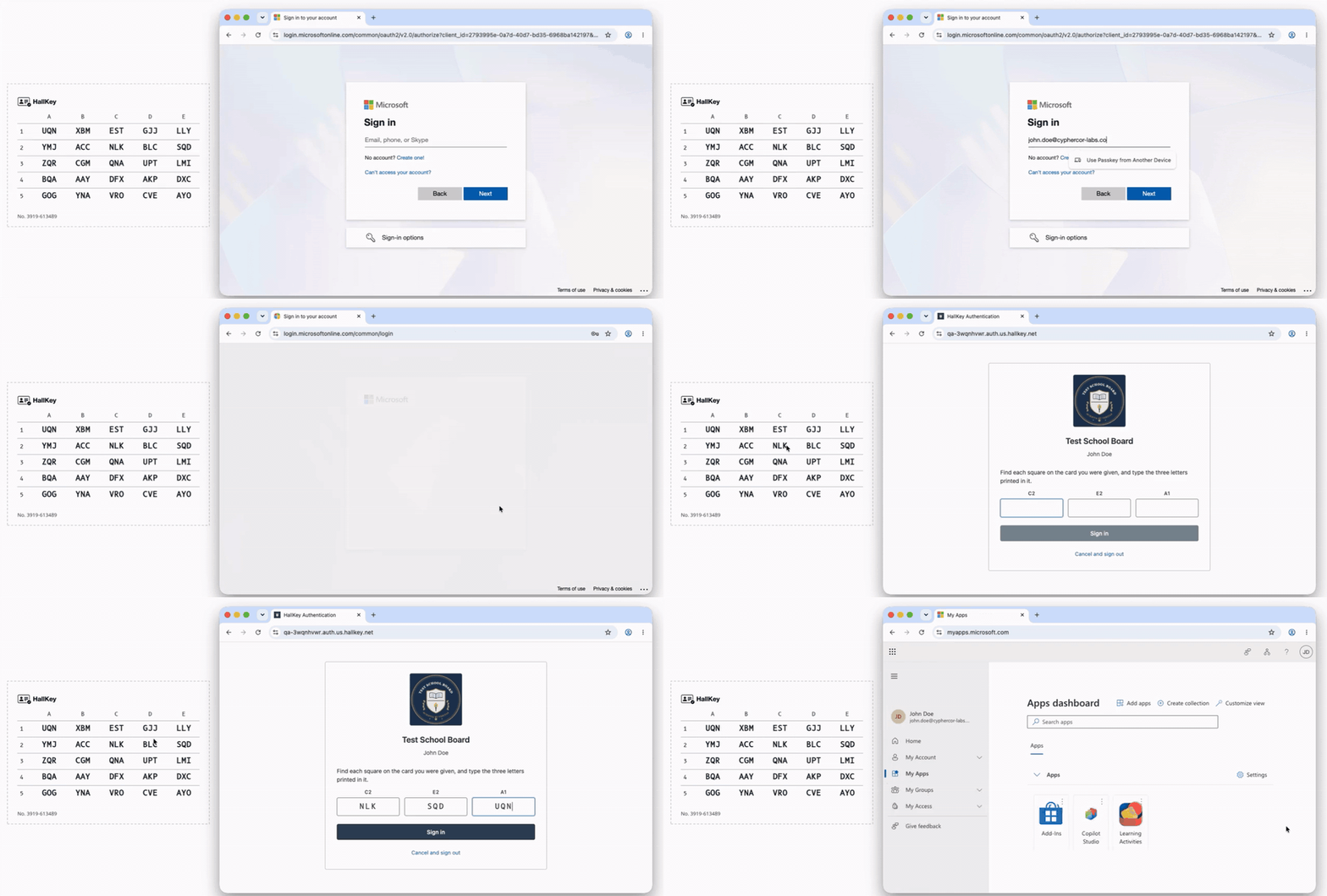
A student signs in to Microsoft 365: Microsoft password first, then three codes from the HallKey card.
Before you begin
- Microsoft Entra ID P1 or P2 for the students in scope. Conditional Access requires it.
- An Entra administrator who can register applications, grant admin consent, and edit authentication methods and Conditional Access, such as a Global Administrator.
- A HallKey administrator who can add applications.
- A pilot security group, and an administrator account outside it.
How setup works
- Add the application in HallKey. In the HallKey console, go to Applications, create a new Microsoft 365 application and keep its Entra registration details open.
- Register an application in Entra. Under App registrations, create a single-tenant registration with HallKey’s Authorize endpoint as the Web redirect URI, and turn on ID tokens.
- Add permissions and grant admin consent. Add the Microsoft Graph delegated permissions openid and profile, then grant admin consent for your organization.
- Connect the two. Paste the Directory (tenant) ID and Application (client) ID into HallKey, so HallKey publishes the discovery document Entra needs.
- Add HallKey as an external method. In Entra ID, go to Authentication methods > Policies > Add external MFA, enter HallKey’s Client ID and Discovery URL and the registration’s App ID, then enable it for your pilot group.
- Require MFA with Conditional Access. Create a policy for the pilot group with the Require multifactor authentication grant. Don’t use authentication strengths: external methods don’t satisfy them. You can start in Report-only mode.
- Register HallKey for each student and issue cards. Add HallKey as an authentication method for each user, create the students in HallKey, and issue and print their passcode grids.
- Test, then widen the rollout. Sign in as a test student, check that students outside the pilot group sign in as before, then add more groups.
One thing to plan for: external methods can’t be used for Microsoft’s self-service password reset, so check your password reset registration settings for HallKey users before you go live. The HallKey guide covers this step.
For full step-by-step instructions with screenshots, see the HallKey Microsoft 365 / Entra ID setup guide and Microsoft’s documentation on using Microsoft Entra MFA with an external MFA provider. For more on how this works with LoginTC, see our overview of Entra ID External Authentication Methods.
Google Workspace
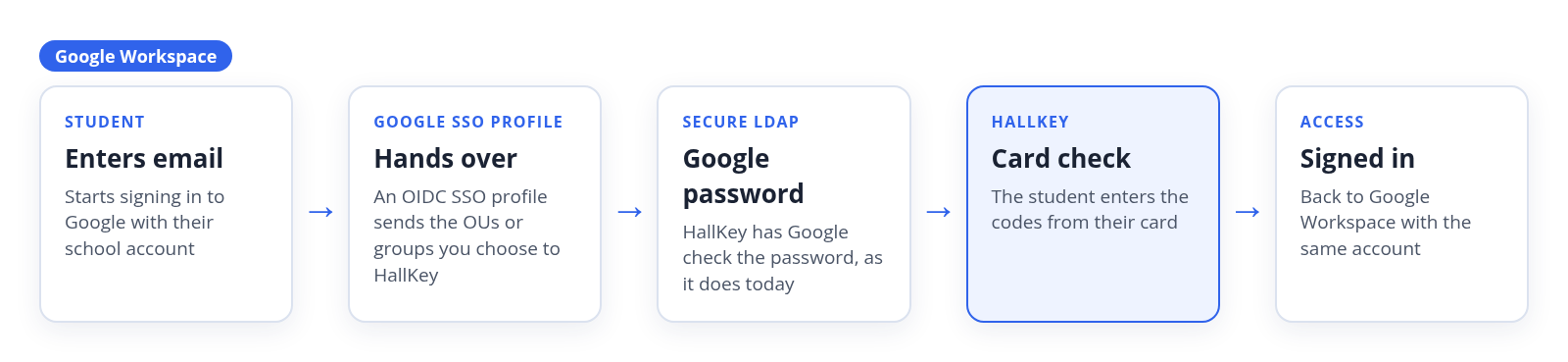
Students keep their Google password. When a student signs in, Google hands over to HallKey through an OIDC SSO profile. HallKey shows the school’s sign-in page, has Google check the password through Google’s Secure LDAP service, then asks for the card before returning the student to Google. You assign the profile to selected organizational units or groups, so you control which students see the card step.
Before you begin
- A Google Workspace edition that includes the Secure LDAP service, and a super administrator to configure it.
- A HallKey administrator who can add applications.
- A pilot organizational unit or group, and an administrator account outside it that keeps signing in with Google.
How setup works
- Add the application in HallKey. In the HallKey console, go to Applications and create a new Google Workspace application.
- Create an LDAP client in Google. In the Google Admin console, go to Apps > LDAP > Add client, name it HallKey and allow it to verify user credentials and read user information for the organizational units that contain your students.
- Download the certificate and generate access credentials for the LDAP client, then enter them, with the search base for your students, in HallKey’s Secure LDAP panel.
- Turn the LDAP client on. New LDAP clients start switched off, and the change can take a few minutes.
- Create the SSO profile. In Google, go to Security > Authentication > SSO with third-party IdP > Add OIDC profile and paste the Client ID, Client secret and Issuer URL from HallKey. Then copy the profile’s Redirect URI back into HallKey.
- Create the students in HallKey and issue cards. Issue and print a passcode grid for each student in the pilot.
- Assign the profile to a pilot group. Under Manage SSO profile assignments, assign the HallKey profile to the pilot organizational unit or group. Don’t assign it to your top-level organization until the pilot is complete.
- Test sign-ins, including Chromebook device sign-in, which needs to be tested separately from browser sign-in.
For full step-by-step instructions with screenshots, see the HallKey Google Workspace setup guide and Google’s Setting up SSO documentation.
Built for schools and education organizations
HallKey supports individual schools, districts, multi-academy trusts, regional educational service agencies and education IT providers. Its multi-tenant design lets central IT teams manage multiple schools while keeping each school separate.
Hosting and data sovereignty
HallKey deployments are hosted in the United States or the United Kingdom. You choose the region when you sign up, which helps schools address data-sovereignty requirements: where information is stored, which jurisdictions apply and who can access it. Is your country not listed? Contact the HallKey team.
No student phones required
Schools can enforce an additional authentication step without conflicting with smartphone restrictions or relying on student-owned devices.
Designed for education budgets
Printable cards offer an alternative to purchasing and managing individual hardware security keys for large student populations.
Built for school-wide deployment
HallKey works with your existing identities and supports central management across individual schools, districts and multi-academy trusts.
Free guided pilot
Every HallKey pilot is completely free, including setup and expert assistance. Our MFA experts work directly with your team to:
- Plan the pilot, including which students take part, how cards are distributed, and how lost cards and recovery are handled.
- Connect your identity platform, whether that’s Microsoft Entra ID or Google Workspace, and confirm the configuration.
- Set up HallKey and issue cards to your pilot group.
- Test real student sign-ins on the devices and sign-in paths your students actually use.
Start with a small student group, a whole school or multiple schools, and evaluate the experience before planning a broader deployment. A smaller pilot is an option, not the only rollout path.
Start your free HallKey pilot
Get setup help from MFA experts and test real student sign-ins in your Microsoft or Google environment.
Frequently asked questions
What is HallKey?
HallKey is phone-free MFA for students, from the team behind LoginTC. It adds a printed-card check to school sign-ins for Microsoft 365 and Google Workspace. Students keep their existing school accounts and passwords, and no smartphone, authenticator app or hardware key is needed. Learn more at hallkey.net.
Is HallKey part of LoginTC?
HallKey is built by Cyphercor, the team behind LoginTC. It builds on LoginTC’s passcode grid authentication and is the evolution of LoginTC’s education-focused MFA work, on a dedicated platform for schools.
Does HallKey require students to have smartphones?
No. The second factor is a printed card, so students don’t need a smartphone, an app or any personal device. That makes HallKey a fit for schools that restrict phones and for students who don’t have one.
Which identity platforms does HallKey support?
HallKey supports Microsoft Entra ID and Google Workspace. On Microsoft, it is added as an external authentication method and requires Microsoft Entra ID P1 or P2. On Google, it connects through an OIDC SSO profile and Google’s Secure LDAP service, so it needs a Workspace edition that includes Secure LDAP. See the HallKey setup guides.
Does HallKey replace student passwords?
No. HallKey is not passwordless. Students sign in with their existing school password, then complete the card check. HallKey does not create a separate student password, and your identity platform stays responsible for passwords.
How do students get their HallKey cards?
Cards can be printed at school, or students can receive an enrolment invitation by email and print their card at home. Each student’s card contains a unique grid, and there is no hardware to buy, stock or ship.
What happens if a student loses their card?
IT revokes the lost or exposed card before issuing a new grid. Schools should agree who verifies the student and grants any temporary access, and include recovery procedures and student instructions in rollout planning.
Does HallKey work on Chromebooks and shared computers?
The card isn’t tied to one computer. Test the supported browser sign-ins on your shared devices, Chromebooks and home computers during your pilot. Cloud sign-in needs an internet connection.
Is a printed grid card phishing-resistant?
No. A fake sign-in page can relay grid codes, and a photograph can copy a card. Use phishing-resistant authentication, such as security keys, where your security policy requires it, treat printed grids as secrets and revoke exposed cards. HallKey is designed for students who can’t use phones or hardware keys.
Can HallKey manage multiple schools?
Yes. HallKey is multi-tenant. Central IT teams at districts, multi-academy trusts, regional educational service agencies and education IT providers can manage multiple schools while keeping each school separate.
What does the free HallKey pilot include?
The pilot is free and includes setup assistance, integration with your Microsoft or Google environment, and testing with real student sign-ins. You can start with a small student group, one school or several schools. Start a free pilot.
How much does HallKey cost?
HallKey pricing is quoted for each school or organization. You can request an education quote on the HallKey website, or start with a free pilot first.
Where is HallKey hosted?
HallKey deployments are hosted in the United States or the United Kingdom. You choose the region when you sign up, which helps schools meet data-sovereignty requirements.