UK School Phone Ban: What IT Admins Must Know About MFA
June 18, 2026 •
The United Kingdom’s forthcoming statutory phone ban in schools is sending ripples far beyond the classroom. For school IT administrators, the disruption is not just about confiscating handsets at the gate. It strikes at the heart of how staff and students currently authenticate into school networks, applications, and managed devices. If your institution relies on smartphone-based multi-factor authentication (MFA) to secure logins, the phone ban in schools demands an urgent rethink of your authentication strategy. This guide breaks down exactly what the legislation requires, why it creates an MFA problem, and what you can do about it today.
What Is the UK School Phone Ban and What Does It Actually Require?
In January 2025, the UK Government announced plans to make the existing guidance on mobile phones in schools legally binding. The Department for Education (DfE) guidance, Mobile Phones in Schools, already advised headteachers to prohibit the use of mobile phones throughout the school day, including during lessons, break times, and lunch. The new statutory duty takes this further by removing the discretion that previously allowed schools to interpret “prohibition” loosely.
The statutory phone ban in schools will require all state-funded schools in England to implement a full prohibition on mobile phone use throughout the entire school day.
Who Is Covered by the Ban?
The ban applies to all pupils in state-funded schools in England. It covers the use of mobile phones during the school day, which the government defines broadly to include time on school premises before, during, and after lessons. The guidance explicitly notes that schools may adopt one of several implementation approaches:
- Phones handed in at the school gate and stored securely until the end of the day.
- Phones kept in lockers throughout the day.
- Phones kept in bags and never taken out whilst on school premises.
- Phones kept in bags and never taken out during lessons.
According to the BBC, the legislation focuses on pupil phone use. However, the practical enforcement reality, combined with existing Bring Your Own Device (BYOD) policy overhauls, means many schools are simultaneously reviewing whether staff should also face tighter restrictions on personal device use within the IT environment.
Why the Ban Creates an Immediate IT Problem
Modern MFA commonly relies on a second factor delivered to or stored on a smartphone. That includes:
- SMS one-time passcodes (OTPs) sent to a personal mobile number.
- Authenticator app push notifications (Microsoft Authenticator, Google Authenticator, LoginTC, etc.).
- TOTP codes generated by apps or built-in iOS/Android functionality.
If pupils or staff cannot have their phones accessible during the school day, these MFA methods are functionally unavailable at the moment of login. For IT admins running Microsoft 365, Google Workspace, MIS systems, or any cloud-based platform with MFA enforced, this is not a trivial inconvenience but a structural gap that must be filled.
Why MFA in Schools Cannot Simply Be Turned Off
Some IT administrators may be tempted to relax MFA requirements in response to the phone ban. This would be a serious mistake, and the data makes clear why.
Schools are not low-value targets. Educational institutions hold sensitive personal data on minors, payroll records, safeguarding files, and financial information. The UK’s National Cyber Security Centre (NCSC) has consistently listed education as one of the most frequently targeted sectors in the UK, with ransomware attacks on schools increasing year-on-year.
Furthermore, the UK’s Data Protection Act 2018 and the UK GDPR impose a legal obligation on schools to implement appropriate technical security measures to protect personal data. Removing MFA to accommodate a phone ban would almost certainly fall below the standard of “appropriate technical measures” expected by the Information Commissioner’s Office (ICO). A data breach resulting from disabled MFA could expose a school to significant regulatory and reputational consequences.
Disabling MFA to solve the phone ban problem is not a compliant solution — it is trading one policy problem for a far more dangerous security and legal risk.
Smartphone-Free MFA: Your Practical Options
The good news is that MFA has never required a smartphone. The era of push-notification authenticators simply made phones the path of least resistance. With the phone ban in schools forcing a reassessment, IT admins have an excellent opportunity to deploy more secure, more manageable, and in many cases less expensive authentication methods. Here are the leading alternatives.
1. Passcode Grid Cards — The No-Cost, No-Hardware Standout
A passcode grid is a printed card containing a matrix of alphanumeric characters. During login, the authentication system challenges the user to enter the characters at specific grid co-ordinates (for example, “Enter the characters at B3, F7, and D1”). The correct combination serves as the second factor. Because the card itself contains no electronics, no battery, and no connectivity, it is entirely unaffected by any phone ban.
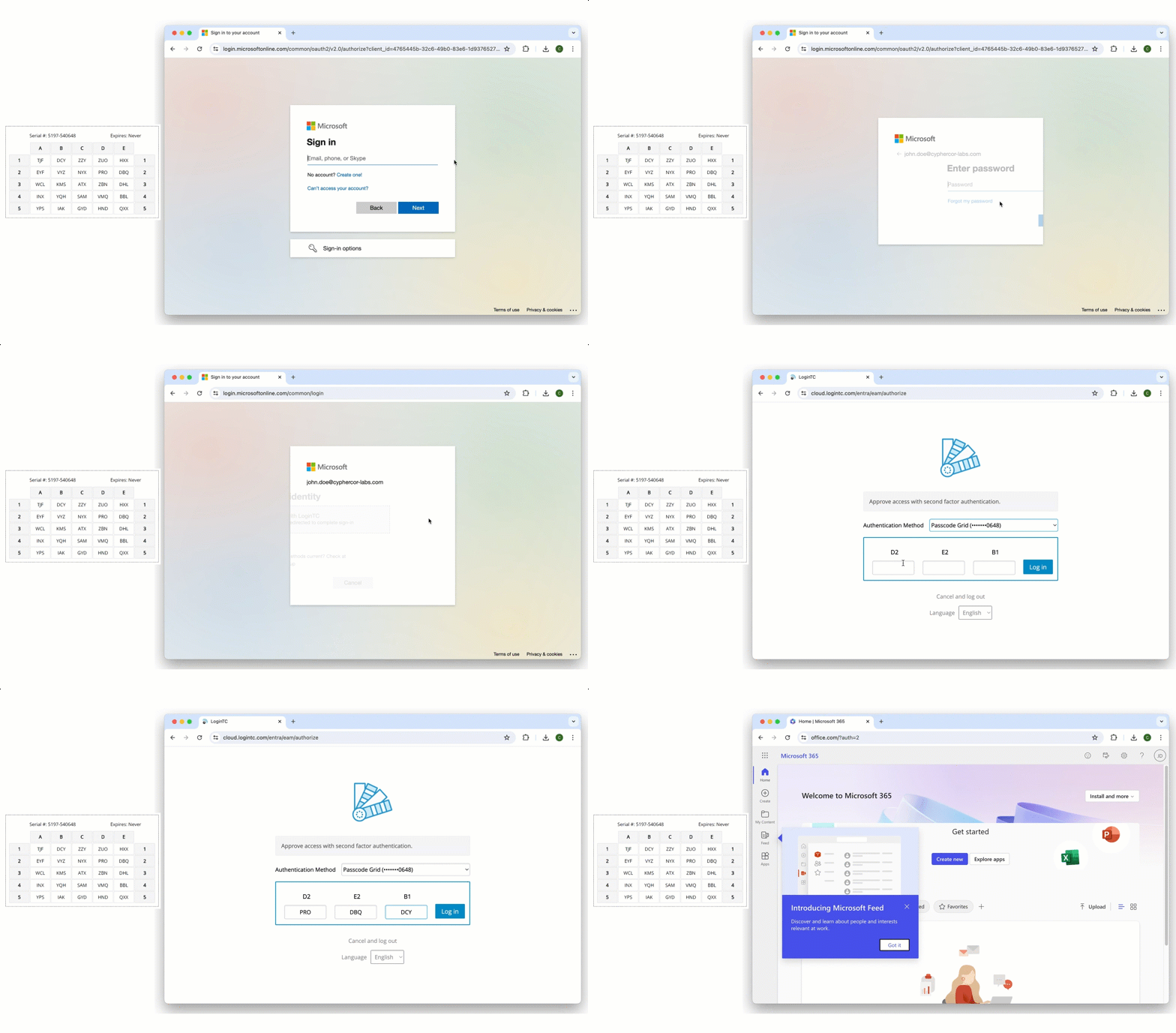
Passcode grid authentication requires no smartphone, no internet connection, no hardware token, and no software installation — making it uniquely suited to phone-restricted school environments.
LoginTC’s Passcode Grid solution provides exactly this capability. Cards can be printed on standard paper or card stock, laminated for durability, and distributed to staff and pupils at negligible cost. There is no per-user licensing complexity for the card itself, and the grid can be regenerated and reissued instantly if a card is lost. For schools operating under tight IT budgets, which describes virtually every state-funded school in England. This combination of zero hardware cost and straightforward administration is genuinely compelling.
For schools, this comes packaged as HallKey: device-free MFA for staff and pupils, from the team behind LoginTC.
Passcode grids are also an excellent fit for shared-device environments where a given pupil may log in from different machines throughout the day. The card travels with the user; the authentication experience remains consistent.
2. Hardware Tokens (TOTP and HOTP)
Hardware tokens are dedicated, single-purpose devices that generate time-based (TOTP) or HMAC-based (HOTP) one-time passcodes. These devices have no screen beyond a small display for the OTP, no camera, no microphone, and no connectivity. They are not mobile phones and are therefore fully compatible with the phone ban.
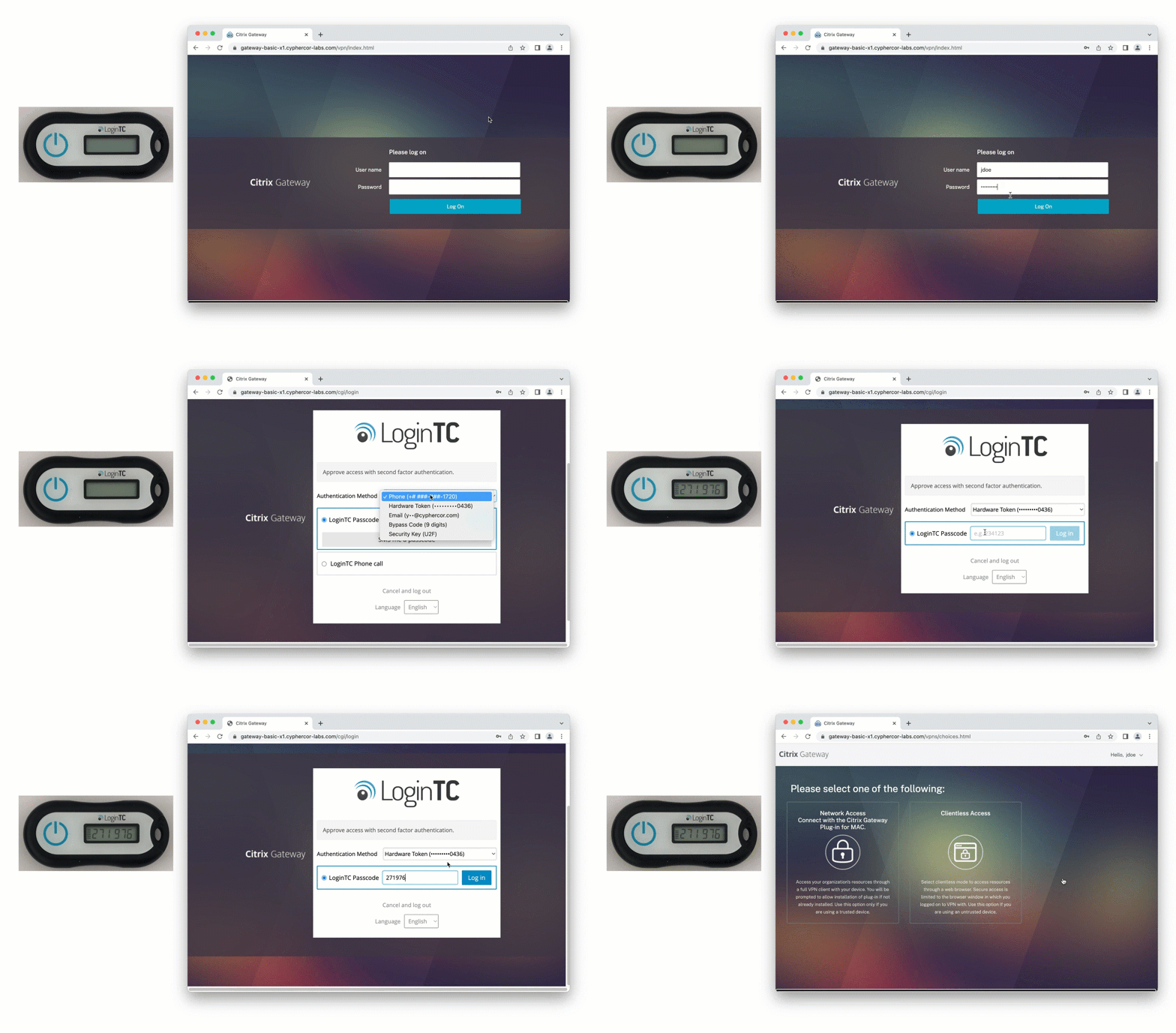
Hardware tokens are the gold standard for high-security environments and are widely used in government and financial services. For schools, the primary consideration is cost: hardware tokens typically range from £30 to £80 per unit depending on the vendor and volume. For a secondary school with 100 staff members, this represents a meaningful but manageable budget line. Issuing tokens to thousands of pupils, however, requires careful cost-benefit analysis and robust procedures for loss and replacement.
3. FIDO2 / WebAuthn and Passkeys
FIDO2 is the modern open authentication standard developed by the FIDO Alliance and the World Wide Web Consortium (W3C). It enables passwordless or second-factor authentication using public-key cryptography, with the private key stored either on a dedicated hardware security key or, increasingly, in a device’s secure enclave (passkeys on managed laptops or tablets).
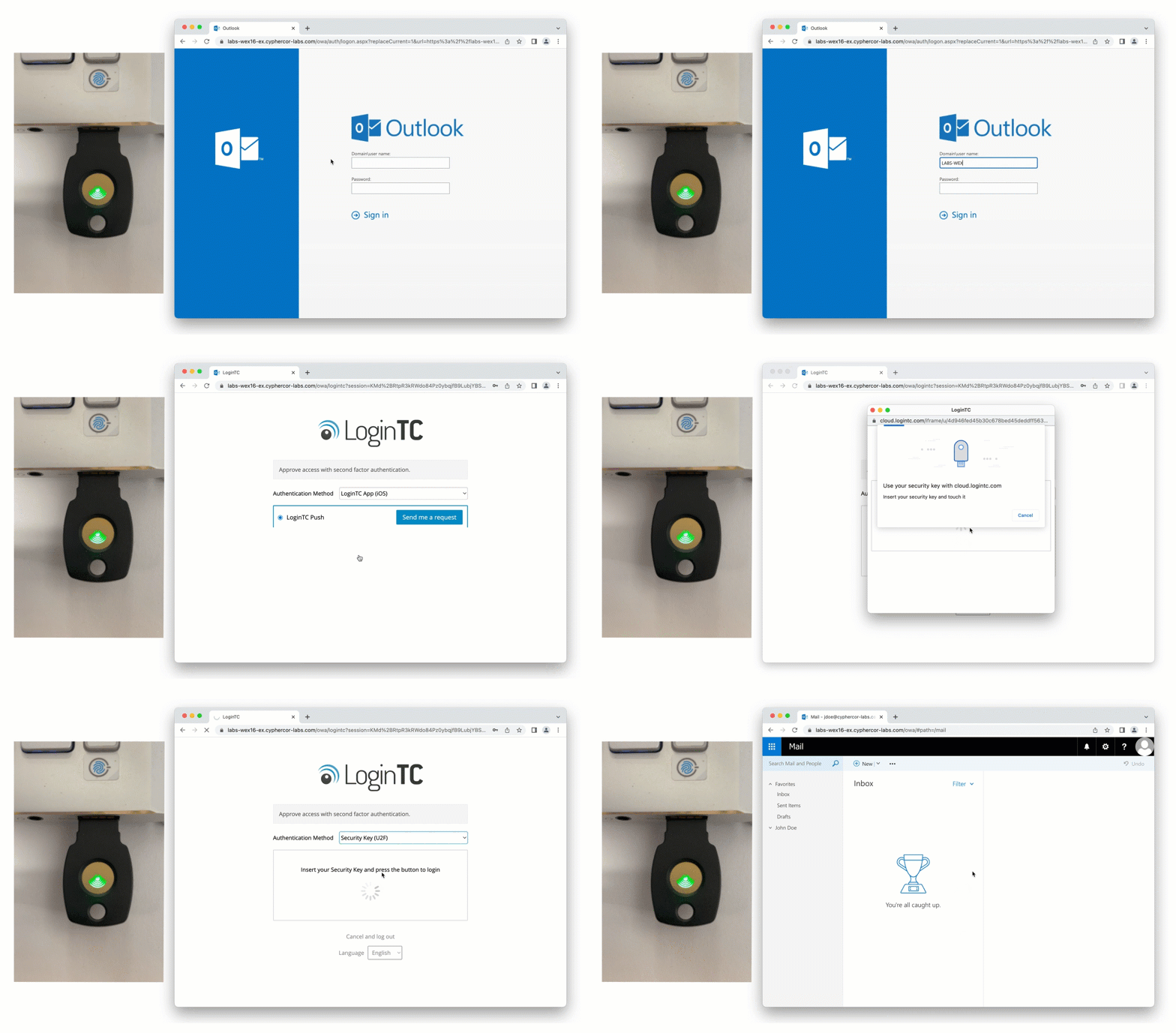
FIDO2 hardware security keys provide phishing-resistant MFA with no reliance on a mobile phone, making them one of the most secure options available to school IT teams.
For schools that have deployed managed Chromebooks, Windows devices, or iPads, device-bound passkeys are a particularly attractive option. The second factor is bound to the school-managed device itself, meaning authentication is completed without any additional hardware or card. Microsoft’s Entra ID (Azure AD) and Google Workspace both support FIDO2 passkeys natively, which aligns well with the Microsoft 365 and Google Workspace deployments common in English schools.
The limitation of FIDO2 hardware keys, like TOTP tokens, is unit cost. Device-bound passkeys on managed hardware sidestep this issue but require a fully managed device estate — a standard that not all schools have achieved uniformly across both staff and pupil populations.
4. Email-Based OTP and Magic Links
For lower-risk applications and internal portals, email-delivered one-time passcodes or magic links represent a practical interim measure. These require no phone and no additional hardware — only access to the user’s school email account on a managed device. They are, however, only as secure as the email account itself, and should not be considered equivalent in security to hardware-based second factors. Email OTP is best suited to non-critical systems where the friction of stronger methods outweighs the risk profile.
5. FIDO2 Smart Cards
Smart card authentication has traditionally used certificate-based authentication to secure identity, but modern smart cards are also built using FIDO2 authentication, making them phishing resistant and much easier to deploy and manage. Authentication is performed by inserting the card into a reader attached to the workstation. This approach is common in the NHS and central government, and it offers strong, phishing-resistant Multi-Factor Authentication (MFA) without any phone dependency.
Implementing Phone-Free MFA: A Practical Roadmap for School IT Admins
Understanding your options is one thing; deploying them under the operational pressures of a school environment is another. Here is a structured approach to transitioning away from phone-dependent MFA.
Step 1: Audit Your Current MFA Methods
Begin with a complete inventory of every application, system, and portal that currently uses MFA, and document which authentication method is in use. Pay particular attention to Microsoft 365 and Google Workspace, your MIS (such as SIMS, Arbor, or Bromcom), any cloud-based HR or payroll systems, and your network VPN if staff access resources remotely. Identify which of these currently depend on SMS OTP or authenticator apps and make them priority migration targets.
Step 2: Segment Your User Population
Staff and pupils have different risk profiles, different device access patterns, and different budget implications. Senior leadership and finance staff handling sensitive data warrant stronger authentication (FIDO2 hardware keys or hardware TOTP tokens). Teaching staff may be well served by passcode grid cards. Pupils accessing shared devices for learning platforms may be appropriately served by device-bound passkeys or passcode grids. Avoid a one-size-fits-all approach — it will either overspend your budget or under-protect your highest-risk users.
Step 3: Pilot Before You Deploy
Select a representative group — one department of teaching staff and one year group of pupils — and pilot your chosen phone-free MFA method for four to six weeks. Collect data on help desk ticket volume, login failure rates, and user feedback. This evidence base will be invaluable when presenting the full rollout plan to senior leadership and governors.
Step 4: Update Your Policies and Communicate Clearly
Any change to authentication method must be reflected in your school’s IT Acceptable Use Policy, Data Protection Impact Assessment (DPIA), and any relevant cyber security documentation required by your cyber insurance provider. Communicate changes to staff and, where applicable, pupils and parents with clear written guidance, ahead of any go-live date.
Step 5: Plan for Lost or Forgotten Credentials
Physical cards and tokens get lost. Establish a clear, audited process for issuing replacements, revoking compromised credentials, and providing temporary access to users who present at the help desk without their card or token. LoginTC’s Passcode Grid, for example, allows administrators to regenerate and reissue a new grid to a user instantly, invalidating the previous one — a critical capability for maintaining security without creating an operational bottleneck.
UK School IT Requirements: Cyber Security Frameworks You Should Know
The phone ban in schools does not exist in isolation. It intersects with a broader landscape of UK school IT requirements and cyber security expectations that every IT admin should be across.
Cyber Essentials and Cyber Essentials Plus
The UK Government’s Cyber Essentials scheme sets a baseline of five technical controls for organisations seeking certification. Multi-factor authentication is increasingly central to compliance, particularly the User Access Control and Secure Configuration controls. Schools pursuing Cyber Essentials or Cyber Essentials Plus certification must ensure their MFA implementation meets scheme requirements — and phone-free methods are fully eligible.
DfE Filtering and Monitoring Standards
The Department for Education’s Filtering and Monitoring Standards for Schools and Colleges (2023) require schools to implement appropriate filtering and monitoring on all school-managed devices and networks. Secure, authenticated access is a prerequisite for effective filtering — another reason why disabling MFA is not a viable response to the phone ban.
Related Reading for School IT Teams
If you are evaluating your broader authentication strategy for your school, two earlier LoginTC resources are directly relevant. Our guide on how to securely authenticate without a smartphone explores the technical landscape of phone-free MFA in depth. And our dedicated post on MFA for schools: how to secure student logins without smartphones addresses the specific challenges of the educational environment, including shared devices and large-scale user management. Both are worth reading alongside this post as you build your response to the statutory ban.
For a ready-made option built for schools, see HallKey: device-free MFA for schools.
Frequently Asked Questions
Does the UK phone ban in schools affect staff as well as pupils?
The statutory ban specifically targets pupil mobile phone use during the school day. However, many schools are using the legislation as a catalyst to review staff BYOD policies simultaneously. IT admins should clarify their school’s position on staff personal devices and ensure that any MFA transition plan accounts for both staff and pupil authentication needs.
Can schools continue to use Microsoft Authenticator or Google Authenticator after the phone ban?
Not without creating a compliance conflict. If phones are prohibited during the school day and MFA is enforced at login, users cannot complete an authenticator app push notification or TOTP code without accessing their phone. Schools should migrate to phone-free MFA methods such as passcode grid cards, hardware tokens, or device-bound passkeys before the statutory ban takes effect.
What is a passcode grid and how does it work?
A passcode grid is a printed card containing a matrix of alphanumeric characters. When a user logs in, the authentication system requests characters from specific co-ordinates on the grid. The user reads the characters from their physical card and enters them, completing the second-factor verification. No phone, no app, and no internet connection are required.
Is it legal to disable MFA in schools to comply with the phone ban?
It is not illegal per se, but disabling MFA would almost certainly breach the school’s obligations under the UK GDPR and Data Protection Act 2018 to implement appropriate technical security measures. A data breach resulting from disabled MFA could attract regulatory action from the ICO. The correct response is to replace phone-based MFA with a phone-free alternative, not to remove MFA entirely.
What is the cheapest MFA option for schools without phones?
Passcode grid cards are the most cost-effective option, as they can be printed on standard paper or card at negligible cost per user. LoginTC’s Passcode Grid solution requires no dedicated hardware and no per-card licensing, making it suitable for schools with tight IT budgets. Device-bound passkeys on already-managed school devices are also effectively zero additional cost where the device estate supports them.
When does the UK phone ban in schools become statutory?
As of early 2025, the UK Government has announced its intention to make the existing DfE guidance on mobile phones in schools legally binding, with legislation expected to progress through Parliament. School IT admins should treat implementation planning as an immediate priority rather than waiting for a confirmed enforcement date.
Conclusion: The Phone Ban in Schools Is an Opportunity, Not Just a Challenge
The phone ban in schools is compelling every IT administrator in England to confront a question that should have been asked long ago: is relying on personal smartphones for MFA actually the right approach for a school environment? The honest answer, for most schools, is no. Phones introduce safeguarding risks, distraction, and an authentication dependency on hardware that schools do not control. The statutory ban removes the convenience argument for phone-based MFA and opens the door to more robust, more manageable, and more appropriate alternatives.
Passcode grid cards offer a uniquely practical starting point: zero hardware cost, instant issuance, and no dependency on connectivity or software. For users and applications requiring stronger assurance, FIDO2 hardware security keys and device-bound passkeys provide phishing-resistant authentication without a phone in sight. Hardware TOTP tokens fill the gap in between. The right solution for your school will depend on your user population, budget, and existing device estate — but the right answer is never to disable MFA.
LoginTC is built to support exactly these kinds of transitions. Whether you need to deploy Passcode Grid authentication across your staff population, integrate with your existing Microsoft 365 or Google Workspace environment, or explore a layered approach combining multiple phone-free methods, LoginTC provides the flexibility and the administrative control that school IT teams need. If you are navigating the phone ban and need to rethink your MFA strategy, explore HallKey, our MFA for schools, or speak to the LoginTC team today