Biometric MFA vs. Passwordless: How FIDO2 Smart Cards Bridge the Gap
May 20, 2026 •
For years, the potential of passwordless authentication has been on the horizon, promising stronger security, greater convenience, and phishing-resistance. For most organizations, though, the full switch doesn’t happen overnight. It takes changes to identity infrastructure, user onboarding processes, and sometimes lengthy compliance sign-off.
That doesn’t mean organizations have to stand still in the meantime.
Biometric FIDO2 smart cards offer a practical path forward. They use the same hardware that powers a fully passwordless deployment. The difference is that they work as a strong second factor today, alongside existing credentials, without requiring organizations to overhaul how users sign in.
In this post, we’ll cover how FIDO2 biometric smart card authentication works, what makes biometric smart cards a unique form factor, and how LoginTC brings this technology to Windows logins — including Remote Desktop and Console access.
What is FIDO2 Biometric Smart Card Authentication?
FIDO2 is a cryptographic authentication standard built on the WebAuthn specification and CTAP2 protocol. Rather than relying on a shared secret like a password or a one-time code, FIDO2 uses a public-private key pair tied to a specific piece of hardware. The private key never leaves that device. There is nothing to intercept, steal, or phish.
Biometric smart cards build on this by embedding a fingerprint sensor directly onto the card. Instead of a PIN, users place their finger on the card’s built-in scanner to complete authentication. That matching process happens entirely on the card itself. Biometric data is never transmitted to a server.
This creates a strong two-factor combination. The card is something users have. Their fingerprint is something they are. Both factors are verified at once, in a single tap.
It also removes a common barrier to smart card adoption. Traditional smart card authentication relies on certificates, which require significant infrastructure to manage. For example, organizations need a certificate authority, ongoing management resources, and technical expertise to run it. Biometric FIDO2 smart cards deliver the same hardware-bound security without that overhead, making them a viable option for a much wider range of organizations.
What are FIDO2 Biometric Smart Cards?
Biometric FIDO2 smart cards, like AuthenTrend’s ATKey.Card NFC, are credit-card-sized security keys with a built-in fingerprint scanner. They are designed to work across multiple interfaces, including USB, NFC, and smart card readers. A single card covers all of them.
Fingerprint matching happens entirely on the device. Biometric data is enrolled once and stored securely within the card’s hardware, isolated from any external system. Cards in this category are generally FIDO2 and CTAP2.1 certified. The strongest implementations meet compliance standards including NIST SP 800-73-5, IAL2/IAL3, AAL3, and FIPS 201, making them suitable for organizations with strict regulatory requirements.
Some products in this space, including AuthenTrend’s lineup, also offer wearable accessories like badge holders with lanyard compatibility. This gives organizations flexibility in how cards are carried and presented across different work environments.
Biometric MFA vs. Passwordless: What’s the Difference?
Biometric smart cards can support two different authentication models. Understanding the difference helps organizations choose the right deployment for where they are today.
Passwordless authentication removes the password entirely. Users authenticate with only their biometric card. There is no username and password combination at all. This is the strongest and most seamless end state for identity security, and it is the direction the industry is heading.
Biometric MFA keeps the existing username and password as the first factor and adds the biometric smart card as the second. Users log in the way they always have, then verify their identity with a fingerprint tap on the card. This is significantly stronger than SMS codes, OTP apps, or standard push notifications. And it uses the exact same hardware that a fully passwordless deployment would.
For organizations that want to eventually go passwordless but are not ready yet, biometric MFA is a practical first step. The hardware investment made today carries forward into a future passwordless deployment. Nothing gets replaced. The deployment model simply evolves.
This is part of what makes biometric smart cards, including AuthenTrend’s ATKey.Card NFC, a compelling option for IT teams planning ahead. LoginTC’s integration supports the biometric MFA model, adding a phishing-resistant biometric second factor to Windows logins, Remote Desktop, VPNs, and more.
How it Works with LoginTC + Windows
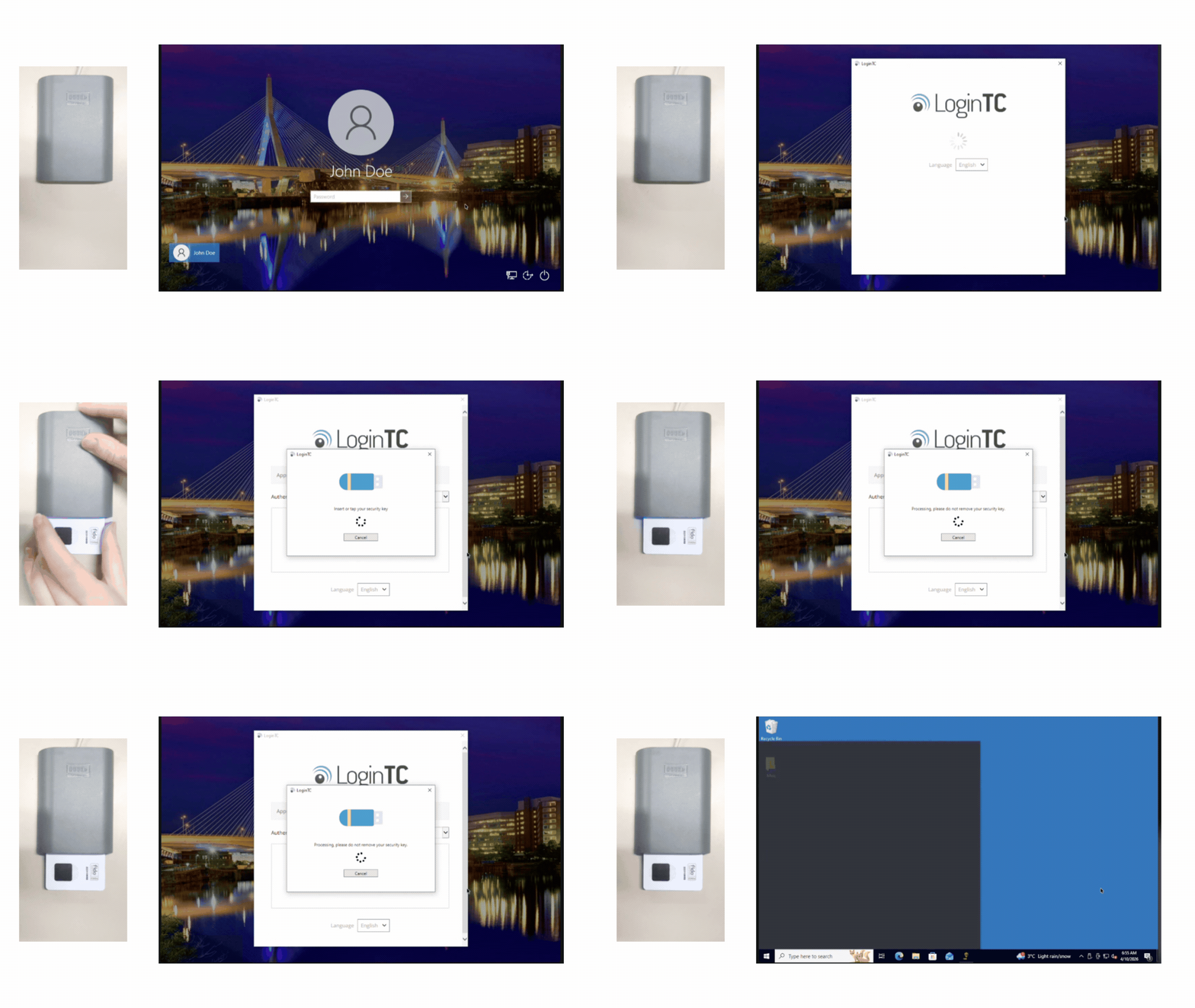
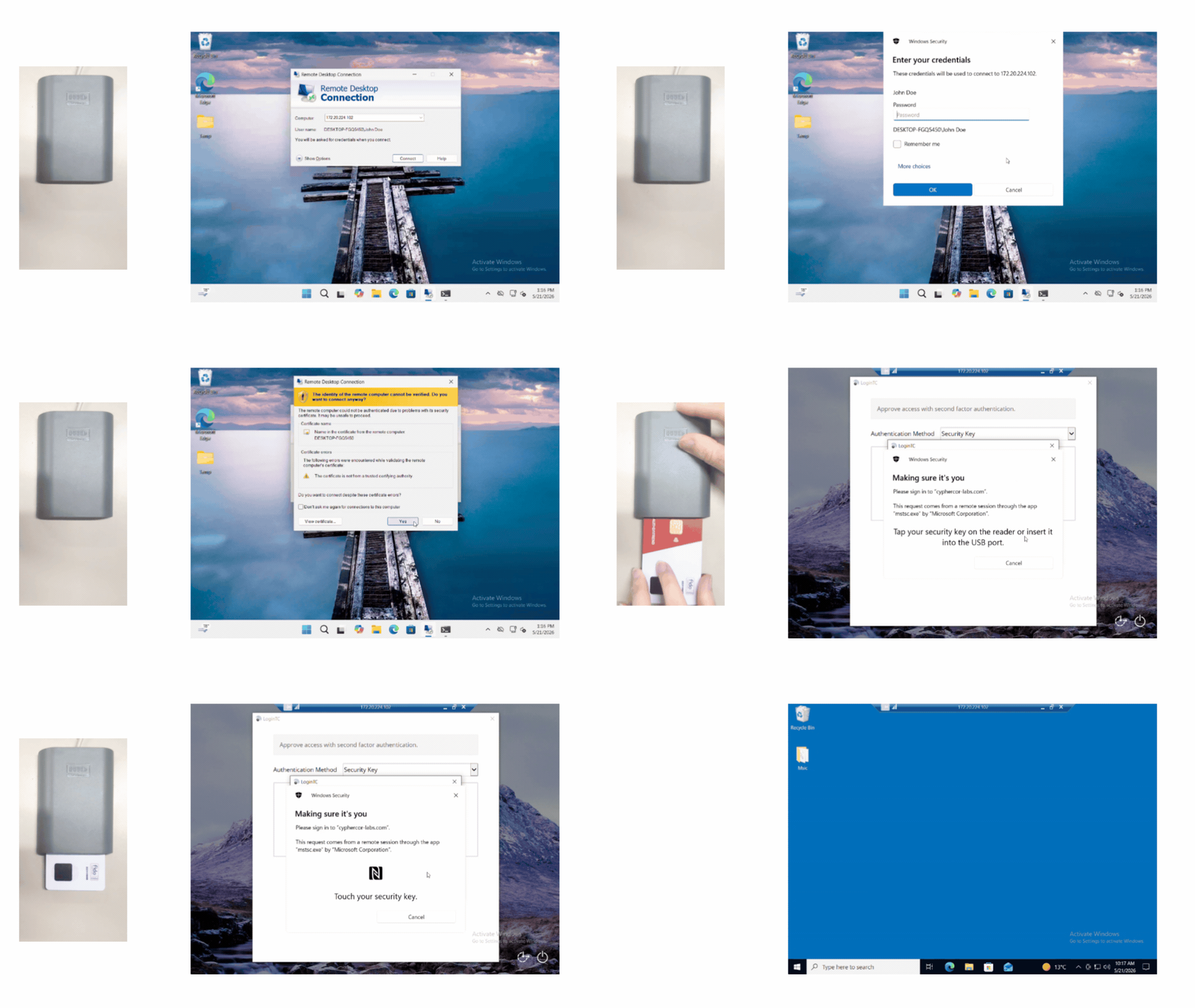
LoginTC’s support for FIDO2 biometric smart cards brings fingerprint-based authentication to Windows logins, including Console access and Remote Desktop. This extends FIDO2 smart card support beyond web applications and VPNs to the Windows login itself. It is a first for the authentication industry.
Here is how the experience looks for end users.
Insert to Authenticate — Windows Console
Tap to Authenticate — Windows Console
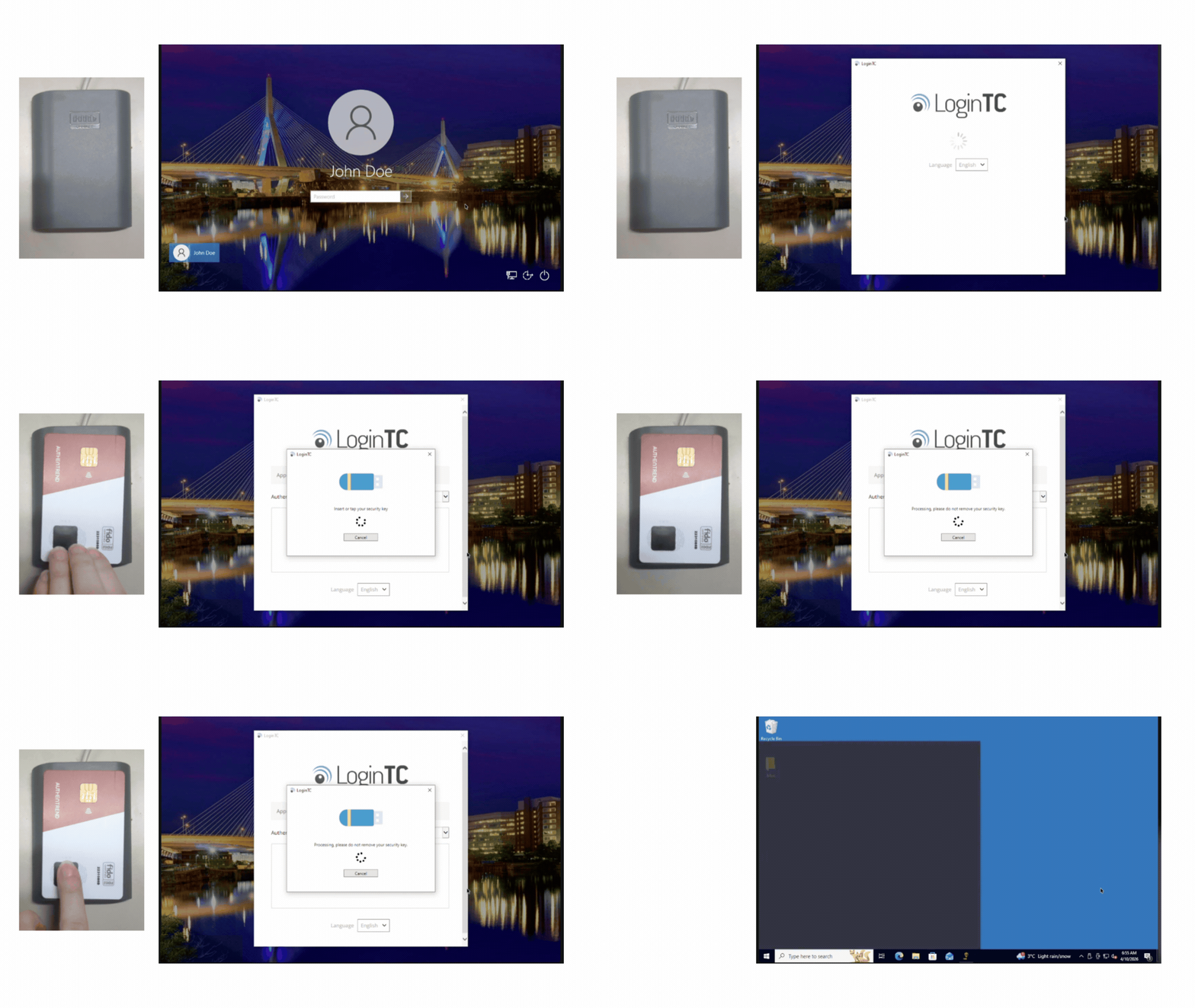
Users enter their first-factor credentials, then place their biometric smart card onto a reader. The on-card fingerprint scanner confirms their identity and completes the login. No PIN, no push notification, no additional steps.
Insert to Authenticate — Windows RDP
Tap to Authenticate — Windows RDP
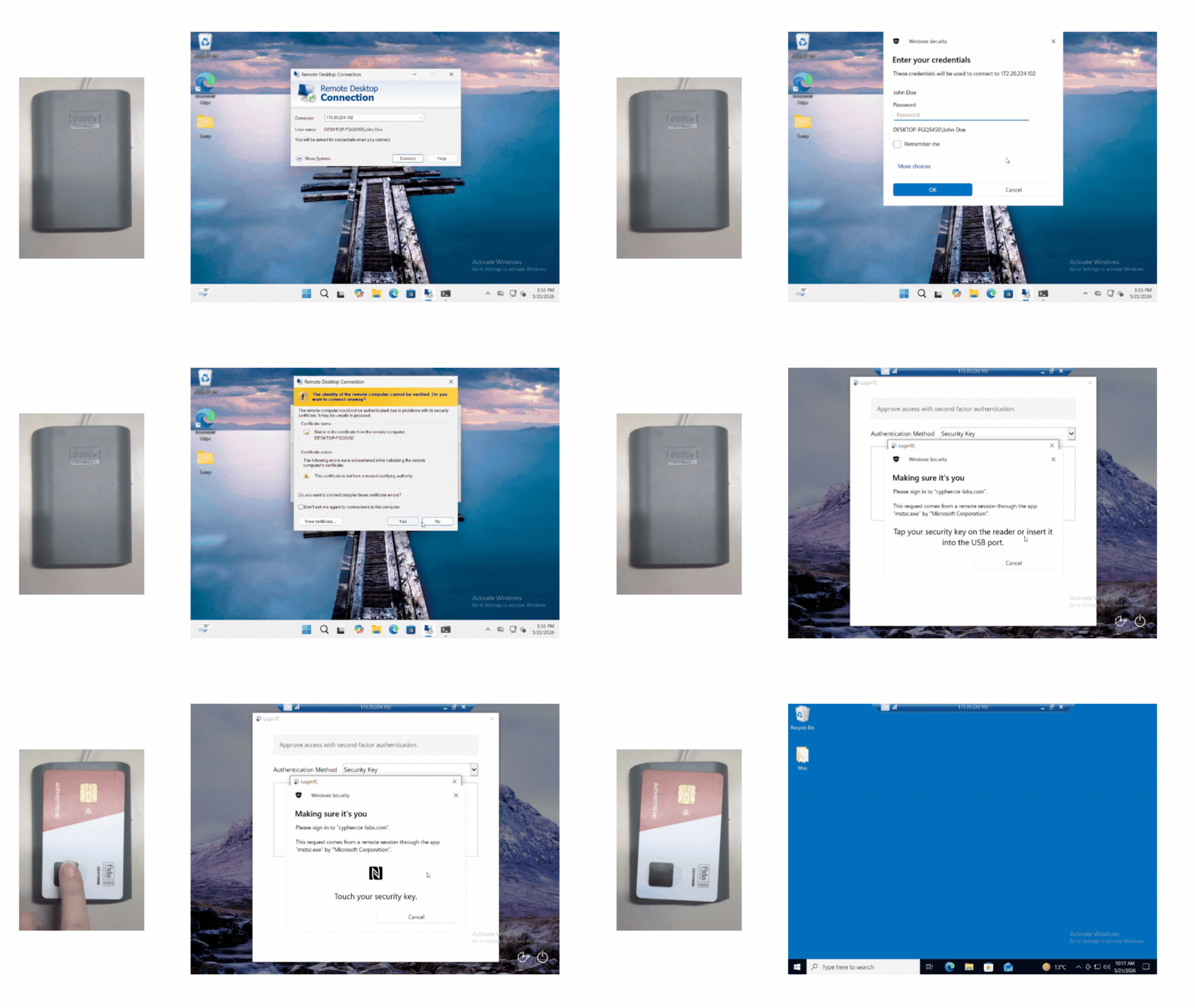
The same experience applies to Remote Desktop sessions. Users authenticate with a card tap and fingerprint scan from wherever they are connecting, keeping the login flow fast and consistent.
Next Steps
FIDO2 biometric smart card authentication with LoginTC is available to customers on the Business-tier cloud MFA plan and LoginTC Managed On-Premises MFA.
Combine LoginTC MFA with the power of biometric FIDO2 smart cards, including AuthenTrend’s ATKey.Card NFC, for phishing-resistant authentication across your organization’s most critical access points. Biometric smart card authentication is compatible with the following LoginTC connectors:
- Windows Logon and RDP
- Entra ID
- Outlook Web App (OWA)
- Active Directory Federated Services (AD FS)
- RADIUS for VPNs and firewalls
Start a free trial of LoginTC today to try LoginTC for your organization.