How to migrate to Fortinet IPsec VPN IKEv2 MFA
December 17, 2025 •
Last reviewed: July 2026
Steps at a glance
- Map your current FortiGate authentication flow (IKE, XAuth, RADIUS, Mode Config) so you know where MFA needs to be inserted.
- Choose LoginTC Cloud or LoginTC Managed (on-prem) based on network access, air-gap requirements, and HA needs.
- Configure FortiGate for RADIUS: RADIUS server pointing to LoginTC Connector, user groups, and Phase1-Interface tied to RADIUS for XAuth.
- Plan Mode Config: virtual IP, DNS servers, domain suffix, split-include or split-exclude policies.
- Test end-to-end timing under real conditions with FortiClient, strongSwan, native macOS, and Windows built-in IPsec clients.
- Document user experience, offline access rules, emergency bypass, and enrollment workflows before wider rollout.
Fortinet has signaled a clear direction: organizations should be transitioning off SSL VPN and onto IPsec-based VPNs, specifically IKEv2. This shift aligns with broader industry recommendations around stronger encryption, standardized negotiation, and reduced attack surface.
For many customers, though, the technical transition raises a tough practical question: How do you enforce MFA for Fortinet IPsec VPN?
A surprising number of MFA products weren’t built with IPsec workflows in mind. Many rely heavily on browser-based redirects, proprietary SAML hooks, or embedded SSL VPN login portals. Customers need an MFA solution that matches the new VPN architecture exactly.
LoginTC MFA for Fortinet is one of the platforms that fully supports this model today, and with Fortinet’s roadmap shifting, that support matters more than ever.
In this post, we’ll explore how to deploy MFA for IPSec VPNs with IKEv2.
Why did Fortinet drop SSL VPN tunnel mode?
A recent FortiOS release officially deprecated Fortinet SSL VPN tunnel mode in favor of more robust, high-throughput options. Some of the key reasons for this include:
- Performance and Scalability: SSL VPN tunnel mode routed encrypted traffic through the SSL engine, creating potential bottlenecks under heavy load.
- Feature Parity: Modern IPsec VPN solutions now offer built-in split tunneling, advanced route-based policies, and support for the latest encryption suites.
- Security Alignment: IPsec VPNs are better suited for Zero Trust frameworks, offering fine-grained access control and compatibility with advanced MFA solutions.
As of FortiOS 7.6.3, any existing SSL tunnel-mode configurations will not carry over. Upgrading without a migration plan risks immediate disruption for remote users.
2026 update: why the Fortinet SSL VPN migration deadline matters more now
Since this post was first published in late 2025, the practical pressure on the Fortinet SSL VPN sunset has increased. Three factors converged:
- FortiOS 7.6.3 removed SSL VPN tunnel mode. Any existing SSL tunnel-mode configurations no longer carry over on upgrade, so organizations that delayed migration now face an upgrade-blocked posture. See the official FortiOS 7.6.3 release notes.
- Cyber insurance underwriters now expect phishing-resistant MFA on VPN. Renewal questionnaires increasingly ask specifically about MFA enforcement on remote access, and SMS-only MFA is no longer accepted at many carriers. FIDO2 or push with number matching is the emerging baseline.
- Zero Trust and CISA guidance point at RADIUS-layer MFA for VPN. Enforcing MFA at the RADIUS transaction (rather than through a browser redirect) matches how IPsec actually authenticates users and eliminates a class of adversary-in-the-middle attacks that target web-based MFA flows.
Bottom line: if your FortiGate is still on SSL VPN tunnel mode, your migration to IPsec IKEv2 is no longer optional, and your MFA vendor needs to work at the RADIUS layer where IPsec authenticates. That is the specific architecture LoginTC is built for.
Impact on MFA for Fortinet environments
If your organization leverages SSL VPN tunnel mode together with MFA, the removal introduces two main challenges:
1. Configuration Breaks
Migrating to IPsec means replacing your Phase 1/Phase 2 SSL profiles. Any existing MFA triggers tied to SSL tunnel logins will need to be reconfigured or rebuilt.
2. User Experience Shift
SSL tunnel-mode clients often handle authentication and tunnel setup in one flow. Switching to IPsec can introduce complexity for end users if MFA is not tightly integrated into the new connection workflow.
Ensuring continuity of MFA prompts and a seamless user experience is critical. Without it, you risk weakening user adoption, increasing help-desk tickets, and potentially exposing your network to unauthorized access.
Is there MFA for Fortinet IPsec VPN IKEv1 or IKEv2
Yes, some MFA solutions enable second factor authentication with IPSec VPNs, including LoginTC. LoginTC’s approach is intentionally different as it enforces MFA at the RADIUS layer, where Fortinet IPsec actually performs user authentication. That means:
- Full compatibility with IKEv1 and IKEv2
- Support for XAuth clients
- Support for Mode Config (including dynamic address assignment, DNS/wins pushing, split tunneling configuration)
- Fast, predictable RADIUS responses that match Fortinet’s expected timing
- Flexible policy enforcement without relying on a web portal
If your environment uses any of the following Fortinet configurations, LoginTC works cleanly with them:
config vpn ipsec phase1-interface
- IKE Mode Config enabled (set mode-cfg enable)
- IP assignment via range, named object, DHCP, or RADIUS
- Split-include / split-exclude routing
- Certificate-based authentication
- Dynamic or static gateways
This makes LoginTC a strong fit for deployments where SSL VPN is being deprecated and the organization wants to preserve MFA without rearchitecting everything else.
What is the best way to mitigate the Fortinet SSL VPN change with MFA?
Once you’ve committed to moving off SSL VPN, the next step is building a deployment plan that preserves reliability, minimizes user disruption, and ensures your MFA layer is fully compatible with IPsec (IKEv1/IKEv2). Because IPsec doesn’t expose a browser page or inline MFA prompt, all enforcement must occur at the RADIUS layer. That means your plan needs to cover authentication flow, network path, timeout behavior, and policy logic with precision.
Below is a framework you can use when designing an MFA deployment for Fortinet IPsec VPN with LoginTC.
1. Map your authentication flow (IKE to XAuth to RADIUS)
Start by documenting exactly how your FortiGate is performing authentication after the IKE handshake. Fortinet typically uses:
- IKE negotiation (phase1/phase2)
- XAuth request to the client
- Backend lookup through RADIUS or LDAP
- Mode Config assignment (address, DNS, domain, split-tunnel routes)
Your goal is to place MFA at the RADIUS authentication step. LoginTC inserts cleanly here.
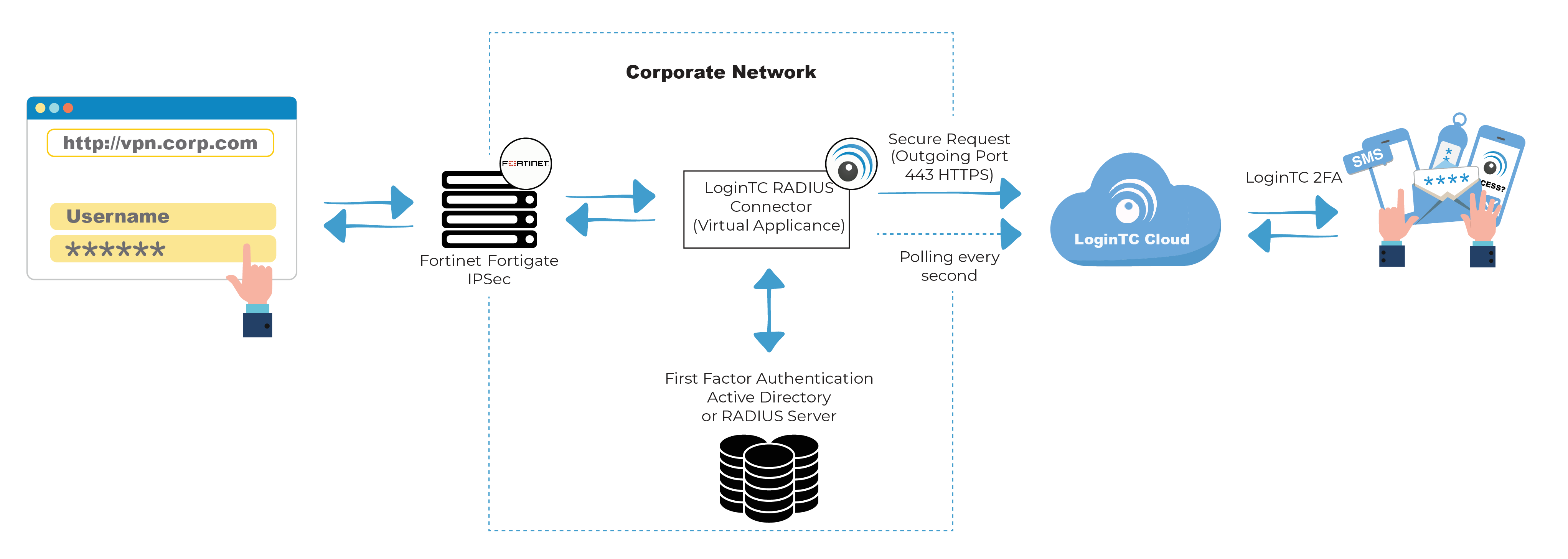
Because LoginTC enforces MFA during the RADIUS transaction, the design doesn’t require modifying IPsec client configurations or prompting users with a web redirect.
2. Decide where your LoginTC Connector will live
Both LoginTC Cloud and LoginTC Managed (on-prem) can support IPsec VPN authentication. Your deployment architecture depends on:
- Whether traffic can reach cloud services
- Whether an air-gapped or closed environment is required
- Whether you need redundancy or site-local failover
- Latency requirements between FortiGate and your MFA provider
Typical locations for the LoginTC Connector include:
- On-prem VM inside a protected management subnet
- A dedicated security services network
- A small DMZ segment for cloud-bound RADIUS traffic
- A dual-node HA pair (for on-prem)
For cloud deployments, ensure outbound connectivity to LoginTC Cloud is permitted. For on-prem deployments, ensure internal communication with your directory (AD/LDAP) is available and stable.
3. Configure FortiGate for RADIUS enforcement
Within FortiOS, your configuration will focus on three areas:
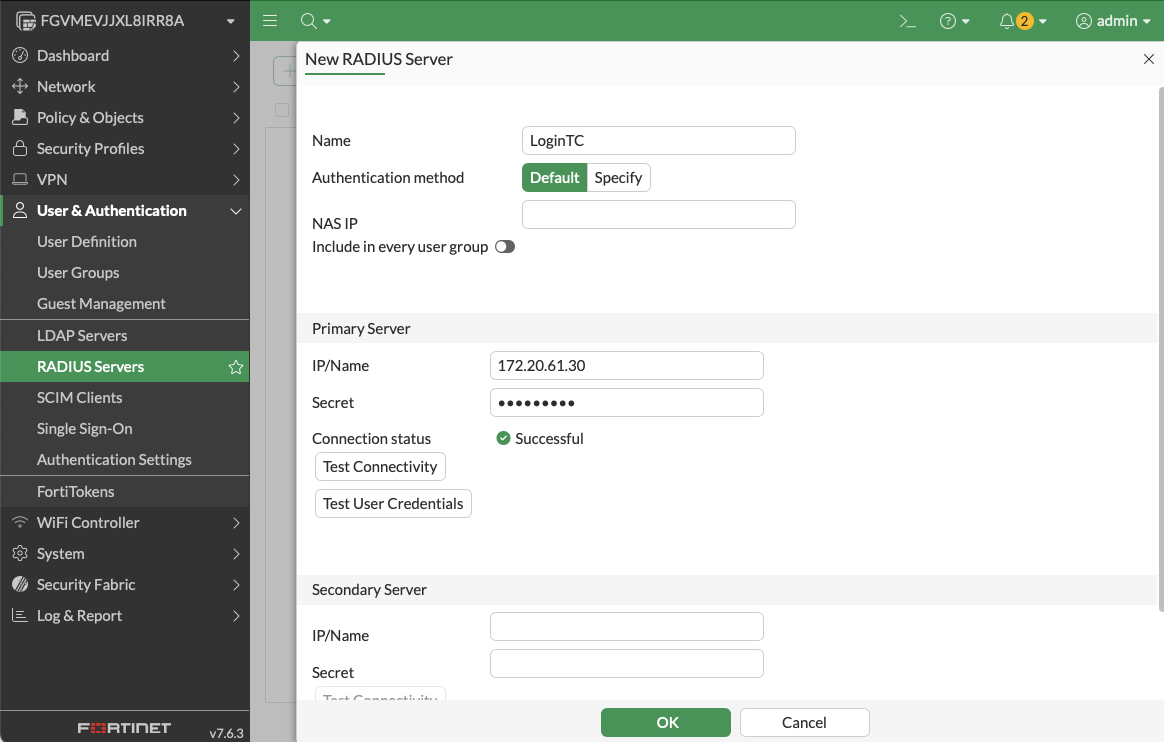
A. RADIUS Server Definition
Create a primary RADIUS server entry pointing to your LoginTC Connector. Confirm:
- Authentication ports
- Secret key
- Response timeout window (60 seconds recommended)
- No retries that exceed IKE negotiation timing
B. User Groups
Even if your directory uses AD or LDAP, Fortinet allows RADIUS-based groups. This is where your VPN users inherit their access policies.
C. IPsec Phase1-Interface Integration
Under your Phase1-Interface, tie your user group to the RADIUS server for XAuth.
4. Plan for Mode Config behavior
The Mode Config block determines what your VPN users receive after authentication:
- Virtual IP
- DNS servers
- Domain suffix
- Split-include or split-exclude policies
If you use RADIUS attributes for Framed-IP or DNS assignment, integrate these cleanly with LoginTC’s policies or your directory backend.
This is especially important for deployments that rely on per-user or per-group IP assignment.
5. Test end-to-end timing under real conditions
IPsec authentication is strict about timing. If MFA takes too long, the handshake fails and the client retries repeatedly.
Your testing checklist should include:
- IKEv1 and IKEv2 negotiation timing
- Different IPsec clients (FortiClient, strongSwan, native macOS, Windows built-in)
- VPN logins over slow networks or mobile hotspots
- RADIUS latency under load
- Fail-open vs fail-closed behavior on the FortiGate
LoginTC is optimized for these flows, but your environment, including WAN latency, DNS resolution, directory speed, has an impact.
6. Document user experience and fallback paths
IPsec MFA is predictable once deployed, but because there’s no browser fallback, make sure to document:
- What users see when MFA is pending
- Offline access rules (if any)
- What happens if a user does not approve
- Emergency bypass procedures
- Enrollment workflows for new users
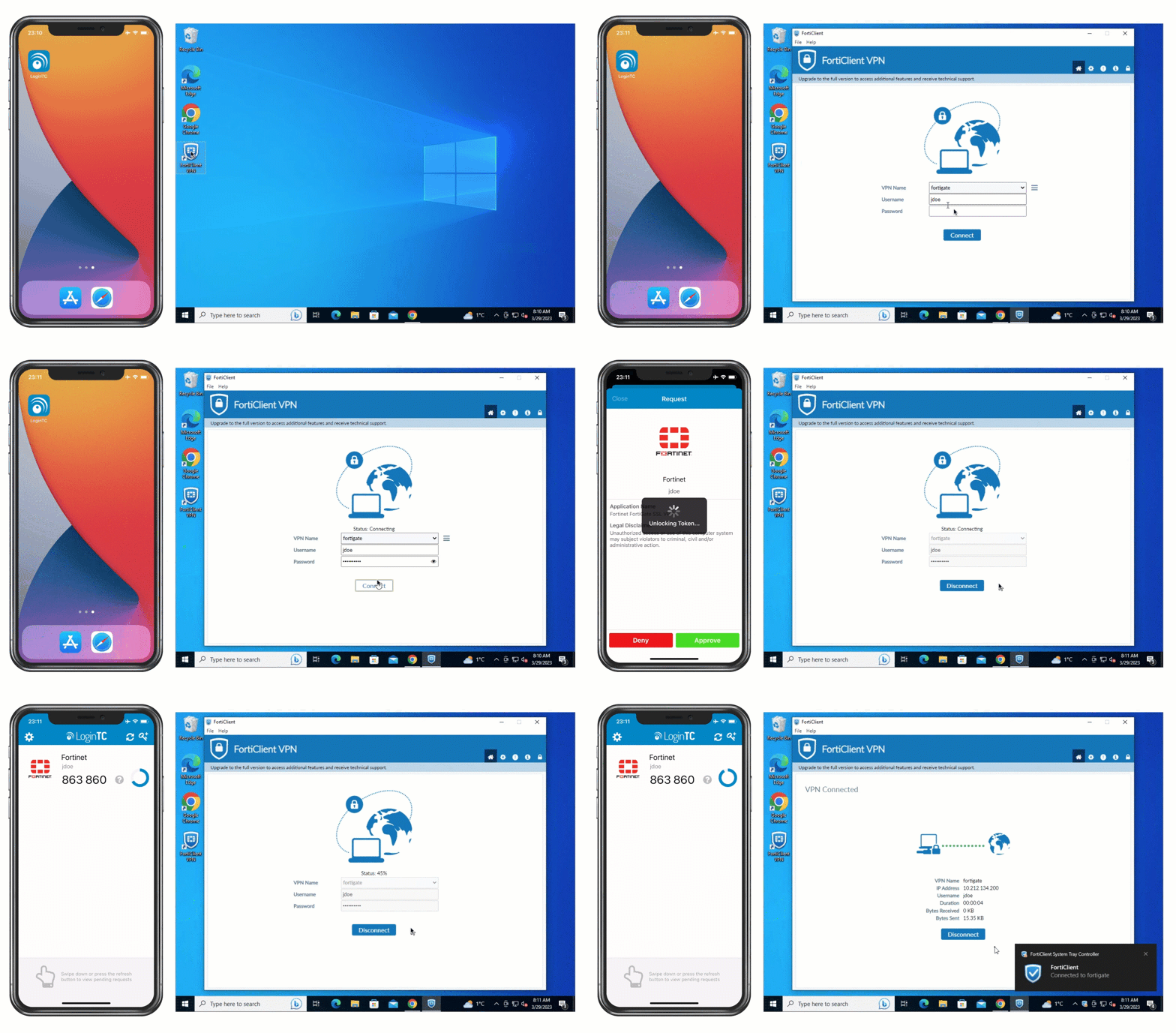
Fortinet VPN with Push authentication
LoginTC MFA for Fortinet IPsec VPN
To address these challenges, LoginTC offers an out-of-the-box MFA solution designed specifically for the FortiGate IPsec VPN. With LoginTC MFA you get:
- Native Fortinet integration: LoginTC plugs directly into FortiGate’s RADIUS authentication workflows. Whether you choose certificate-based Phase 1 or pre-shared keys, LoginTC adds a secondary authentication challenge during tunnel establishment, allowing you to implement Fortinet IPsec VPN MFA without scripting or custom workarounds.
- User-friendly authentication methods: With LoginTC you can choose from a variety of authentication methods that meet the needs of your end users easily, including push notifications and phone call.
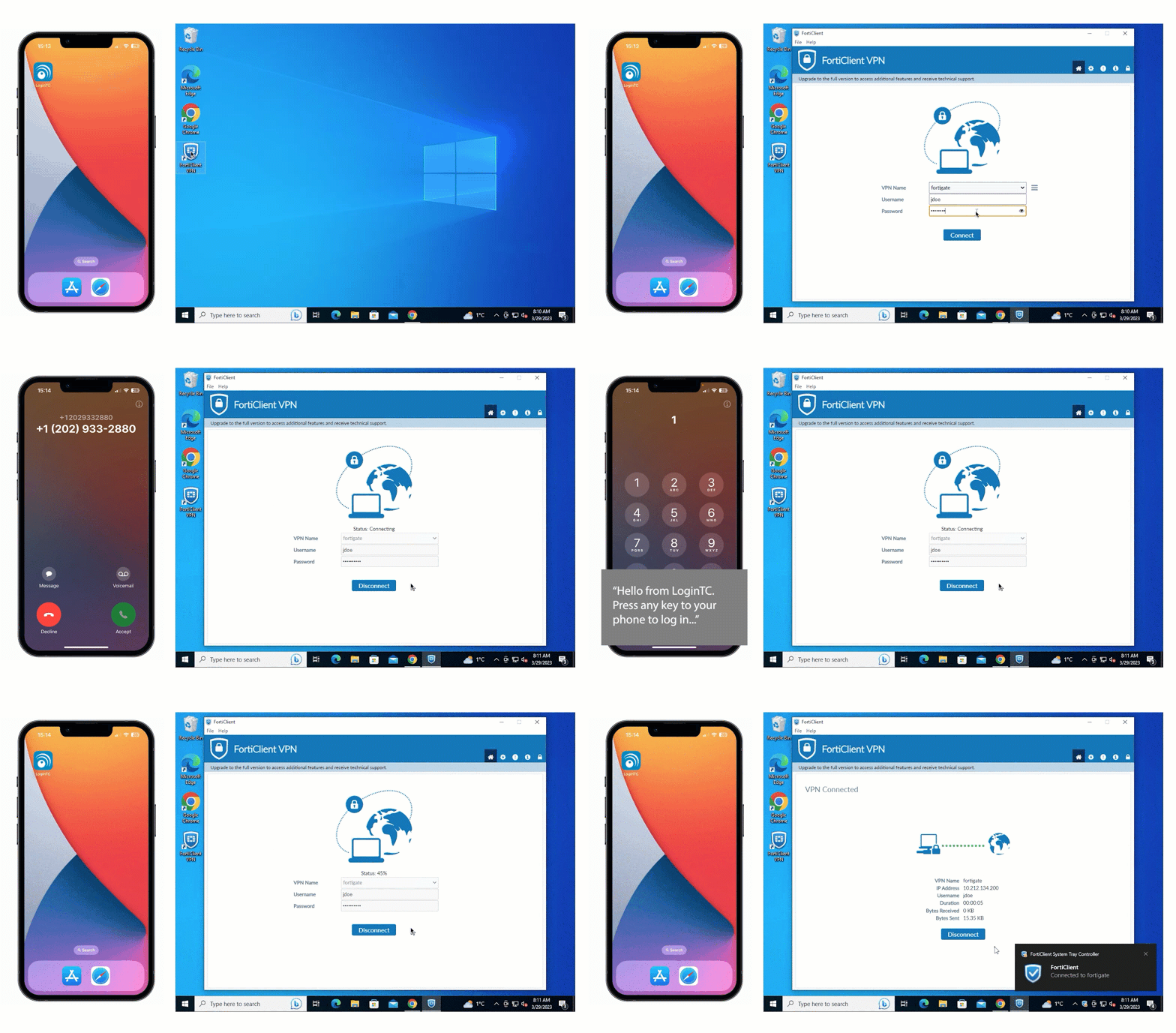
Fortinet VPN with Phone Call authentication
- Administrator policies: LoginTC allows you to define MFA requirements per user group, application, or even more specific attributes like geolocation or time of day. For example, you can require FIDO2 token authentication for critical infrastructure teams, while permitting push notifications for less privileged roles.
- Fast deployment: With pre-built connectors and comprehensive documentation, LoginTC can be up and running in under an hour. No need to rebuild your entire VPN layer, simply insert LoginTC into your existing IPsec profiles.
Plan your IPSec migration with expert help
As Fortinet phases out SSL VPN tunnel mode, organizations don’t have much room for delay. The shift to IPsec means authentication behavior changes, timing becomes stricter, and MFA vendors that only work through browser redirects or custom prompts won’t survive the transition. A successful rollout depends on choosing an MFA platform that fits how IPsec actually works, not how SSL VPN used to work.
LoginTC was designed for environments exactly like this: RADIUS-driven, timing-sensitive, infrastructure-heavy. Whether you’re migrating configurations from legacy SSL VPN deployments or designing a fresh IPsec VPN setup with Mode Config, RADIUS groups, and directory integration, the platform gives you the flexibility and stability these tunnels demand.
Book a call with our integration experts to add MFA to your IPSec VPN today.
Frequently asked questions about Fortinet IPsec VPN MFA
Does Fortinet still support SSL VPN tunnel mode?
No, not in current FortiOS releases. FortiOS 7.6.3 removed SSL VPN tunnel mode, and existing SSL tunnel-mode configurations do not carry over on upgrade. Fortinet’s direction is IPsec-based VPN, specifically IKEv2. Organizations still on SSL VPN tunnel mode need to plan their migration to IPsec before upgrading FortiOS.
How does LoginTC add MFA to Fortinet IPsec VPN?
LoginTC enforces MFA at the RADIUS authentication layer, which is where Fortinet IPsec actually performs user authentication. You install the LoginTC RADIUS Connector inside your network, configure the FortiGate RADIUS server to point at it, and tie the RADIUS-backed user group to your Phase1-Interface for XAuth. Every IPsec sign-in is then challenged with a second factor.
Does LoginTC support IKEv1 and IKEv2?
Yes. LoginTC’s RADIUS-based approach supports both IKEv1 and IKEv2, works with XAuth clients, and integrates cleanly with Fortinet Mode Config (including virtual IP assignment, DNS push, and split-tunnel policies). It is compatible with all RADIUS-speaking Fortinet VPNs.
Do I need to rearchitect my VPN to add MFA?
No. LoginTC inserts into your existing FortiGate configuration without requiring changes to the IPsec client, the VPN topology, or the Mode Config policies. You add the RADIUS server definition and tie it to your Phase1-Interface. That is the extent of the FortiGate-side change.
Which IPsec clients does LoginTC work with?
LoginTC works with any IPsec client that authenticates through FortiGate’s RADIUS layer. Tested and supported clients include FortiClient, strongSwan, native macOS IPsec, and Windows built-in IPsec. Because enforcement happens at the RADIUS transaction, no client-side changes or plug-ins are required.
What authentication methods can users choose from?
LoginTC supports push notifications (normal and number matching), software OTP, hardware OTP, SMS passcode, email passcode, phone call, FIDO2 security keys, passcode grid cards, QR scan, and one-time bypass codes. Administrators can require different methods for different user groups, and can enforce policies based on group, geolocation, or time of day.
Can LoginTC MFA work in an air-gapped or on-premises-only environment?
Yes. LoginTC Managed runs fully on-premises with no cloud dependency. Every authentication decision happens inside your network. For fully offline scenarios, users can authenticate with hardware OTP tokens, FIDO2 security keys, or passcode grid cards. This makes LoginTC suitable for isolated networks, OT/SCADA environments, and organizations with strict data residency requirements.
How long does a Fortinet MFA deployment take?
End-to-end deployment can be completed in just over ten minutes per FortiGate, following the official LoginTC video walkthrough. Larger environments with multiple FortiGates, HA pairs, or complex Mode Config policies may take longer to plan and test, but the connector installation and RADIUS wiring themselves are fast operations.
Ready to migrate your Fortinet VPN to IPsec with MFA?
Talk to our integration experts about your FortiGate migration, or start a free trial and test LoginTC in your own environment. On-prem, cloud, and hybrid deployments supported.