How to use LoginTC for Microsoft Entra ID External Authentication Methods
June 17, 2024 •
Last reviewed: September 2026
If you use Entra ID for your Office 365 and Microsoft online applications at your organization, you may be looking for more comprehensive multi-factor authentication (MFA) services than what Microsoft has to offer. That’s where the Entra ID External Authentication Methods option can help.
If you arrived here because of Microsoft’s retirement of its own SMS and voice authentication, the context is worth reading first: the SMS and voice retirement dates and what changes for tenants on 1 February 2027. External authentication methods are not in scope for that retirement, which is why the setup below is one of the routes organizations are evaluating.
Steps at a glance
- Confirm you have Microsoft Entra ID P1 or higher, since external MFA is configured through Conditional Access.
- Sign in to your existing LoginTC account or start a LoginTC free trial.
- Create a new LoginTC application for Entra ID and connect it to your Microsoft account.
- In Microsoft Entra ID, add an external authentication method using the integration details from your LoginTC application.
- Configure a Conditional Access policy that requires multifactor authentication, then add any additional settings.
In this article, you’ll learn all about Microsoft Entra ID External Authentication Methods, as well as how to integrate with LoginTC for comprehensive multi-factor authentication (MFA) services across your organization.
Table of Contents
1. What is Microsoft Entra ID
2. What are External Authentication Methods (EAM) in Entra ID
3. Why should I use LoginTC for Entra ID EAM
4.. How to set up LoginTC in Entra ID
What is Microsoft Entra ID?
Microsoft Entra ID is an identity and access management (IAM) solution that helps secure organizations with cloud and hybrid environments.
Entra ID enables organizations to use SSO, privileged access controls, and MFA, as well as offering end-user self-service tools and an admin dashboard to manage identities and access.
While Entra ID is a popular resource for many organizations to secure their environment, there have been some drawbacks to Entra ID that made it difficult for administrators to streamline access management across their entire organization.
One of the main limitations that administrators expressed was the inability to connect Entra ID with other MFA services they use for applications outside of Microsoft. This meant that end-users needed multiple tokens for access and identities had to be managed in multiple places.
All that has changed with External Authentication Methods (EAM).
What are External Authentication Methods (EAM) in Entra ID?
Announced in May 2024 and generally available since February 2026, external authentication methods let you integrate a third-party MFA provider directly into Entra ID. Microsoft now also refers to the capability as External Multifactor Authentication, or External MFA, so you will see both names in the Microsoft documentation and in the Entra admin center.
This allows administrators to leverage MFA providers they use for other applications — such as VPNs and firewalls, Windows Logon and RDP, Remote Access, and more — for their Microsoft online applications, such as Office 365.
Instead of having one token for Microsoft logins, and another token for your additional applications, end-users can use the same authentication credentials to login anywhere across your organization.
This also simplifies credential management for administrators. Instead of needing to go to multiple places to update user credentials, policies, and tokens, users can be managed seamlessly from one admin panel. This reduces the impact of onboarding and offboarding, as well as the day-to-day management of users.
External authentication methods are also the replacement path for Conditional Access custom controls, which can no longer be created or edited and stop working in May 2027. If you are migrating from one, the sequence is set out in Microsoft is retiring Conditional Access custom controls.
Why should I use LoginTC for Entra ID EAM?
LoginTC is a comprehensive MFA solution that connects across an organization’s environment and can be leveraged for a wide variety of use cases.
Identities and credentials can be managed centrally with tools and policies that make the solution easily customizable to your organization’s unique needs. LoginTC can also be deployed in the cloud or on your premises.
If you are still weighing whether to bring in a third-party provider at all rather than working out how, the fuller argument is in why choose third-party MFA for Entra ID.
What can I protect with LoginTC?
In addition to Office 365 and Microsoft online applications, LoginTC can be added to a range of applications and services.
Organizations can use LoginTC for Windows Logon and RDP, Remote Desktop services, VPNs, firewalls, web access managers, and more.
What authentication methods can I use with LoginTC?
With LoginTC, you can choose any authentication method that works best for your end-users. Some of the available methods include:
- Physical Authentication methods: Hardware tokens, FIDO2 authentication, Passcode Grids.
- App-based methods: Push notification, Number matching, Desktop push, Software OTP, Authenticator app.
- Trusted account methods: SMS passcode, Email passcode, Phone call, Phone OTP
- Emergency methods: Bypass Code, Offline Bypass Code
Entra ID vs AD FS
Another method organizations can use to connect LoginTC to Microsoft online services is by using Active Directory Federation Services (AD FS) as the identity provider.
Although this method works well for organizations already using AD FS, it places an additional infrastructure burden on organizations without it.
Additionally, using Entra ID EAM instead of AD FS ensures that organizations do not need any on-premises infrastructure, and can utilize a cloud-based solution to manage identities and access.
For these reasons, Entra ID EAM is a better option for organizations that don’t use AD FS and would rather leverage a cloud environment than deploy additional software on premises.
How to set up LoginTC in Entra ID
Before you start. External authentication methods are enforced through Conditional Access, and Conditional Access requires Microsoft Entra ID P1 or higher. You will also need two role assignments, which often sit with two different people: Authentication Policy Administrator or Global Administrator to configure the method, and Privileged Role Administrator to grant admin consent to the provider application. Sorting both out in advance is the difference between an afternoon and a fortnight.
Below is a short explanation of how the external authentication method integration works. For a full detailed description, visit our Entra ID EAM docs page.
1. Sign in to your existing LoginTC account or create a LoginTC free trial.
2. Create a new application for Entra ID and connect it to your Microsoft account.
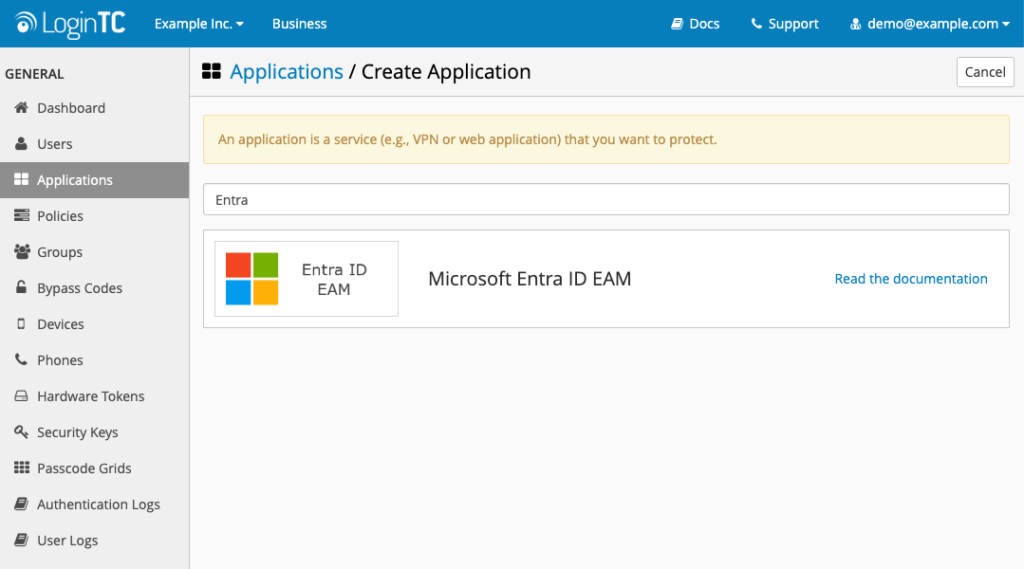
3. In Microsoft Entra ID, add an external authentication method using the integration details in your LoginTC application.
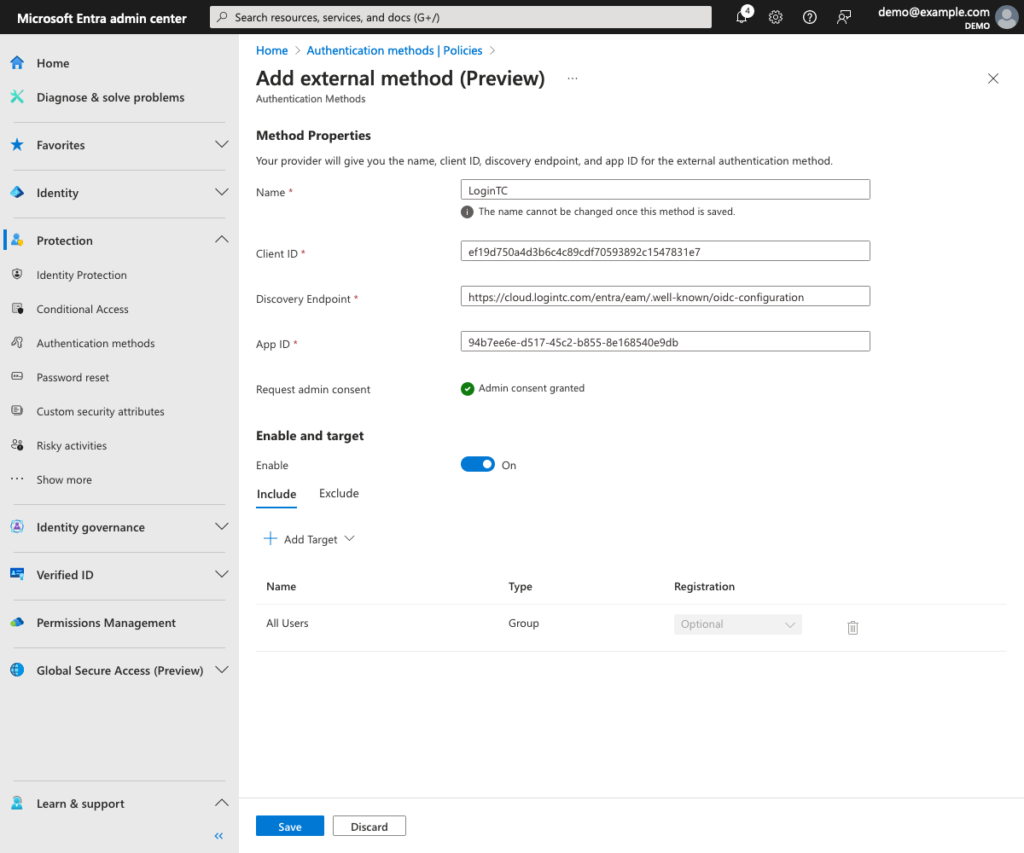
4. Configure policies to require MFA and additional settings as needed.
One thing to check in your existing policies. External MFA methods are not currently supported with Conditional Access authentication strengths. Microsoft’s guidance is that policies should use the standard Require multifactor authentication grant instead. If your existing Conditional Access design is built around authentication strengths, plan that change at the same time as the rollout rather than discovering it on the day.
What will the authentication process look like for end users?
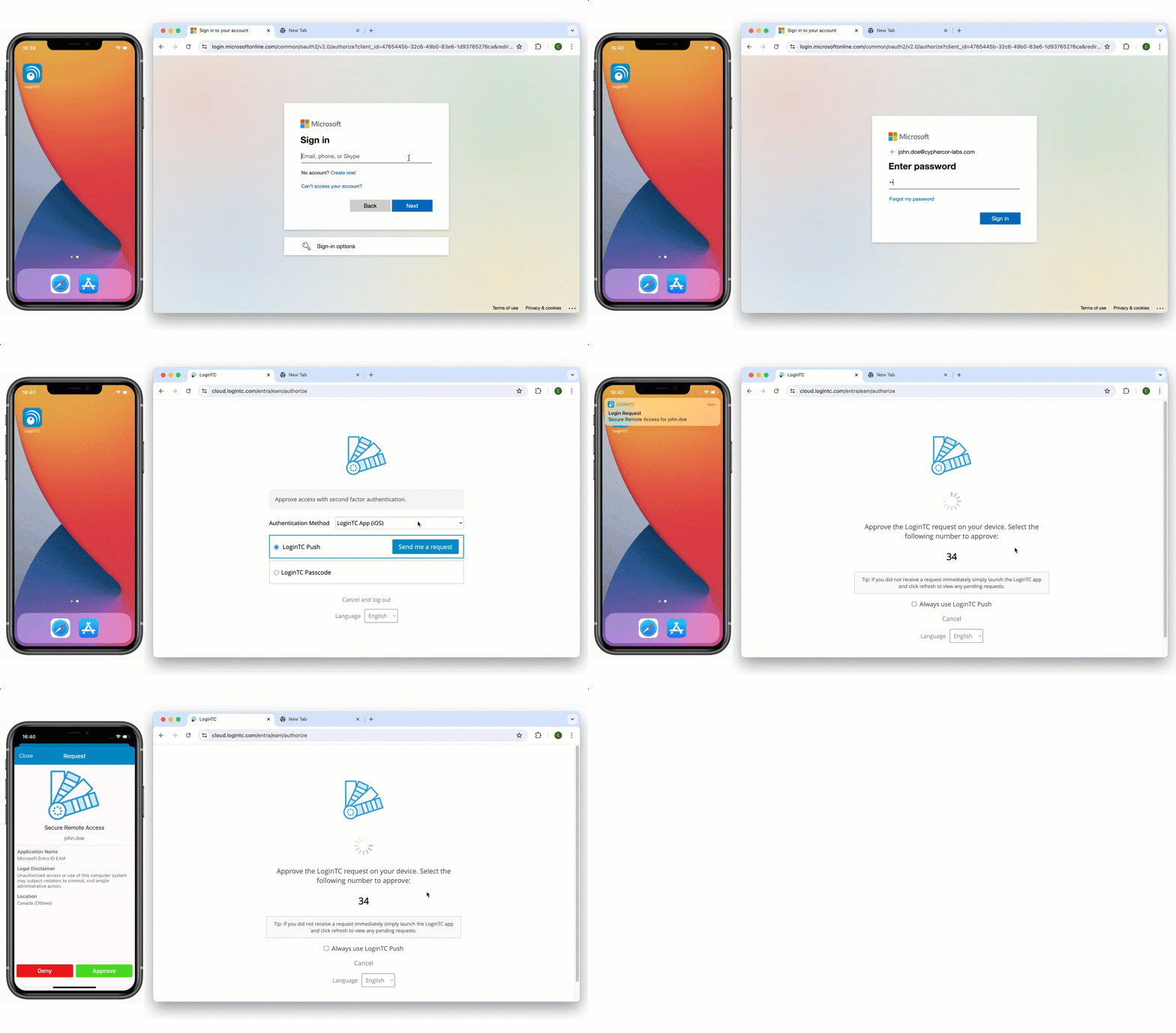
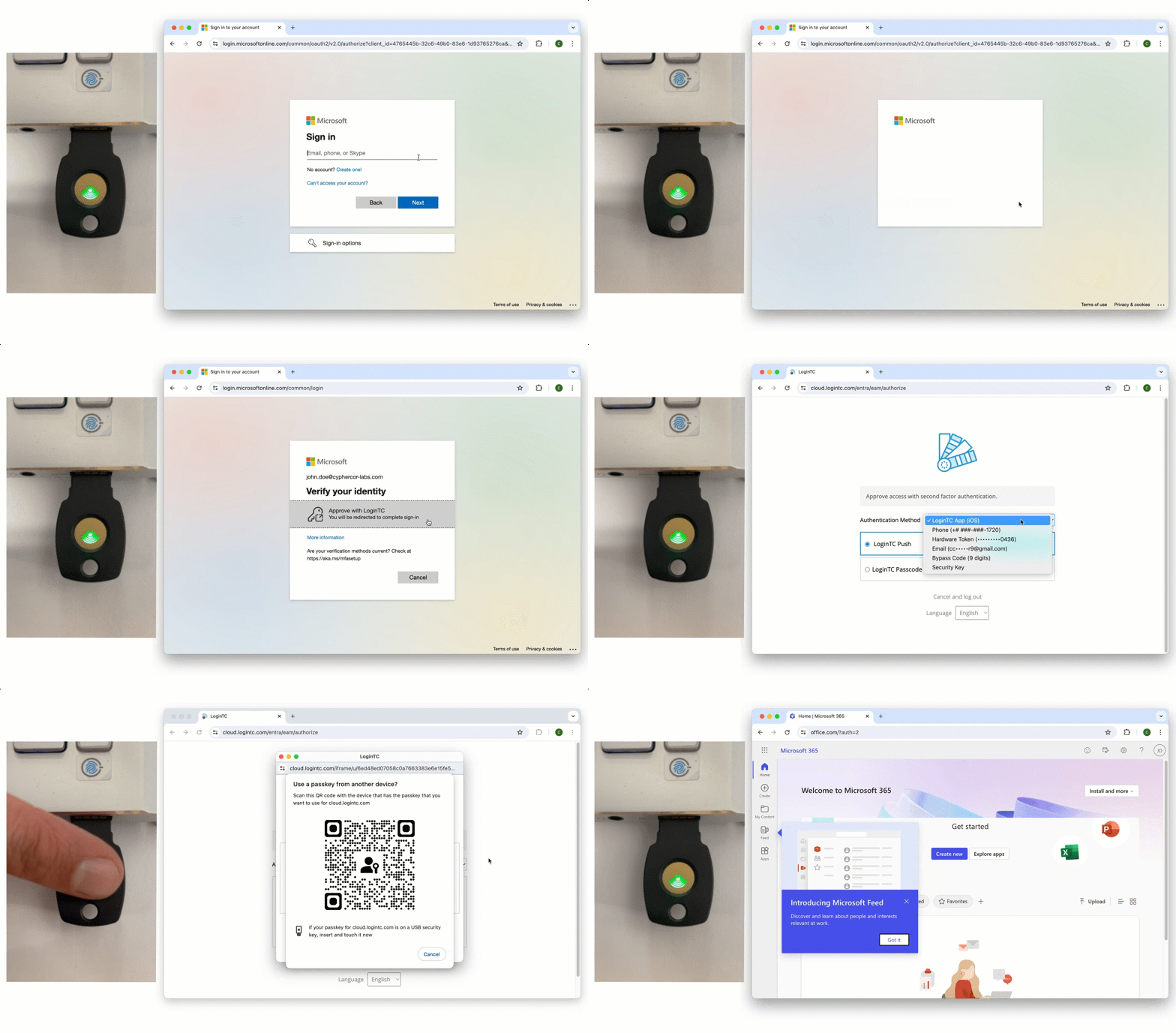
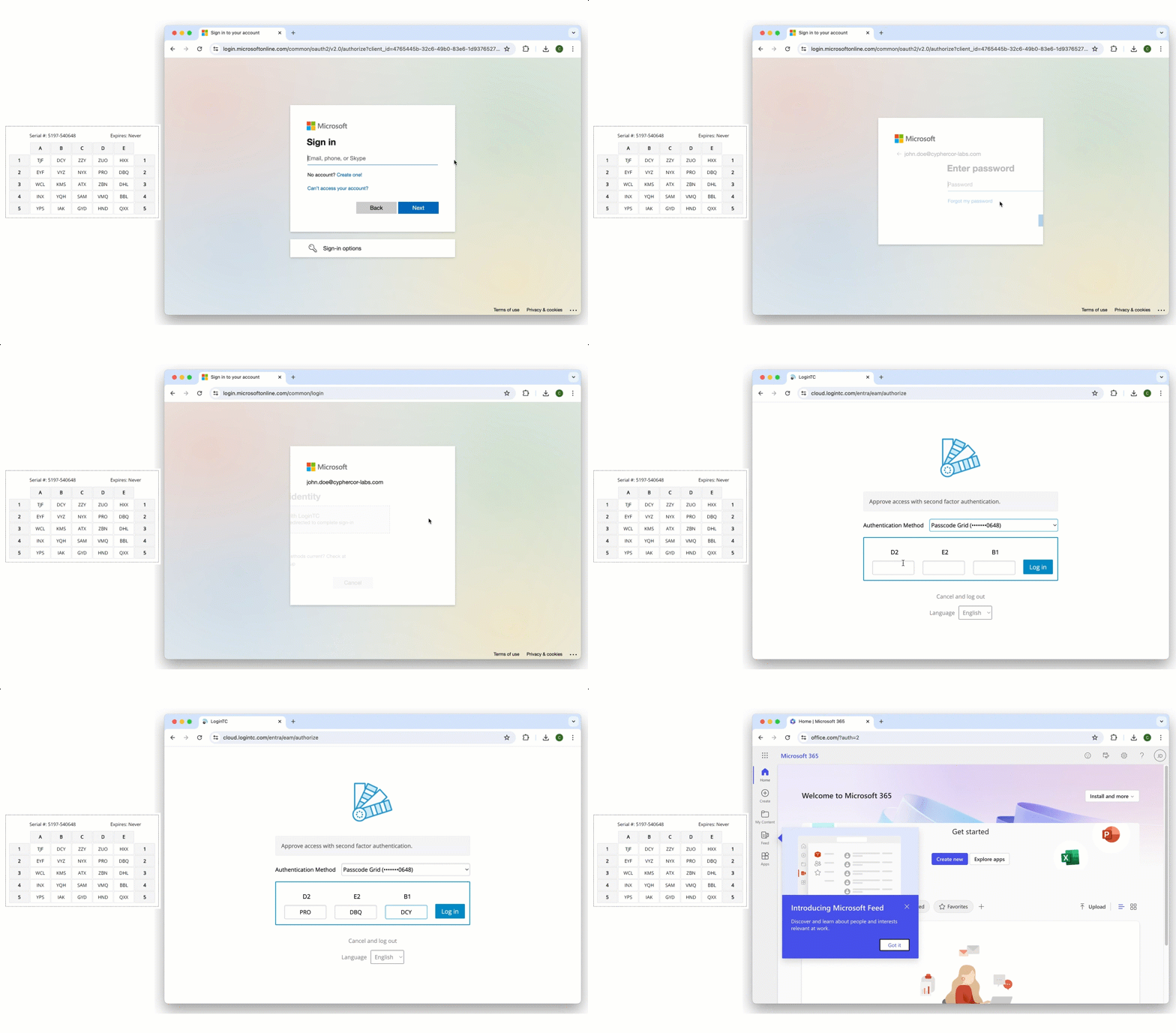
Once your Entra ID EAM has been configured, users will now see a prompt for MFA after they input their email address and password. After they select LoginTC, an authentication window will appear and prompt them to continue authentication with their second-factor credentials.
Below are some examples of different authentication methods in action:
Entra ID with LoginTC Push Number Matching
Entra ID with LoginTC FIDO2 Authentication
Entra ID with LoginTC Passcode Grid
How to get started with LoginTC Entra ID EAM
With Entra ID External Authentication Methods, you don’t have to settle for inferior multi-factor authentication services anymore.
Getting deployed with LoginTC EAM for Entra ID is easy and quick. Existing Entra ID administrators who are interested in leveraging LoginTC for their External Authentication Method services can start a free trial right away.
If you want additional advice, or to talk about your organization’s specific deployment, you can also book a no-commitment consultation call with one of our MFA experts.
Related Articles