MFA for Schools: How to Secure Student Logins Without Smartphones
March 02, 2026 •
Schools are under more pressure than ever to strengthen their cybersecurity. Cyber insurance providers are demanding it. State education agencies are recommending it. And the volume of attacks targeting school districts continues to climb year over year. Multi-factor authentication, or MFA, has become the baseline expectation for any organization that wants to protect its accounts and systems from unauthorized access.
But here is the problem: almost every mainstream MFA solution on the market was designed for corporate environments. They assume that every user has a smartphone, a data plan, and the technical comfort to install and configure an authenticator app on a personal device. In a business setting, that assumption is usually reasonable. In a school, it falls apart almost immediately.
Students do not carry employer-issued phones. Requiring them to use personal devices raises equity, privacy, and policy concerns. Younger students may not have smartphones at all. And even for staff, the support overhead of managing app-based MFA across a large, frequently changing user base can quickly exceed what a lean school IT team can handle.
This guide is written for school IT administrators and technology directors who need to deploy MFA across their organization, protect staff and student accounts, and meet cyber insurance or compliance requirements, all without forcing students onto a smartphone-based authentication system. We will cover why schools are a priority target for attackers, what MFA actually does, where most MFA tools fail in a school context, and what a practical, scalable solution looks like in practice.
Why Schools Are One of the Most Targeted Sectors for Cyberattacks
It might seem counterintuitive that schools would rank among the most frequently attacked organizations in any given year, but the data is consistent. Education consistently appears near the top of sector-specific breach reports alongside healthcare and finance.
The reasons are not hard to understand. Schools store enormous amounts of sensitive data: student names, dates of birth, addresses, academic and disciplinary records, and in many cases health and financial information tied to student support programs. Staff records add another layer of sensitive personal data. In aggregate, a school district’s data represents exactly the kind of rich, personal information that is valuable on criminal markets and difficult for victims to remediate after a breach.
At the same time, schools typically operate with lean IT teams and constrained security budgets. A mid-sized school district might have one or two IT staff members responsible for everything from helpdesk tickets to infrastructure security. That is not a criticism; it is a reality that attackers are well aware of and actively exploit. Schools are perceived, often correctly, as softer targets than comparably sized businesses.
Ransomware has been the most visible threat. Attacks on school districts have caused school closures, wiped out weeks of instructional time, and cost individual districts millions of dollars in recovery, remediation, and ransom payments. In many of these cases, the initial access was gained through compromised credentials, which MFA would have blocked.
Cyber insurance providers have taken notice. Coverage requirements have tightened significantly over the past few years, and MFA is now a near-universal requirement for schools seeking new coverage or renewing existing policies. For many districts, deploying MFA is no longer a best-practice recommendation. It is a contractual obligation.
What Is Multi-Factor Authentication and Why Do Schools Need It?
Multi-factor authentication is the practice of requiring more than one form of verification before granting access to an account or system. In its most common form, a user enters their username and password as usual, and is then prompted to provide a second proof of identity before the login completes.
That second factor is what makes MFA so effective. Passwords are compromised constantly. They are reused across multiple services, guessed through brute-force attacks, stolen in phishing campaigns, or leaked in data breaches at third-party services. Once a password is in the wrong hands, a standard login is a single step away from a full account takeover.
MFA breaks that equation. Even if an attacker has a valid username and password, they cannot complete the login without also possessing the second factor. For most attack scenarios, that is an insurmountable barrier. Attackers operate at scale and rely on automation. When a compromised credential requires a second authentication step that the attacker cannot replicate, they move on.
For schools, the accounts that most urgently need MFA protection include staff email (a frequent entry point for phishing and business email compromise), student information systems, VPN and remote access, administrative portals, and identity platforms like Microsoft Entra ID and Google Workspace. Protecting these systems with MFA dramatically reduces the risk of unauthorized access even when passwords are weak or have been compromised.
The good news is that MFA does not have to be complicated or expensive. The challenge for schools is finding a solution that actually fits how their users work.
The Problem With Most MFA Solutions in a School Environment
Walk through the MFA options that most IT teams evaluate and a pattern quickly emerges. Microsoft Authenticator requires a smartphone. Google Prompt requires a smartphone. Duo Push requires a smartphone. Most modern MFA tools are built around the assumption that users will install an app on a mobile device, receive a push notification at login, and tap to approve. It is a smooth, user-friendly experience in an office where every employee has a company phone or a personal device they are comfortable using for work purposes.
In a school, that workflow breaks down for several reasons.
The most obvious is that students do not have school-issued smartphones. Most schools do not provide mobile devices for authentication, and asking students to use personal phones creates a different set of problems. Not every student has a smartphone. Among those who do, asking them to install a school-related app on a personal device can raise privacy concerns and, depending on your jurisdiction, may conflict with parental consent requirements or acceptable use policies. Younger students, particularly in elementary and middle school, may not have phones at all.
There is also an equity dimension that school IT administrators think carefully about. If MFA depends on owning a smartphone, students without one are effectively unable to authenticate. That creates a two-tier system that most schools are not willing to accept.
Hardware tokens are often floated as an alternative. They remove the smartphone dependency by providing a physical device that generates one-time passcodes. But hardware tokens come with their own complications at school scale. Procurement and per-unit costs add up quickly across a student body of any size. Tokens can be lost or damaged, and each replacement involves cost and logistics. Distributing, tracking, and managing physical hardware tokens for hundreds or thousands of students is a significant operational burden for a small IT team.
Email or SMS passcodes are another option, but they introduce their own friction. SMS delivery depends on students having phone numbers on file and carrying phones, and email passcodes route through the same account system that may already be compromised. Neither is ideal as a primary MFA method.
What schools actually need is an MFA solution that requires no personal device, no app installation, no data plan, and no hardware procurement budget, while still providing genuine security and being simple enough for students of all ages to use reliably.
What Schools Should Look for in an MFA Solution
Before evaluating specific products, it helps to define what a good MFA solution for a school actually looks like. The requirements are different from a corporate deployment, and shopping with corporate-focused evaluation criteria will lead to the wrong answer.
The most important requirement is that the solution works without a smartphone or any personal device. This is non-negotiable for most schools. Authentication needs to happen through a mechanism the school controls and can distribute to every student without relying on what any individual student happens to own.
Compatibility with your existing identity platform is the next consideration. The vast majority of schools run either Microsoft Entra ID (formerly Azure Active Directory) or Google Workspace as their identity and directory platform. Any MFA solution worth deploying should integrate natively with one or both without requiring you to replace or rebuild your identity infrastructure. Adding a new product should not mean migrating your entire user directory.
Cost is a real constraint in education. Per-user pricing that makes sense for a 200-person company may be completely unworkable for a district with 3,000 students. Education-specific pricing is not just a nice-to-have; for many districts it is the deciding factor between deployment and inaction.
Simplicity matters more in a school than in almost any other environment. Students ranging from age 10 to 18 need to be able to complete the authentication process without calling the helpdesk. If the process requires more than a few seconds and a basic level of instruction, adoption will be a constant struggle.
Offline capability is worth considering for schools with inconsistent internet connectivity. Some school buildings, particularly in rural districts, may have unreliable connectivity, and an MFA method that requires an internet connection to generate a passcode creates problems in those environments.
Finally, centralized administrator controls matter for operational reasons. IT staff need to be able to provision users at scale, enforce authentication policies by group (staff versus students, for example), and handle replacements and resets without significant manual overhead.
Passcode Grid Cards: A Practical MFA Method for Students
Passcode grid authentication is the method that addresses the school MFA problem most directly. It requires no smartphone, no app, no data plan, and no purchased hardware. And it works.
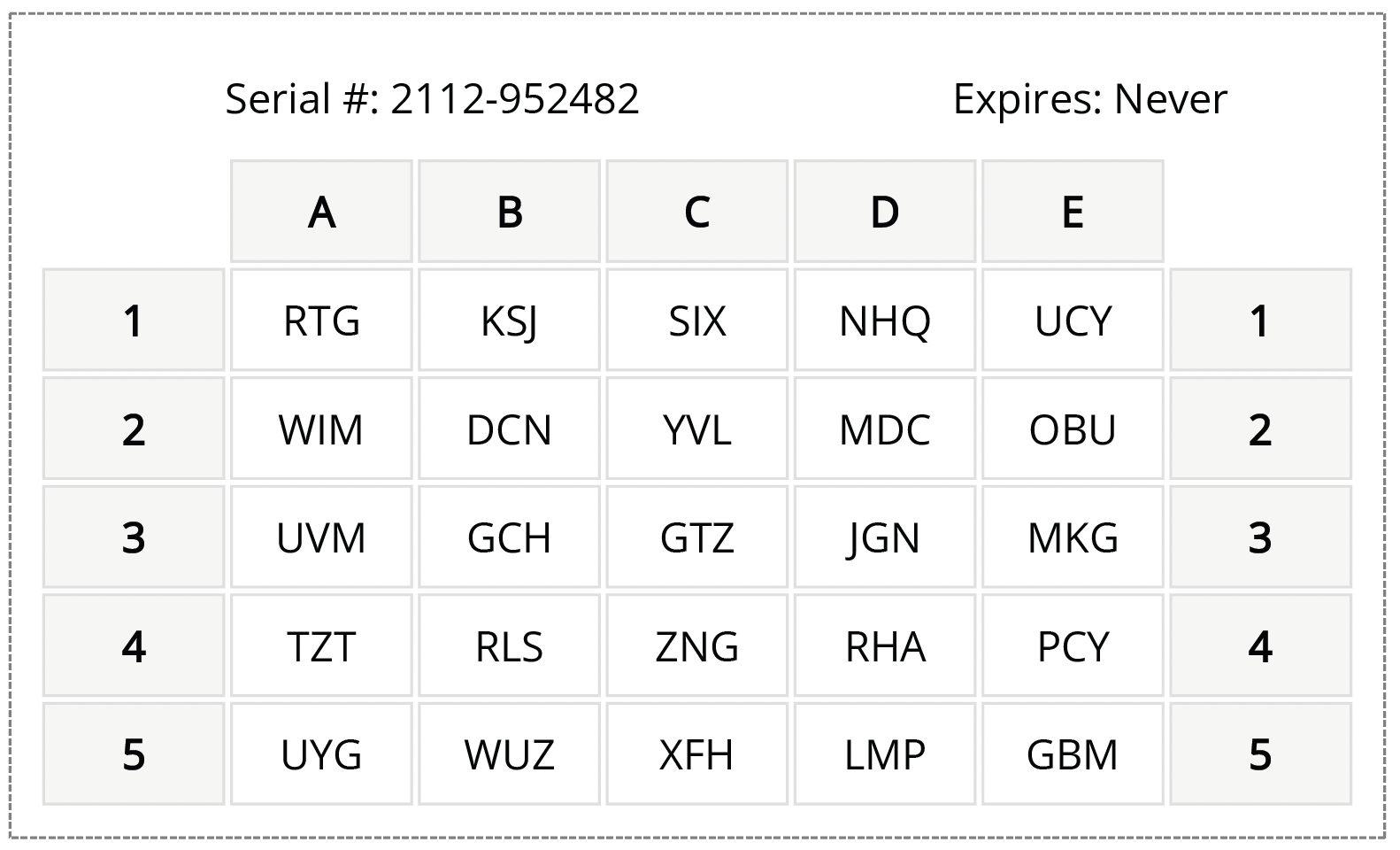
A passcode grid card is a printed card, roughly wallet-sized, that contains a unique 5×5 grid of three-letter combinations. Each card is generated individually, so every student has a grid that is unique to them. When a student logs into a school system protected by MFA, they are prompted to enter a short passcode derived from specific positions on their personal grid. The process takes a few seconds and requires nothing beyond the card itself.
For school IT teams, the operational model is straightforward. Cards are generated through the LoginTC Admin Panel and printed in-house at no cost. Distribution works like handing out a student ID. There is no app to install, no account to set up on a personal device, and no dependency on anything the student owns or carries outside of school.
One practical concern that comes up with any physical authentication method is what happens when it is lost. With passcode grid cards, the answer is simple: the IT administrator deactivates the old card and prints a new one. There is no hardware to order and no waiting period. The replacement cost is a sheet of paper. The old card, once deactivated, is immediately useless to anyone who finds it, since the card alone cannot grant access without also knowing the user’s login credentials.
Passcode grid authentication also works offline. For schools with connectivity challenges, this matters. The grid card itself is the authentication mechanism, and it does not require an internet connection to function, which means students in buildings with unreliable connectivity can still authenticate reliably.
Learn more about how passcode grid authentication works
How to Add MFA to Your School’s Entra ID or Google Workspace
The two identity platforms that dominate K-12 and higher education are Microsoft Entra ID and Google Workspace. Deploying MFA in a school almost always means deploying it through one or both of these platforms, and the approach differs slightly for each.
Adding MFA to Microsoft Entra ID
Microsoft introduced External Authentication Methods (EAM) as a framework that allows organizations to use a third-party MFA provider alongside their Entra ID tenant. For schools, this is significant because it means you can add a purpose-built school MFA solution, like LoginTC, without replacing Entra ID or migrating your directory.
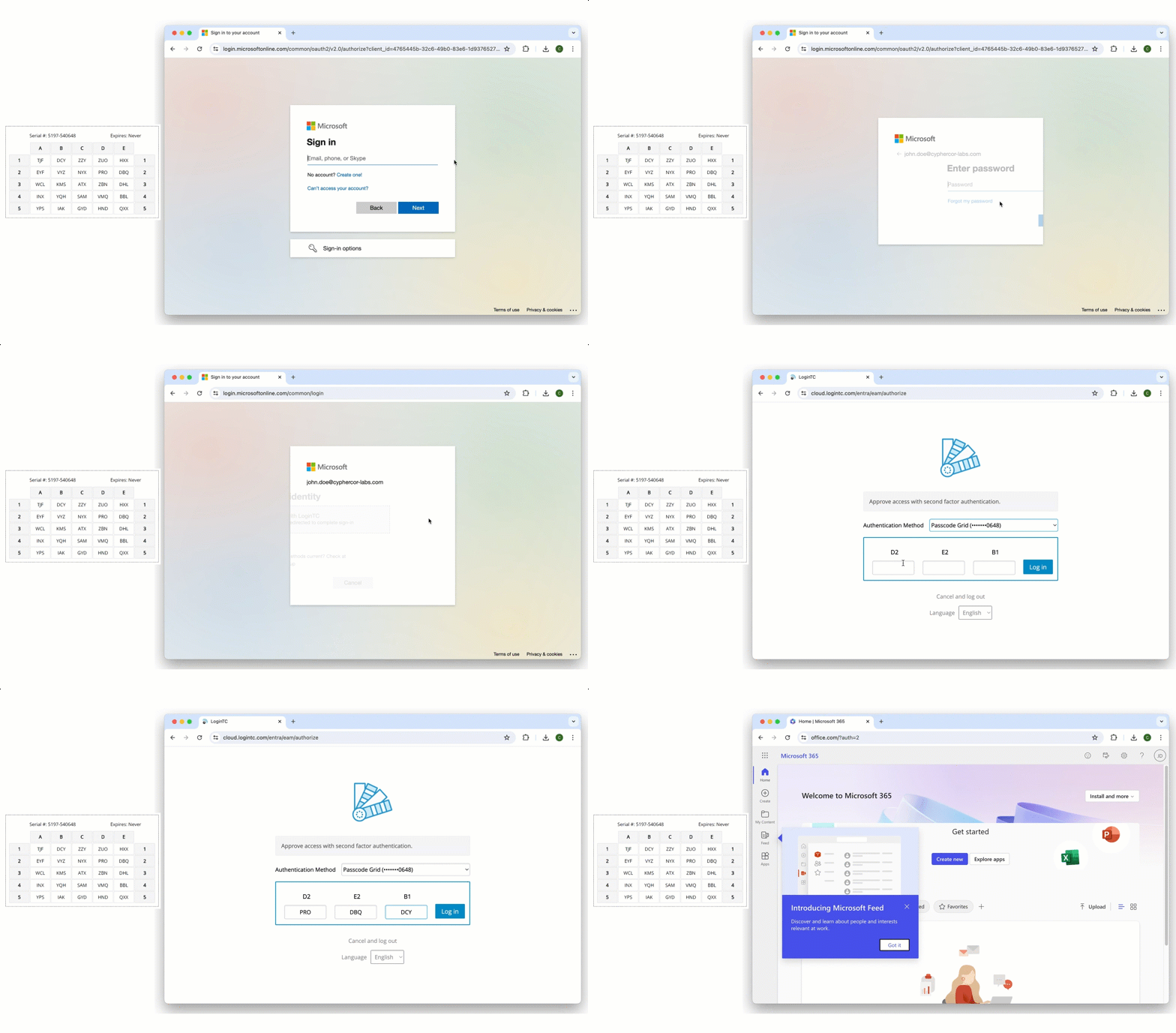
Through the Entra ID EAM integration, LoginTC becomes the MFA layer for all connected Microsoft services: Office 365, Microsoft Teams, SharePoint, Outlook, and any other applications tied to your Entra tenant. Students and staff authenticate with their passcode grid card at login, and the result flows back through Entra ID as a completed MFA event. Your existing Conditional Access policies continue to work. Your user directory stays where it is. You are simply adding a better authentication method on top of the infrastructure you already have.
The setup process is faster than most IT administrators expect. LoginTC can be added to an Entra tenant in under ten minutes, and the LoginTC team provides hands-on support throughout the configuration process so your team is not navigating the integration alone.
See how LoginTC integrates with Entra ID External Authentication Methods
Adding MFA to Google Workspace
For schools running Google Workspace for Education, MFA can be enforced through Google’s admin console using SAML and SSO configurations that support third-party authentication providers. This allows schools to enforce MFA on student and staff Google accounts without requiring the Google Authenticator app or any other smartphone-based method.
One of the more useful features of Google Workspace’s admin structure for schools is the ability to apply different policies to different organizational units. This means you can enforce stricter MFA requirements on staff and administrator accounts while applying a student-appropriate method to the student population, all within the same deployment. IT administrators maintain centralized visibility and control across both groups from a single admin panel.
Real Schools Are Already Doing This: The Freeport Area School District
It is worth grounding this in a real example, because the school MFA problem can feel abstract until you see how another district actually solved it.
The Freeport Area School District faced a situation that will be familiar to many school IT administrators. When the district went to obtain cyber insurance, they were informed that adding MFA to their network would make the process significantly easier and affect their coverage terms. Ron Grove, the IT Manager at Freeport, set out to find a solution that would work for the school’s specific needs.
“I was looking for something that incorporated with Windows,” Ron explained. After seeing a demo of LoginTC, he did not feel the need to evaluate any other providers. LoginTC integrated with Windows Logon and RDP services, as well as the district’s VPN and other systems, adding authentication without disrupting how staff worked day to day.
When asked about his favorite feature, Ron’s answer was simple: “The greatest feature of LoginTC is that it works every time.”
That reliability matters enormously in a school context. An MFA solution that generates support tickets, fails intermittently, or frustrates students and staff will face resistance and workarounds that undermine the security it was meant to provide. For the Freeport Area School District, the combination of straightforward deployment, reliable daily operation, and the ability to meet cyber insurance requirements made LoginTC the clear choice.
Read the full Freeport Area School District case study
LoginTC Education: Purpose-Built MFA for Schools
LoginTC Education is a dedicated MFA product designed specifically for the needs of K-12 schools, colleges, and universities. It is built around passcode grid authentication, integrates natively with Microsoft Entra ID and Google Workspace, and is priced with education budgets in mind.
There is no smartphone requirement anywhere in the product. Students authenticate using printed passcode grid cards that IT generates and distributes in-house at no cost. Cards can be reprinted instantly if lost. The entire system is managed through a centralized admin panel that gives IT teams control over user provisioning, policy enforcement, and authentication logging across the entire organization.
For schools using Entra ID, the integration runs through Microsoft’s External Authentication Methods framework, meaning LoginTC layers on top of your existing tenant without requiring any directory migration or infrastructure changes. For Google Workspace schools, the integration works through standard SSO configuration.
Education pricing for LoginTC Education reflects the budget reality of school IT departments, with steep discounts off listed rates. The LoginTC team provides hands-on onboarding support, so your IT staff is not left to figure out the configuration independently.
If your district is evaluating MFA for cyber insurance requirements, compliance, or general security posture improvement, LoginTC Education is worth a close look. You can talk to an MFA expert about LoginTC Education.
Getting Started With MFA for Your School
Deploying MFA across a school does not have to be a months-long project or a budget-breaking initiative. The schools that do it well start by identifying the highest-priority systems, typically staff email, VPN and remote access, and the identity platform that underpins everything else. They choose a solution that fits how their users actually work rather than trying to force a corporate tool into an education context. And they lean on vendor support during the initial rollout rather than trying to navigate every configuration decision alone.
The smartphone assumption is the single biggest thing that causes schools to dismiss MFA as impractical. Once you remove that assumption and look at solutions designed for environments where students and staff authenticate from a printed card rather than a personal device, the deployment picture changes significantly.
MFA for schools is not a future consideration. It is a present requirement for cyber insurance, a meaningful protection against the attacks that are actively targeting school districts right now, and a baseline that students and staff deserve to have protecting their accounts. The right solution makes it achievable without adding operational burden to an already stretched IT team.
Learn more about LoginTC Education and get a quote for your district