How to Add Windows RDP MFA for Remote Users
March 17, 2026 •
Last reviewed: July 2026 | Reading time: ~10 minutes
What’s new for Windows RDP MFA in 2026
Three things have changed for RDP MFA since this post first went live in March 2026, and all three affect how you should deploy it today.
1. CISA’s phishing-resistant MFA mandate now applies to RDP
CISA’s updated guidance requires phishing-resistant MFA for federal agencies and strongly recommends it for critical infrastructure. Push notifications and SMS OTPs no longer meet the bar for privileged remote access. RDP is explicitly called out as a high-value target that requires FIDO2 or hardware-key authentication. If you’re protecting RDP for admin accounts, you should be planning the move to FIDO2/passkey authentication now.
2. Passkey support for RDP is available in LoginTC Managed 2.1.12
LoginTC Managed 2.1.12 added FIDO2/WebAuthn passkey support for Windows Logon and RDP scenarios. This means users can authenticate to RDP with Windows Hello for Business or a hardware security key — no smartphone required, no cloud dependency, and phishing-resistant by design. See how to set up passkey authentication for Active Directory for the full walkthrough.
3. HOTP hardware tokens are back on the roadmap
For environments where WebAuthn isn’t viable — air-gapped networks, shared workstations, legacy endpoints — HOTP hardware token support in LoginTC Managed 2.1.12 gives you a phishing-resistant offline factor for RDP without any WebAuthn dependency.
Windows RDP is one of the most common attack vectors we see in our customer base. Every quarter, incident reports show the same pattern: a compromised RDP password, a lateral move, and ransomware within 48 hours. Multi-factor authentication for RDP is not a nice-to-have anymore; it’s the difference between a contained security incident and a full network breach. Remote Desktop Protocol (RDP) remains a cornerstone for IT administration and remote work, yet it is also one of the most frequently exploited attack vectors.
The shift to hybrid and remote work models has only amplified this vulnerability, making robust multi-factor authentication (MFA) for Windows RDP sessions critical for protecting your digital assets and ensuring business continuity. This post will delve into why RDP MFA is essential, how to implement it effectively, and best practices to safeguard your Windows servers and remote users.
The Critical Need for Windows RDP MFA in Today’s Threat Landscape
In the realm of cybersecurity, RDP has long been a double-edged sword: incredibly useful for remote management and access, but notoriously vulnerable if not properly secured. For years, cybercriminals have targeted RDP ports, leveraging brute-force attacks, stolen credentials, and phishing to gain unauthorized access to corporate networks. Once inside, they can deploy ransomware, exfiltrate sensitive data, or establish persistent backdoors.
RDP is a primary attack vector, frequently exploited in ransomware and data breach incidents.
Data consistently highlights the severity of this threat. A Verizon Data Breach Investigations Report points to stolen credentials as a leading cause of breaches, and RDP is a prime target for credential abuse. Moreover, the FBI has repeatedly issued warnings about increased RDP exploitation, particularly by ransomware groups. Without multi-factor authentication, a simple compromised password is all an attacker needs to breach your network via RDP.
Traditional single-factor authentication (username and password) is simply inadequate against modern, sophisticated threats. Passwords can be guessed, phished, or leaked in data breaches. MFA introduces an additional layer of security, requiring users to verify their identity using something they know (password), something they have (a phone, a hardware token), or something they are (biometrics). This significantly raises the bar for attackers.
Multi-factor authentication reduces account compromise by 99.9% according to Microsoft.
Implementing MFA for RDP sessions means that even if an attacker obtains a user’s RDP password, they still cannot gain access without the second factor. This drastically reduces the attack surface and protects your Windows servers from unauthorized access, ransomware, and data exfiltration attempts. It’s not just about preventing breaches; it’s also about meeting compliance requirements for standards like HIPAA, PCI DSS, GDPR, and NIST, which often mandate strong authentication for remote access.
Understanding Windows Remote Desktop MFA Implementations
When considering how to implement MFA for your Windows RDP environment, IT administrators face several options, each with its own advantages and limitations. The primary goal is to integrate a robust second factor seamlessly into the RDP logon process, protecting both direct RDP connections and those made via a Remote Desktop Gateway.
Third-party MFA solutions offer superior flexibility and security for RDP compared to native Windows authentication.
Native Windows Authentication Limitations
Out-of-the-box, Windows Server offers limited native MFA capabilities for RDP. While Windows Hello for Business provides biometric or PIN-based authentication for local logons, its direct application to traditional RDP sessions, especially from non-domain-joined devices or for external users, is complex and often impractical. Microsoft’s built-in options generally fall short for comprehensive, enterprise-grade RDP MFA that supports a wide range of authentication factors and integrates with existing identity providers. This often necessitates looking at third-party solutions to achieve the desired level of security and flexibility.
Leveraging Third-Party MFA Connectors
The most effective and widely adopted approach for securing Windows RDP with MFA involves deploying a third-party MFA solution that integrates directly with your Windows servers via a specialized connector. This is where solutions like LoginTC shine.
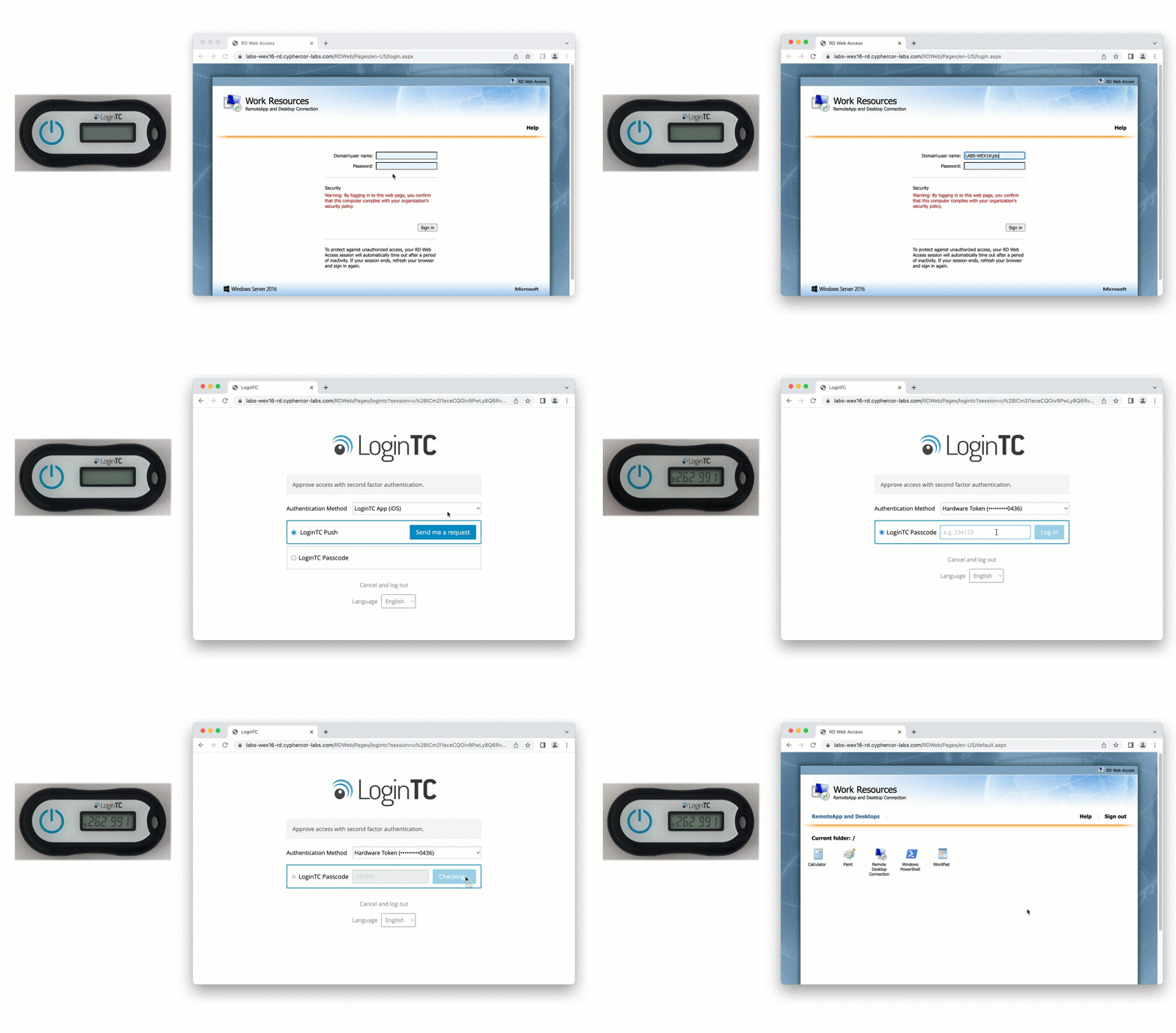
LoginTC provides a dedicated Windows RDP Logon connector that seamlessly integrates multi-factor authentication into the standard Windows logon process. This connector acts as an intermediary, intercepting the authentication request and routing it to the LoginTC cloud service for secondary factor verification. When a user attempts to log in via RDP, after entering their username and password, they are prompted for a second factor – typically a push notification to their smartphone, a one-time passcode (OTP) from an authenticator app, or a hardware token.
This method offers several key advantages:
- Broad Factor Support: Unlike native options, third-party connectors support a wide array of authentication factors, allowing organizations to choose the most appropriate and user-friendly options for their specific needs.
- Centralized Management: MFA policies, user enrollment, and reporting can be managed centrally through the MFA provider’s administration panel, simplifying oversight for IT teams.
- Seamless User Experience: Once configured, the MFA prompt becomes an integrated part of the RDP logon, providing a smooth experience for users without requiring significant changes to their workflow.
- Support for Remote Desktop Gateway: Crucially, these connectors can be deployed on both individual RDP servers and on a Remote Desktop Gateway, ensuring that all remote connections, whether direct or proxied, are protected.
- Offline MFA Capabilities: Advanced solutions offer offline MFA, a vital feature for users who might need to access local machines or RDP sessions without an internet connection.
For a detailed walkthrough of how LoginTC’s connector works and how to set it up, you can refer to our LoginTC Windows RDP Logon documentation. This approach ensures that every RDP session, whether initiated directly or through a gateway, is protected by a strong second factor, significantly bolstering your security posture.
Cloud-Based vs. On-Premises Considerations
When choosing an MFA solution for RDP, another critical decision is whether to opt for a cloud-based or an on-premises deployment.
Cloud-Based MFA (SaaS): Most modern MFA solutions, including LoginTC, are cloud-based. This means the MFA authentication service is hosted and managed by the vendor.
- Pros: Easy deployment, minimal infrastructure overhead, automatic updates and maintenance, high availability, and scalability. It’s often quicker to implement and manage.
- Cons: Requires internet connectivity for authentication (though some offer offline modes), and some organizations may have data residency or compliance concerns with cloud-hosted services.
On-Premises MFA: Some organizations, particularly those in highly regulated industries or with strict data sovereignty requirements, prefer an on-premises MFA solution where all components (authentication server, user directory integration) reside within their own data center.
- Pros: Full control over data and infrastructure, no reliance on external internet for authentication (unless using push notifications that route through public networks), compliance with specific regulatory mandates.
- Cons: Higher upfront costs, significant infrastructure and maintenance overhead, requires dedicated IT resources for management and updates, can be less scalable than cloud solutions.
LoginTC offers a flexible approach, primarily leveraging a robust cloud-based service for its core authentication engine, but with connectors that can be installed on-premises on your Windows servers. For organizations requiring a fully on-premises MFA solution for Windows Server, LoginTC can also accommodate this by integrating with local identity providers and deploying authentication proxies within your network, providing a hybrid model that balances security, control, and ease of use.
Step-by-step: install LoginTC MFA for Windows RDP
This walkthrough assumes you have a LoginTC account (cloud or Managed) and Domain Admin access to the Windows Server hosting RDP or the Remote Desktop Gateway.
- Create the application in the LoginTC admin console. Log into cloud.logintc.com (or your LoginTC Managed console). Go to Applications > Add Application and select Windows Logon as the application type. Note the API key and application ID — you’ll need these during the connector install.
- Sync your users from Active Directory. Under Directories > Add Directory, add your AD via LDAP. Select the OU or security group containing users who need RDP MFA. Confirm the users appear in the LoginTC user list before proceeding.
- Download the Windows Logon connector. From the admin console, download the latest LoginTC Windows Logon connector (.msi installer). Copy it to the RDP host or Remote Desktop Gateway server.
- Install the connector. Run the installer as Administrator. When prompted, paste the application ID and API key from step 1. Choose the authentication factors to allow: push, OTP, FIDO2 passkey, HOTP hardware token — or any combination. For CISA phishing-resistant compliance, enable only FIDO2 passkey and Hardware token for admin accounts.
- Enroll a pilot user. Send the pilot user their enrollment link from Users > [user] > Send Enrollment. They complete enrollment on their device (biometric, security key, or authenticator app), and the credential is registered.
- Test the RDP flow. RDP to the protected host as the pilot user. After entering AD credentials, LoginTC prompts for the second factor. Approve and confirm the session opens. Check the LoginTC event log for a successful authentication entry.
- Roll out in phases. Start with IT admins (week 1–2), expand to privileged accounts (weeks 3–6), then to broader remote workforce (weeks 7–12). Use Group Policy to push the connector to additional RDP hosts as you scale.
Best Practices for Deploying Windows Server MFA RDP
Implementing MFA for Windows RDP isn’t just about installing a piece of software; it’s a strategic security initiative that requires careful planning, execution, and ongoing management. A rushed MFA rollout can be worse than a delayed one as it can generate user resistance and support tickets that undermine the deployment. The teams that succeed typically take two to four weeks to plan, then roll out in phases starting with IT staff.
A successful MFA deployment balances robust security with an intuitive user experience.
Assessing Your Environment and User Needs
Before deploying any MFA solution, a thorough assessment of your current environment is paramount.
- Identify All RDP Access Points: Map out every Windows server, workstation, or Remote Desktop Gateway that allows RDP access. Determine which users access these systems and from where (internal network, external internet).
- Understand User Groups and Access Patterns: Differentiate between administrators, standard users, and third-party vendors. Their access patterns and tolerance for new authentication methods may vary. For instance, administrators often require the strongest authentication, while a temporary contractor might need a simpler, temporary solution.
- Evaluate Existing Identity Providers: Will your MFA solution integrate with Active Directory, Azure AD, or another LDAP directory? Seamless integration is key to minimizing administrative burden.
- Consider Network Infrastructure: Are there firewalls, proxies, or network segmentation that might impact communication between the MFA connector and the authentication service?
This assessment will help you tailor your MFA solution to your specific organizational needs, ensuring comprehensive coverage without unnecessary complexity.
Choosing the Right Authentication Factors
The effectiveness of your RDP MFA solution largely depends on the authentication factors you choose. Different factors offer varying levels of security, convenience, and cost.
- Push Notifications: Highly convenient and secure. Users receive a prompt on their smartphone and simply tap “Approve.” This is a popular choice for its ease of use and strong security.
- One-Time Passcodes (OTPs): Generated by an authenticator app (like Google Authenticator, Microsoft Authenticator, or LoginTC’s own app) or sent via SMS/email. OTPs are widely supported and provide a good balance of security and convenience. However, SMS OTPs are generally considered less secure due to SIM-swapping risks.
- Hardware Tokens: Physical devices that generate OTPs or use cryptographic keys. These offer a very high level of security but can be more expensive and less convenient for users.
- FIDO2/WebAuthn (Security Keys): Emerging as a strong, phishing-resistant factor. These keys use public-key cryptography and can be integrated with some MFA solutions.
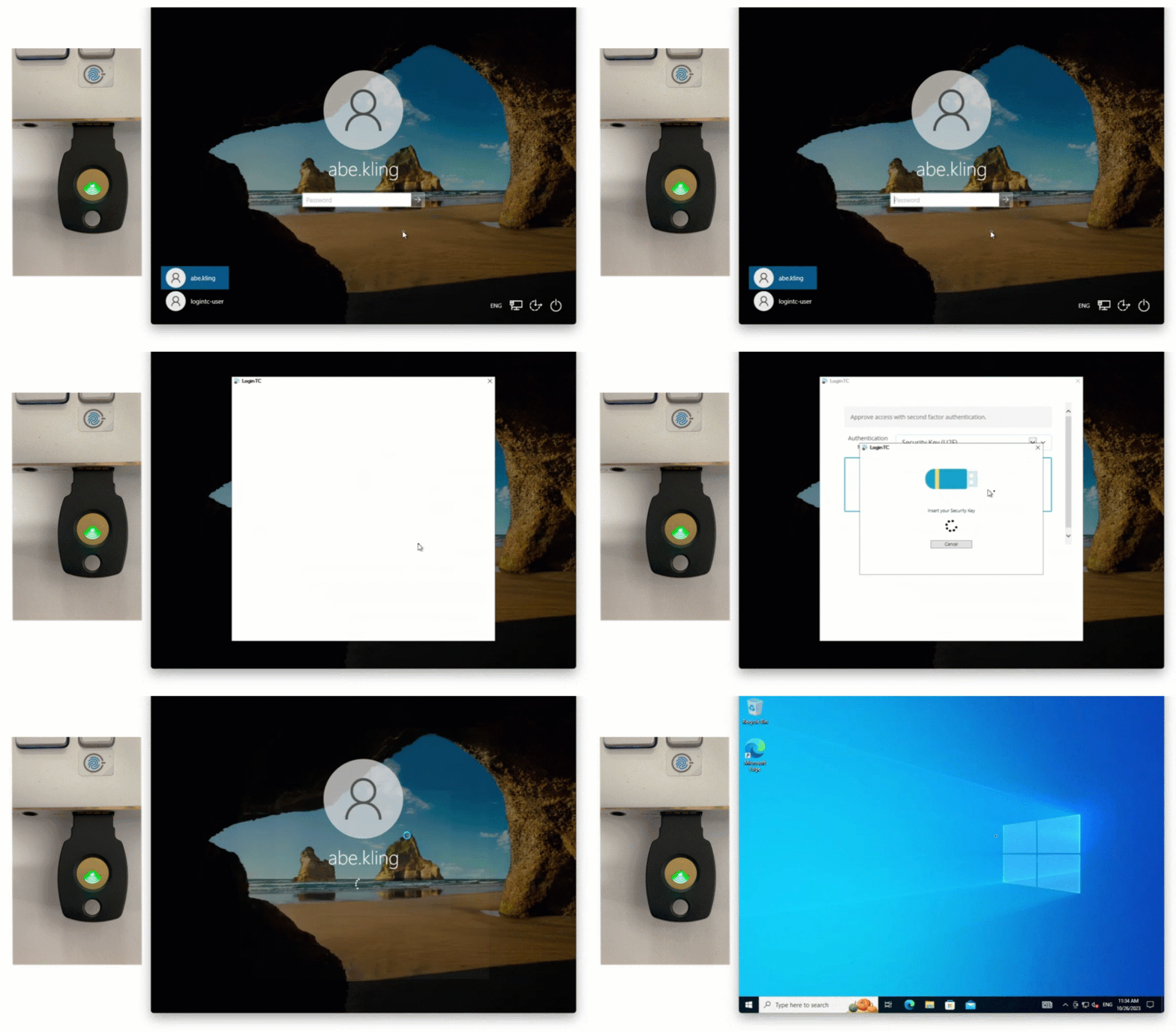
For RDP, a combination of push notifications and OTPs via authenticator apps often provides the best balance. LoginTC supports a range of factors, allowing you to choose what best fits your security policies and user preferences.
Ensuring Business Continuity with Offline MFA
A critical, yet often overlooked, aspect of RDP MFA is the ability to authenticate when an internet connection is unavailable. Imagine an IT administrator needing to access a server via RDP during a network outage or in a remote location without connectivity. Without offline MFA, they would be locked out, potentially crippling incident response or critical maintenance.
Robust RDP MFA solutions include offline authentication capabilities to ensure business continuity during network outages.
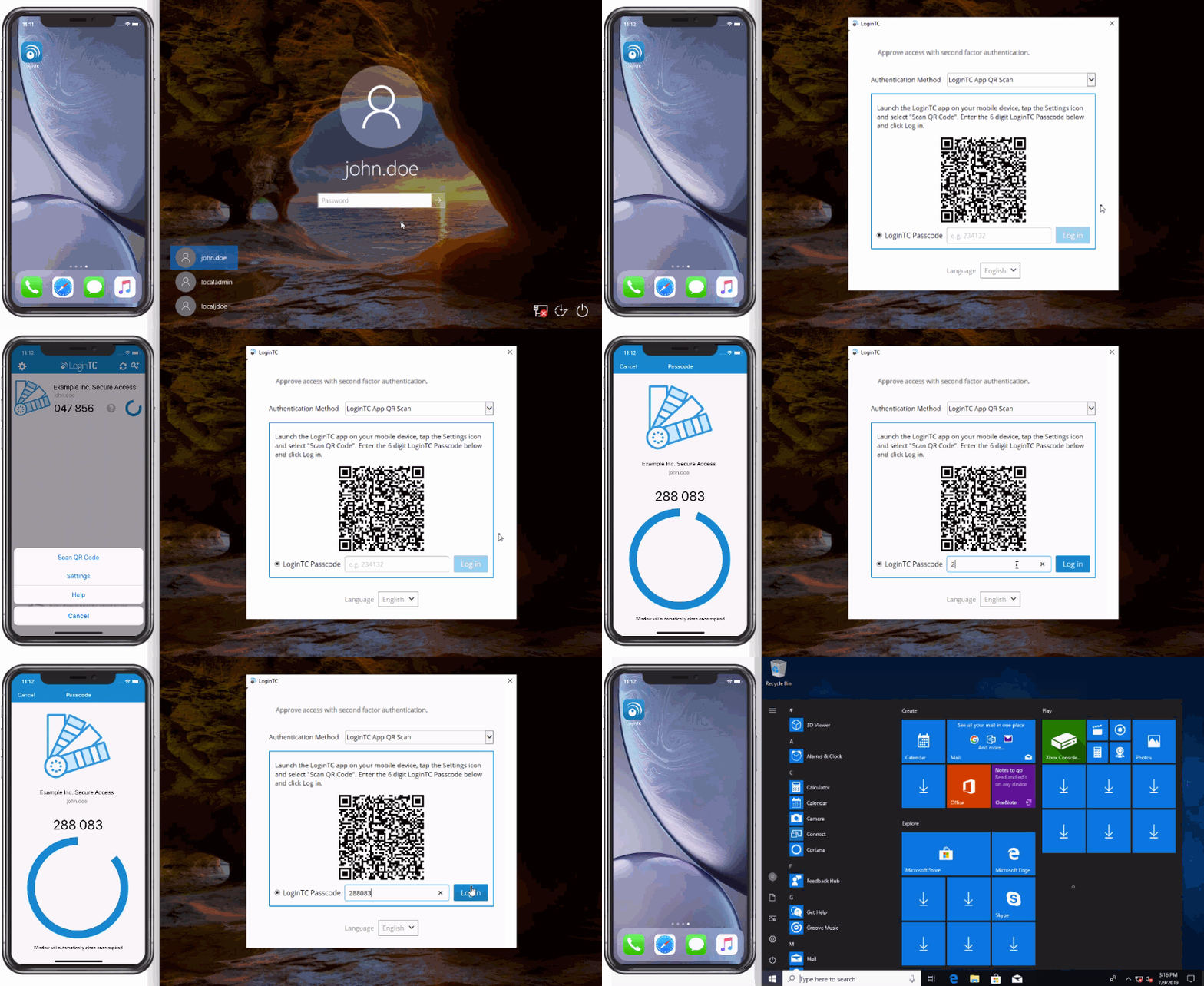
LoginTC offers a robust offline MFA capability for Windows Logon and RDP. This feature allows pre-registered users to authenticate using a time-based one-time password (TOTP) from their LoginTC app even if the Windows server or the user’s device lacks internet connectivity. This ensures that critical access remains available when it’s needed most, preventing downtime and maintaining operational resilience. It’s an indispensable feature for any comprehensive RDP MFA strategy.
Integrating with Existing Infrastructure
A successful MFA deployment should integrate smoothly with your existing IT infrastructure, particularly your identity management system.
- Active Directory (AD) Integration: Most organizations rely on Active Directory for user management. Your chosen MFA solution should seamlessly integrate with AD, synchronizing users and groups, and ideally leveraging existing AD credentials as the first factor. LoginTC’s Windows RDP connector integrates directly with AD, simplifying user provisioning and management.
- Remote Desktop Gateway (RDG) Integration: If you use an RD Gateway to provide secure, single-port access to multiple RDP servers, your MFA solution must be able to protect the RDG itself. Deploying the MFA connector on the RD Gateway ensures that all connections proxied through it are MFA-protected.
- Group Policy Management: Leverage Group Policy Objects (GPOs) to deploy the MFA connector to multiple servers, manage settings, and enforce security policies across your Windows environment.
Smooth integration minimizes administrative overhead, reduces the risk of misconfiguration, and ensures a consistent security posture across all RDP access points.
Real-World Impact and Case Studies of RDP MFA
The theoretical benefits of Windows RDP MFA are compelling, but its real-world impact is even more profound. Organizations that implement robust RDP MFA solutions consistently report significant improvements in their security posture, reduction in breach incidents, and enhanced compliance capabilities.
Implementing RDP MFA significantly reduces the attack surface and bolsters compliance for organizations of all sizes.
One of the most immediate impacts is the dramatic reduction in successful RDP-based attacks. With MFA in place, brute-force attacks and credential stuffing attempts become largely ineffective. Even if an attacker compromises a password, they are stopped dead in their tracks by the requirement for a second factor. This directly translates to fewer security incidents, less downtime from ransomware, and protection against data exfiltration.
From a compliance standpoint, RDP MFA is often a non-negotiable requirement. Regulations like HIPAA (healthcare), PCI DSS (payment card industry), GDPR (data privacy), and various government and industry standards explicitly mandate strong authentication for remote access to sensitive systems. By implementing RDP MFA, organizations can demonstrate due diligence and satisfy these critical compliance obligations, avoiding hefty fines and reputational damage.
Consider the experience of Cinema BPM, a prominent post-production studio that needed to secure access to its Windows Terminal Server sessions. Their challenge was to add MFA to a critical part of their workflow, ensuring that their creative teams could access necessary applications and data remotely and securely. Traditional solutions proved too complex or disruptive. By implementing LoginTC for their Windows Terminal Server sessions, Cinema BPM was able to add a seamless second factor, enhancing security without impeding their fast-paced production environment. As detailed in our LoginTC Cinema BPM case study, this provided them with the peace of mind that their intellectual property and client data were protected, while maintaining high user productivity.
This case study exemplifies how targeted RDP MFA can solve specific business problems, showing that security doesn’t have to come at the cost of usability or productivity. The ability to quickly and effectively deploy MFA across critical Windows remote access points translates directly into tangible security benefits and operational resilience.
Overcoming Common Challenges in Windows RDP MFA Deployment
While the benefits of Windows RDP MFA are clear, IT administrators often face hurdles during deployment. Three challenges come up in almost every RDP MFA deployment: user resistance, network integration friction, and scaling as remote access expands. Simplified deployment and robust support are key to overcoming MFA adoption hurdles and ensuring a successful rollout. Here’s how the teams we’ve worked with handle each one:
Addressing User Adoption and Training
One of the most significant challenges is user resistance. Employees, accustomed to simple password logins, may view MFA as an added inconvenience. This is where communication and training become crucial.
- Communicate the “Why”: Clearly explain why MFA is being implemented (e.g., to protect against ransomware, prevent data breaches, comply with regulations). Highlight the personal benefits of enhanced security.
- Emphasize Ease of Use: Showcase how user-friendly the chosen MFA method is (e.g., a simple push notification tap).
- Provide Clear Instructions: Offer step-by-step guides, video tutorials, and readily available support channels.
- Phased Rollout: Instead of a “big bang” approach, roll out MFA to smaller, more tech-savvy groups first, gathering feedback and refining the process before a wider deployment.
- Offer Choice (where possible): If your MFA solution supports multiple factors, allowing users to choose their preferred method (e.g., push vs. OTP app) can increase adoption.
LoginTC focuses on a user-centric design for its authentication methods, making the enrollment and daily use of MFA as intuitive as possible, thereby minimizing user friction.
Navigating Technical Integration Complexities
Integrating a new security solution into an existing, often complex, IT environment can present technical challenges.
- Compatibility Issues: Ensuring the MFA connector is compatible with your specific Windows Server versions, Active Directory configuration, and any existing Remote Desktop Gateway setup is vital. LoginTC’s connectors are designed for broad compatibility with various Windows Server editions.
- Network Configuration: Firewalls, proxy servers, and network segmentation can block necessary communication between the MFA connector and the cloud authentication service. Ensure that required ports and URLs are whitelisted.
- Testing: Thorough testing in a staging environment before production deployment is critical. Test different user scenarios, authentication factors, and edge cases (e.g., network outages for offline MFA).
- Documentation and Support: Rely on comprehensive documentation and responsive technical support from your MFA vendor. LoginTC provides detailed documentation for its Windows RDP Logon connector and dedicated support to assist with integration challenges.
Ensuring Scalability and Performance
As your organization grows or remote access needs expand, your MFA solution must scale without compromising performance or security.
- Cloud-Based Scalability: Cloud-based MFA solutions like LoginTC inherently offer high scalability, as the vendor manages the infrastructure to handle fluctuating authentication loads.
- Impact on Logon Times: Ensure that the MFA process adds minimal latency to the RDP logon experience. Efficient connectors and optimized authentication flows are key.
- High Availability: For critical RDP access points (like Remote Desktop Gateways), ensure the MFA solution supports high availability configurations to prevent a single point of failure.
By addressing these challenges proactively, IT admins can deploy Windows RDP MFA effectively, securing their remote access infrastructure while maintaining a positive user experience.
Frequently Asked Questions About Windows RDP MFA
What is Windows RDP MFA?
Windows RDP MFA is multi-factor authentication applied to Remote Desktop Protocol sessions on Windows Server or Windows client machines. After a user enters their Active Directory username and password, an MFA connector requires a second factor, such as a push notification, one-time passcode, FIDO2 passkey, or hardware token, before the RDP session opens. This blocks attackers who have stolen a valid password.
Does Windows natively support MFA for RDP?
Not fully. Windows Hello for Business provides FIDO2 authentication for local Windows logon, and Windows Server 2022 supports FIDO2 sign-in for domain-joined machines, but native tools don’t include enterprise features like centralized policy, offline MFA, Remote Desktop Gateway protection, or non-Windows factors. A third-party MFA connector like LoginTC fills this gap.
How do I add MFA to a Remote Desktop Gateway?
Install the LoginTC Windows Logon connector on the Remote Desktop Gateway server itself. The connector intercepts authentication requests as they pass through the gateway, so every RDP session proxied through it , regardless of the destination server, is protected by a second factor. This is the recommended architecture for environments where users connect through a single RDG.
Can RDP MFA work without an internet connection?
Yes. LoginTC offers offline MFA for Windows Logon and RDP. Pre-registered users authenticate with a time-based one-time password (TOTP) generated by the LoginTC app, and the RDP host validates it locally, no internet or cloud call required. This is critical for air-gapped environments, remote field sites, and business continuity during network outages.
Does Windows RDP MFA meet CISA’s phishing-resistant requirement?
Only when configured with FIDO2 passkey or hardware token as the second factor. Push notifications and SMS OTPs are not phishing-resistant and don’t meet CISA’s updated guidance for privileged remote access. LoginTC supports FIDO2/WebAuthn passkeys and FIDO2 hardware security keys for RDP starting in LoginTC Managed 2.1.12, satisfying NIST SP 800-63B AAL2 and AAL3 requirements.
How long does it take to deploy LoginTC MFA for RDP?
Time to first protected RDP host is typically under 30 minutes for a cloud LoginTC deployment: create the application, sync users from Active Directory, install the connector, and test with a pilot user. Full production rollout for a 500-user environment takes six to twelve weeks, phased across IT admins, privileged accounts, and broader remote workforce.
Is push notification MFA good enough for RDP admin accounts?
In 2026, no. Push notifications are convenient but vulnerable to MFA fatigue attacks and social engineering. CISA guidance and NIST SP 800-63B require phishing-resistant factors (FIDO2 passkey or hardware key) for privileged remote access. Reserve push MFA for standard users and use FIDO2 or hardware tokens for admin, service desk, and privileged accounts.
What’s the difference between RDP MFA and RD Web / RD Gateway MFA?
RDP MFA protects direct Remote Desktop Protocol sessions to a Windows host. RD Web MFA protects the RemoteApp web portal. RD Gateway MFA protects the SSL/TLS gateway that proxies external RDP connections. LoginTC provides dedicated connectors for all three: Windows RDP Logon, RD Web Access, and RD Gateway RADIUS.
Secure Your Remote Access with LoginTC Windows RDP MFA
The threat landscape demands a proactive and robust approach to securing remote access. Relying solely on passwords for Windows RDP is an invitation to disaster. Implementing multi-factor authentication for your Windows RDP sessions is not just a best practice; it’s a fundamental requirement for protecting your organization from the escalating wave of cyberattacks.
The Windows RDP MFA solutions that succeed share three properties: they install in minutes rather than days, they support the full range of authentication factors your users actually need, and they include offline MFA for when the network fails you. LoginTC’s Windows RDP MFA solution provides the comprehensive protection your remote users and Windows servers need. With its flexible authentication factors, seamless integration with Active Directory, and critical offline MFA capabilities, LoginTC ensures that your remote access is secure, compliant, and always available.
Don’t leave your RDP connections vulnerable to attack. Take the definitive step towards a more secure remote environment. Try LoginTC’s Windows RDP MFA solution today and fortify your gates against evolving threats.
Ready to add MFA to your Windows RDP environment?
Get started with a free LoginTC trial, or talk to our team about your specific RDP, RD Web, or RD Gateway deployment needs.