Passkey Active Directory Integration: 2026 Guide for IT Admins
July 10, 2026 •
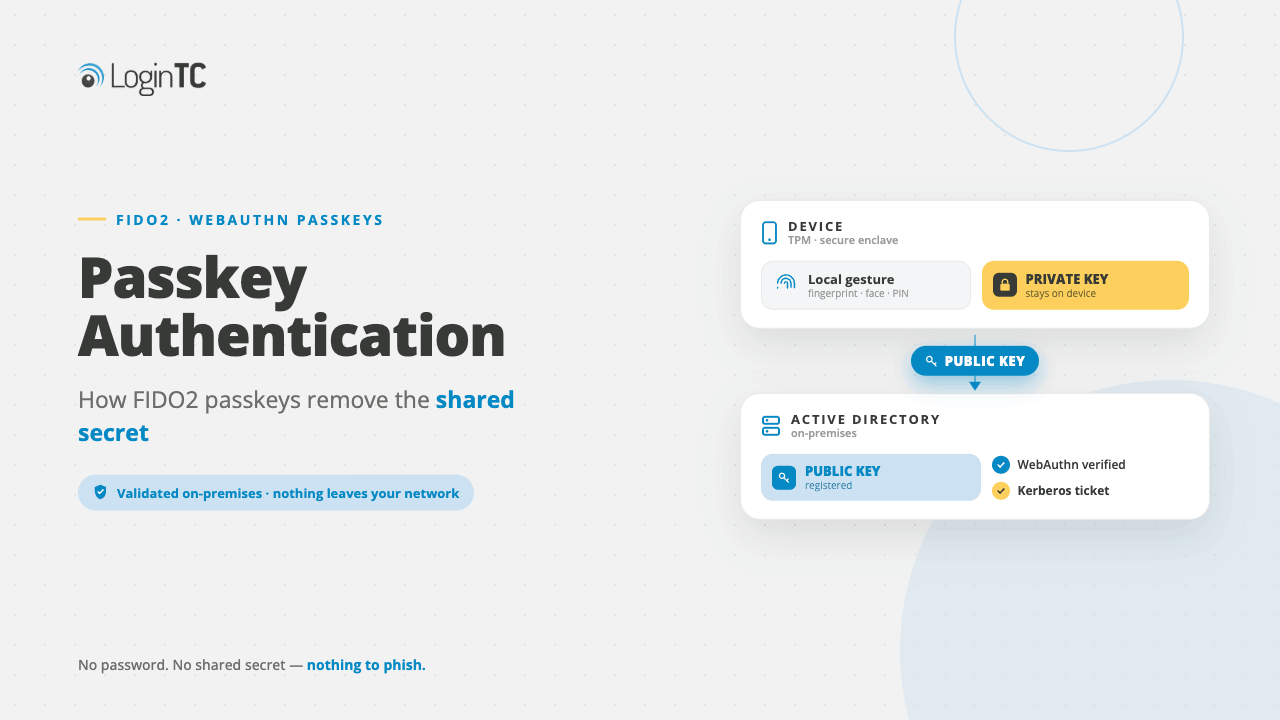
Passkeys can integrate with Active Directory through two primary paths. The first is hybrid Azure AD, using Microsoft Entra ID’s FIDO2 security key support. The second is on-premises deployment, using third-party identity bridges or RADIUS-based MFA solutions. Neither path requires a full cloud migration. Your existing AD infrastructure can support passkey authentication today with the right configuration.
Passkey Active Directory integration is one of the most searched topics among IT admins right now, and for good reason. Passkeys are fast replacing passwords as the default authentication method across enterprise environments, but most organizations still run Active Directory at their core. The question isn’t whether passkeys and AD can coexist. They can. The real question is which integration path fits your infrastructure.
This guide breaks down exactly how passkey authentication works alongside Active Directory in 2026. It covers hybrid and on-premises scenarios, FIDO2 standards, key deployment decisions, and practical security considerations.
What Are Passkeys and Why Do They Matter for Active Directory Environments?
A passkey is a FIDO2-based, phishing-resistant credential that replaces the traditional password with a cryptographic key pair. The private key never leaves the user’s device. Authentication is confirmed locally, using biometrics or a device PIN. The server only ever sees a public key and a signed challenge, never a secret it could expose in a breach.
For Active Directory environments specifically, this matters because AD has historically been a high-value target. Credential stuffing, pass-the-hash, and Kerberoasting attacks all depend on stolen or weak passwords. Passkeys remove that foundation entirely.
The FIDO2 specification, developed by the FIDO Alliance, is the technical standard underpinning passkeys. It encompasses two components. WebAuthn is the browser API. CTAP2 is the protocol that lets external authenticators, like smartphones or hardware tokens, communicate with a relying party. When you hear “FIDO2 passkey,” these are the standards making it work.
Passkeys vs. Smart Cards: What’s Changed?
Smart cards have served enterprise AD environments for years. They’re FIDO-adjacent in spirit: they use asymmetric cryptography and require physical possession. But they come with real operational costs. Card readers, physical issuance, revocation workflows, and user friction all add up.
Passkeys simplify this model significantly. A user’s smartphone or a FIDO2 hardware security key can serve as the authenticator without any card reader infrastructure. Device attestation provides assurance levels similar to smart cards. Synced passkeys extend the convenience further, storing the credential in a platform manager like iCloud Keychain or Google Password Manager.
That said, for high-security, air-gapped, or regulated environments, bound passkeys on dedicated hardware security keys often remain the preferred option over synced passkeys.
How Passkeys Work with Active Directory: The Two Core Paths
Active Directory doesn’t natively speak FIDO2. It was built around Kerberos and NTLM authentication, both password-centric protocols. To use passkeys in an AD environment, you need a layer that translates between FIDO2 and what AD understands. In 2026, there are two well-established approaches.
Path 1: Hybrid Azure AD (Microsoft Entra ID)
The most documented path for passkey Active Directory integration runs through Microsoft Entra ID, formerly known as Azure AD, in a hybrid configuration. In a hybrid setup, your on-premises AD remains the authoritative identity source. It syncs with Entra ID via Azure AD Connect or Entra Connect Sync.
Entra ID natively supports FIDO2 security keys and passkeys for authentication to cloud resources and, increasingly, to on-premises resources through hybrid join scenarios. Here’s how the flow works:
- The user attempts to access a resource (cloud app, VPN portal, or a hybrid-joined Windows device).
- The authentication request routes through Entra ID.
- The user authenticates with a passkey or FIDO2 hardware security key.
- Entra ID issues a Primary Refresh Token (PRT) that the device uses to obtain Kerberos tickets for on-premises resources.
- The on-premises AD validates the Kerberos ticket, granting access as normal.
Microsoft’s hybrid FIDO2 sign-in flow allows passkey authentication to reach on-premises resources without rewriting your Kerberos infrastructure.
This approach works well for organizations already using Microsoft 365 or Azure services. Is your AD already synced to Entra ID with hybrid-joined devices? If so, enabling FIDO2 passkey sign-in takes a relatively small configuration lift.
Key prerequisites for this path:
- Azure AD Connect (version 1.4.32.0 or later, or Entra Connect Sync)
- Hybrid Azure AD joined or Entra ID joined Windows 10/11 devices
- FIDO2 authentication method enabled in Entra ID authentication methods policy
- On-premises domain controllers at Windows Server 2016 or later
Path 2: On-Premises Integration via Third-Party Identity Bridges
Not every organization is ready, or willing, to sync identities to a cloud directory. Regulated industries, government agencies, and organizations with strict data residency requirements often need passkey authentication to work entirely within their own network perimeter.
This is where on-premises identity bridges and MFA solutions come in. These systems sit between your FIDO2/passkey authentication layer and your existing AD, translating modern authentication signals into something Kerberos or RADIUS can act on.
A typical on-premises passkey integration might look like this:
- A user attempts to log in to a VPN, web application, or workstation.
- The login request goes to an on-premises authentication proxy or MFA server.
- The proxy handles the FIDO2/WebAuthn challenge-response with the user’s passkey authenticator.
- On successful passkey validation, the proxy asserts the user’s identity to AD via LDAP, SAML, or RADIUS.
- AD grants access based on group memberships and policies as usual.
Solutions like LoginTC’s RADIUS Connector and LDAP integration enable this pattern, adding phishing-resistant MFA to on-premises AD environments without requiring any cloud connectivity. This keeps your identity plane fully on-premises while modernizing the authentication layer.
On-premises passkey integration is achievable in 2026 without a cloud dependency, using RADIUS or LDAP bridges to connect FIDO2 authentication to Active Directory.
FIDO2 and Passkey Standards You Need to Understand
Before you deploy anything, it helps to understand the three passkey variants your users might encounter. Each has different security and usability trade-offs in an AD context.
Synced Passkeys
Synced passkeys store the private key in a cloud-backed credential manager (such as a platform keychain) and sync it across the user’s devices. They’re convenient because a user who gets a new phone doesn’t lose their credential.
The trade-off: the private key leaves the device (encrypted) to sync to the cloud. For most corporate environments, this is acceptable. For environments with strict key custody requirements, it may not be.
Device-Bound Passkeys
Device-bound passkeys store the private key on a specific device and never export it. If the device is lost, the credential is gone. This is the strongest assurance model for a single device but creates recovery challenges.
Many organizations use device-bound passkeys on managed workstations in combination with a backup authentication method registered to the account in AD or Entra ID.
Hardware Security Key Passkeys
FIDO2-certified hardware security keys store passkeys on dedicated cryptographic hardware. These are device-bound by design. They offer the highest assurance level and are the preferred option for privileged access, administrator accounts, and environments that need hardware attestation for compliance purposes.
Both Entra ID and most on-premises FIDO2 proxies support hardware security key passkeys natively. That makes them the most universally applicable option for AD integration.
Deploying Passkeys in Active Directory: Key Configuration Steps
Deployment specifics vary by path, but these steps apply to most passkey Active Directory integrations.
Step 1: Audit Your Current AD and Device Landscape
Start with an inventory. Identify your domain functional level, Windows Server versions on your domain controllers, and which devices are hybrid-joined versus on-premises-only. Passkey support on Windows requires Windows 10 version 1903 or later.
Also assess your current MFA posture. Are users on SMS OTP, authenticator apps, or no MFA at all? This tells you how large the change management challenge is.
Step 2: Choose Your Integration Architecture
Based on your cloud readiness and compliance requirements, choose hybrid Entra ID integration or on-premises bridge integration. You can also run both paths in parallel for different user populations. For example, put cloud workers on the hybrid path and factory-floor workers on the RADIUS path.
Step 3: Configure Authentication Policies
In Entra ID, navigate to Authentication Methods and enable FIDO2 Security Key for your target users or groups. Set any allowed AAGUID restrictions if you want to limit which hardware security key models are permitted. This is especially useful in regulated environments where you need to control the authenticator supply chain.
For on-premises deployments, configure your RADIUS or LDAP connector to enforce passkey authentication before it passes the request to AD. Use it as the second factor, or as the primary factor if your architecture supports it.
Step 4: Handle User Registration
Passkey registration requires a one-time ceremony where the user proves their identity and enrolls their authenticator. In Entra ID, this happens through the My Security Info portal. In on-premises deployments, this often happens through an admin-managed enrollment workflow.
Plan your registration rollout carefully. Staged rollout by department or group reduces helpdesk load and lets you catch configuration issues before they affect the full user base.
Step 5: Define Recovery and Exclusion Policies
Every passkey deployment needs a break-glass plan. What happens when a user loses their device? Define a secondary authentication path for account recovery, and ensure it’s at least as secure as your standard process. Temporary access passes (supported in Entra ID) are one option. Admin-initiated account unlocks tied to identity verification workflows are another.
Security Considerations for Passkey Active Directory Integration
Phishing Resistance Is the Core Benefit
Traditional MFA methods (SMS codes, TOTP apps) can be bypassed through real-time phishing and adversary-in-the-middle attacks. Passkeys are origin-bound: the cryptographic response is tied to the exact domain the user authenticated against. A fake login page receives a response that’s useless on the real site.
Passkeys are classified as phishing-resistant MFA by NIST SP 800-63B, the highest assurance category for authentication credentials.
This matters for AD environments because it directly counters credential-harvesting attacks that specifically target AD-integrated login portals.
Attestation and Hardware Trust
FIDO2 attestation lets you verify the make, model, and firmware of the authenticator at registration time. For organizations with strict device trust requirements, requiring attestation from approved hardware models adds a meaningful layer of supply chain assurance.
Configure allowlists of approved AAGUIDs (Authenticator Attestation Globally Unique Identifiers) in your Entra ID or on-premises FIDO2 server to enforce this control.
Privileged Account Considerations
For administrator accounts in AD, apply stricter passkey policies. Require hardware security key passkeys (not synced), enforce attestation, and log all authentication events to your SIEM. Privileged access workstations (PAWs) combined with hardware security key passkeys represent the strongest available posture for AD admin access in 2026.
Consider also applying privileged access management controls that wrap passkey authentication with time-based access windows and just-in-time provisioning.
Conditional Access Integration
Passkey authentication signals can feed into Conditional Access policies in Entra ID. You can require passkey-strength authentication specifically for high-risk resources, privileged roles, or sign-ins from unfamiliar locations, while allowing weaker methods for lower-risk scenarios. This tiered approach reduces friction without compromising security where it matters most.
Passkey Active Directory Adoption in 2026: Where Things Stand
The momentum behind passkeys has accelerated sharply. The FIDO Alliance reported that passkey support is now available across all major operating systems, browsers, and device platforms. Microsoft, Apple, and Google have all committed to passkey as the default authentication direction for their platforms.
For IT admins managing Active Directory, this creates both opportunity and pressure. Users are already encountering passkeys on consumer services and expecting the same experience at work. Organizations that delay passkey AD integration risk falling behind on both security posture and user experience.
The good news: the tooling has matured. Both Microsoft’s hybrid path and third-party on-premises integration options are production-ready in 2026. The technical barriers that existed two years ago, particularly around on-premises resource access, have largely been addressed.
Looking to add passkey support alongside your existing MFA setup? LoginTC’s two-factor authentication platform integrates with Active Directory across both hybrid and on-premises configurations. It supports a phased approach, so you don’t have to rip out your current infrastructure.
Frequently Asked Questions
Can passkeys work with on-premises Active Directory without Azure or any cloud service?
Yes. Passkeys can integrate with on-premises Active Directory using third-party identity bridges that handle FIDO2 authentication locally. These solutions, typically deployed as RADIUS connectors or LDAP proxies, validate the passkey credential and assert the user’s identity to AD without requiring any cloud connectivity. This approach is well-suited for regulated industries and air-gapped environments where cloud sync is not permitted.
What domain controller version is required to support passkey authentication in Active Directory?
For hybrid Entra ID passkey integration with on-premises resource access, your domain controllers should run Windows Server 2016 or later. Windows Server 2019 and 2022 are preferred for the most complete FIDO2 and modern authentication support. On-premises-only deployments using RADIUS or LDAP bridges have fewer domain controller version dependencies, since the bridge handles the FIDO2 layer independently of AD’s native authentication stack.
Are synced passkeys safe to use in an enterprise Active Directory environment?
Synced passkeys are generally acceptable for most enterprise users. They store the private key in an encrypted, cloud-backed credential manager and sync it across a user’s trusted devices. The security trade-off is that the key material leaves the device. For standard employee accounts, this risk is typically manageable. For privileged or administrator AD accounts, device-bound passkeys on dedicated hardware security keys are the recommended option.
How does passkey authentication prevent phishing attacks on Active Directory portals?
Passkeys are origin-bound. The cryptographic response generated during authentication is tied to the exact domain of the legitimate site. If a user lands on a phishing page that mimics your AD login portal, the passkey will not produce a valid response for that fake domain. This makes real-time adversary-in-the-middle phishing attacks ineffective, a key advantage over SMS codes and TOTP-based MFA methods that can be intercepted and replayed.
Can I deploy passkeys for some users while keeping passwords for others in the same AD environment?
Yes. Both Entra ID and most on-premises MFA solutions support group-based or staged rollout policies. You can enable passkey authentication for a pilot group while leaving existing MFA or password flows in place for others. This lets you test registration workflows, helpdesk load, and compatibility issues before a full rollout. Staged deployment is the recommended approach for organizations with more than a few hundred users.
What happens if a user loses the device they registered their passkey on?
Recovery procedures depend on your deployment. In Entra ID, admins can issue a Temporary Access Pass, a time-limited, passwordless code that lets the user re-enroll a new passkey authenticator after verifying their identity. In on-premises deployments, admins typically have an out-of-band identity verification workflow followed by a new registration session. Every passkey deployment should have a documented recovery policy before go-live.
Does LoginTC support passkey Active Directory integration?
LoginTC supports Active Directory environments through RADIUS and LDAP integration, enabling phishing-resistant MFA for on-premises and hybrid AD deployments. LoginTC’s connectors work alongside existing AD infrastructure without requiring a full cloud migration. For organizations evaluating passkey-strength authentication in their AD environment, LoginTC provides a practical path to add strong, modern authentication without replacing the core identity infrastructure they already rely on.
Is FIDO2 the same as a passkey?
FIDO2 is the overarching standard; passkeys are a specific implementation of it. FIDO2 encompasses the WebAuthn specification and the CTAP2 protocol. A passkey is a FIDO2 credential that uses asymmetric cryptography to authenticate a user without a password. All passkeys are FIDO2 credentials, but not all FIDO2 credentials are referred to as passkeys. Hardware security key-based FIDO2 credentials, for example, are sometimes called passkeys and sometimes called FIDO2 keys depending on context.
Add Phishing-Resistant MFA to Your Active Directory Today
LoginTC integrates with your existing AD infrastructure, no full cloud migration required.