How to deploy MFA for SCADA environments
December 23, 2025 •
Supervisory Control and Data Acquisition (SCADA) systems manage everything from water filtration and power distribution to chemical manufacturing. Traditionally, these systems were protected by “air-gapping”, the practice of keeping critical infrastructure entirely disconnected from the public internet.
However, as the Industrial Internet of Things (IIoT) grows and the need for remote monitoring increases, the gap between Operational Technology (OT) and traditional IT is closing. This connectivity brings efficiency, but it also introduces significant security risks.
Today, securing these environments requires more than just a firewall; it requires robust multi-factor authentication (MFA). Implementing MFA for SCADA is not a one-size-fits-all process. Industrial settings often face hurdles that a typical office does not, such as a lack of cellular connectivity, legacy hardware, and strict safety regulations that prohibit mobile devices.
To better understand how these challenges can be overcome, let’s look at a real-world scenario involving the deployment of MFA for SCADA in a critical infrastructure facility.
Scenario: Securing the control room
Robert is the Lead Operations Engineer at a regional power substation. His team manages a complex web of SCADA systems that monitor everything from voltage levels to circuit breaker status. Recently, following a series of high-profile attacks on critical infrastructure, Robert’s department was mandated to implement MFA across the entire network to meet NERC CIP compliance.
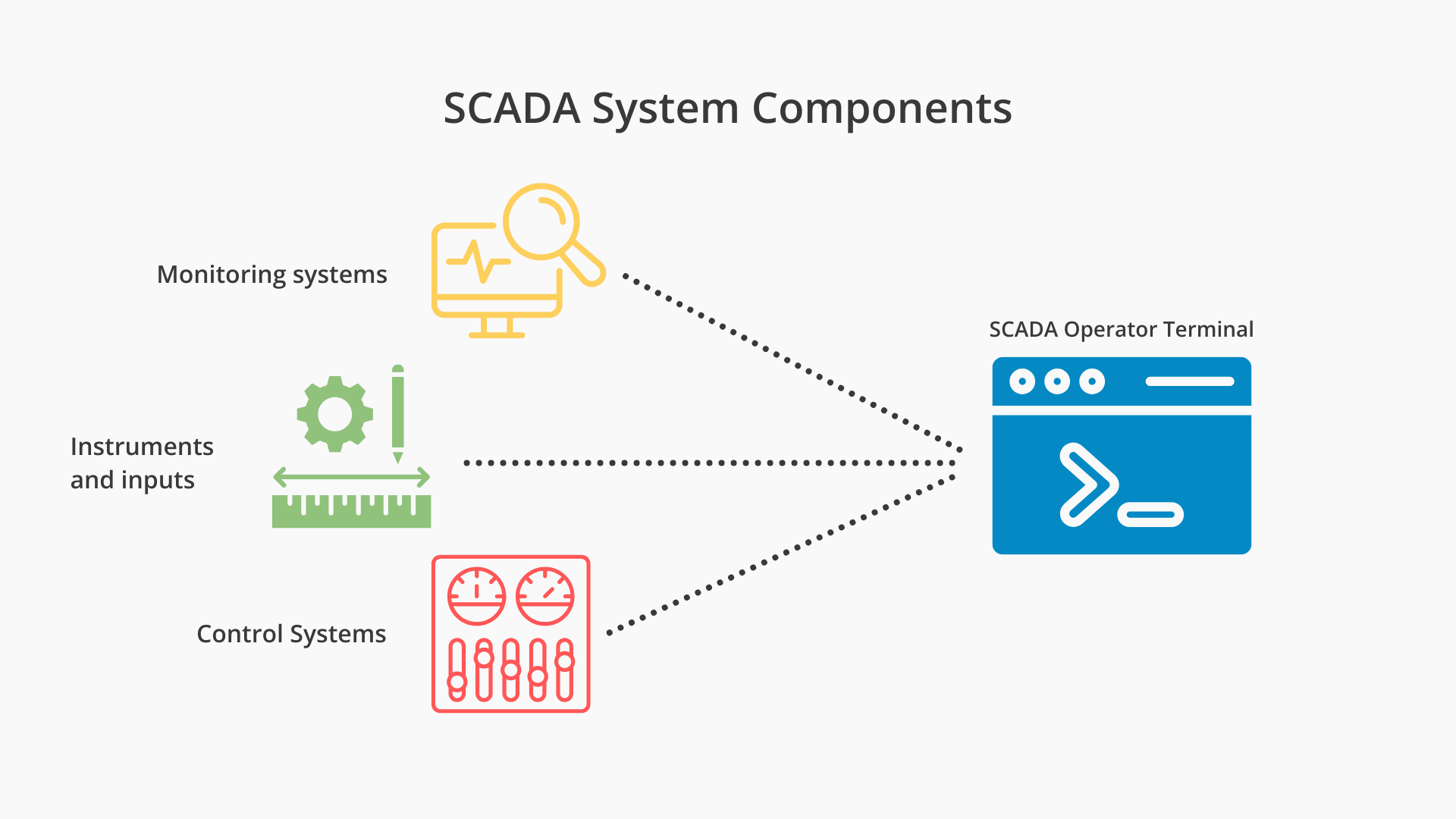
However, Robert faces a significant hurdle: the most critical control terminals are located in a “dead zone” with zero cellular connectivity, and company policy strictly prohibits personal smartphones on the operator floor. Robert needs a way to prove that the person adjusting the grid is who they say they are, without relying on a cloud-based push notification that will never arrive.
Why traditional MFA fails in industrial settings
The primary reason many organizations struggle with MFA for SCADA is that most modern authentication tools are designed for a “cloud-first” world. In a standard corporate office, a user has a smartphone, a reliable Wi-Fi connection, and an account synced to a cloud provider.
In an Operational Technology (OT) environment, these assumptions often disappear. Instead, operators face several hurdles to implementing secure authentication tools, including:
- Air-gapped networks: Many critical infrastructure sites operate on air-gapped or semi-isolated networks. These systems are intentionally cut off from the public internet to prevent external cyberattacks. However, most popular MFA solutions require a “phone home” to a cloud server to validate a login attempt. If a SCADA workstation cannot reach the internet, it cannot verify a push notification. This creates a paradox: the network is isolated for security, but that very isolation makes it harder to implement the modern identity verification required by updated regulations.
- Legacy hardware and protocol limitations: The lifecycle of industrial equipment is measured in decades. It is common to find Human Machine Interfaces (HMIs) running legacy versions of Windows or proprietary software that lacks support for modern security protocols like SAML or OIDC. When a facility needs to implement MFA for SCADA, they frequently find that their existing software simply doesn’t have a “hook” for a secondary security layer, forcing IT teams to look for solutions that can integrate at the operating system or RADIUS level.
- Operational continuity and the risk of lock-outs: In a power plant, uptime is the highest priority. If an operator needs to respond to an emergency alarm but is locked out because their MFA token isn’t working or they can’t get a signal, the result could be catastrophic. Traditional MFA often treats a lack of connectivity as a reason to deny access. In a SCADA environment, the security system must provide high-availability offline options to ensure that legitimate operators always have access when every second counts.
How to meet NERC CIP requirements with MFA for SCADA
Another consideration for many organizations, like Robert’s substation, is the requirement to meet the North American Electric Reliability Corporation (NERC) Critical Infrastructure Protection (CIP) standards.
Specifically, standards like CIP-005 and CIP-007 lay out strict mandates for how access to “Bulk Electric System” (BES) Cyber Assets must be managed.
Some considerations for designing MFA systems that meet NERC CIP requirements include:
Interactive remote access (CIP-005-7)
One of the most clear-cut requirements is found in CIP-005. It mandates that any “Interactive Remote Access” to a high or medium-impact BES Cyber System must be secured with multi-factor authentication. This applies not just to employees working from home, but also to third-party vendors and contractors who may need to dial into the SCADA network to perform maintenance or software updates. The standard requires that the MFA used must be technically diverse, meaning it cannot rely on two factors of the same type (e.g., two different passwords).
System security management (CIP-007-6)
While CIP-005 focuses on the “front door” (remote access), CIP-007 addresses the “internal doors.” It requires responsible entities to manage system access, including the use of authentication for all users. For Robert, this means that even if an operator is physically standing in the control room, the process of logging into a workstation must be tied to a verified identity. Implementing MFA for SCADA at this level prevents an unauthorized person who has gained physical access to the building from immediately tampering with the grid.
The role of intermediate systems
NERC CIP also emphasizes the use of “Intermediate Systems” (often called jump hosts) to terminate remote sessions before they enter the protected Electronic Security Perimeter (ESP). A robust MFA for SCADA solution must be able to sit on these intermediate systems, ensuring that even if a vendor’s primary laptop is compromised, they cannot move laterally into the SCADA network without a second, physically-held factor.
Solution: Deploying MFA for SCADA in offline environments
To solve for the “no-phone” and “no-internet” constraints Robert faces, several offline-capable methods can be deployed to provide robust MFA for SCADA without compromising the facility’s air-gap.
Offline Software OTP
One of the most effective ways to manage MFA for SCADA without an internet connection is through offline software One-Time Passwords (OTPs). Robert’s operators can use a dedicated authenticator app on a company-issued device.

When the operator logs in, they open their authenticator app loaded with a software OTP that can be generated offline. Since the “secret key” is stored locally on both the workstation and the device, no external network communication is required.
FIDO2 security keys
For environments requiring the highest level of protection, FIDO2 security keys are an ideal choice. These physical USB or NFC keys provide “phishing-resistant” authentication by using public-key cryptography. Because FIDO2 keys are passive hardware devices, they require no batteries and no cellular signal.
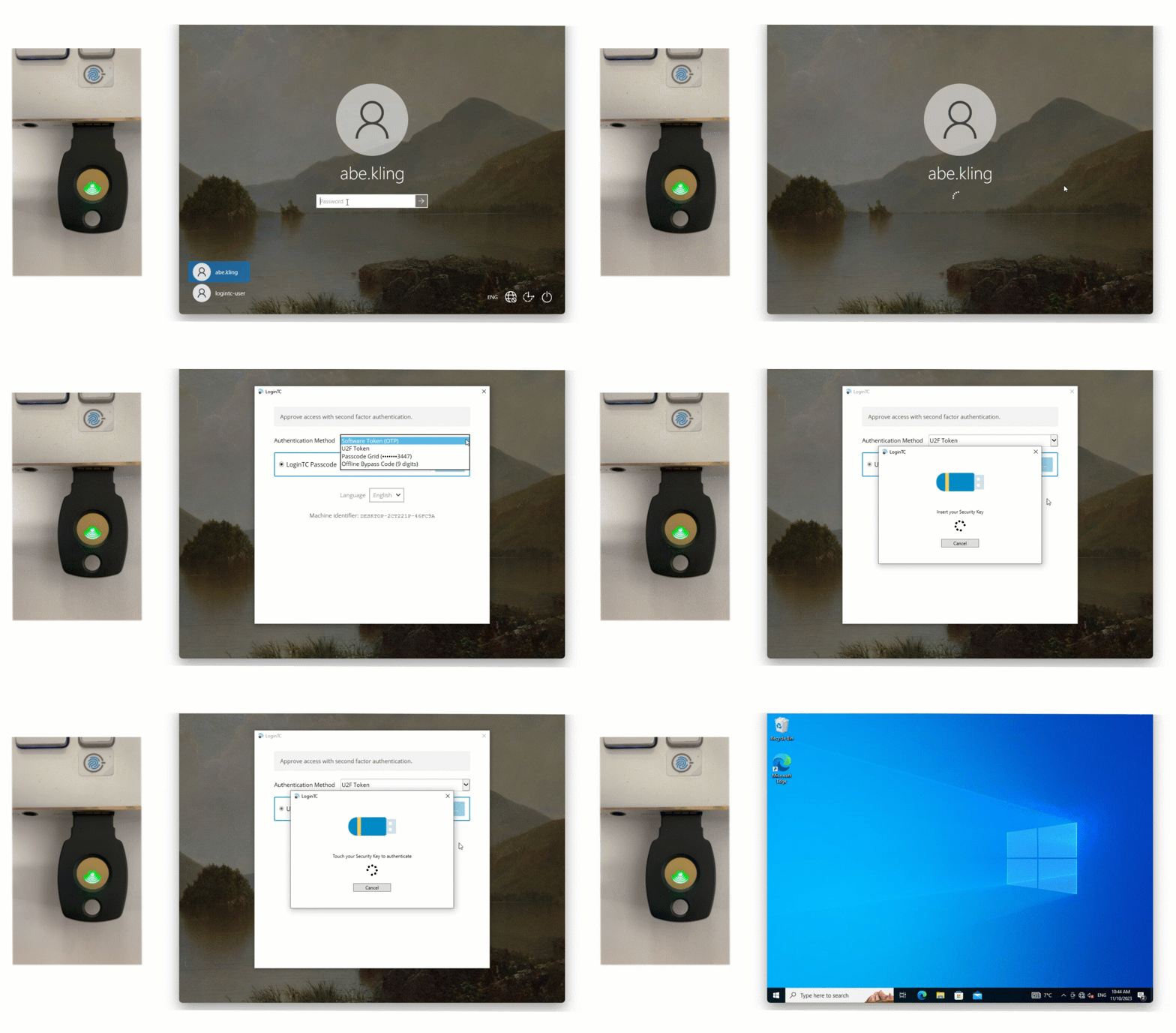
They are particularly useful in “no-phone” zones where electronic devices are restricted, allowing Robert to secure workstations with a simple tap or insert of a physical key.
Hardware tokens and passcode grids
For areas where even company-issued mobile devices are prohibited, hardware tokens or passcode grids are reliable alternatives. Hardware tokens generate a code at the press of a button, while passcode grids (a 5×5 grid of alphanumeric characters) allow users to authenticate by providing specific “tuples” (coordinates) from their card.
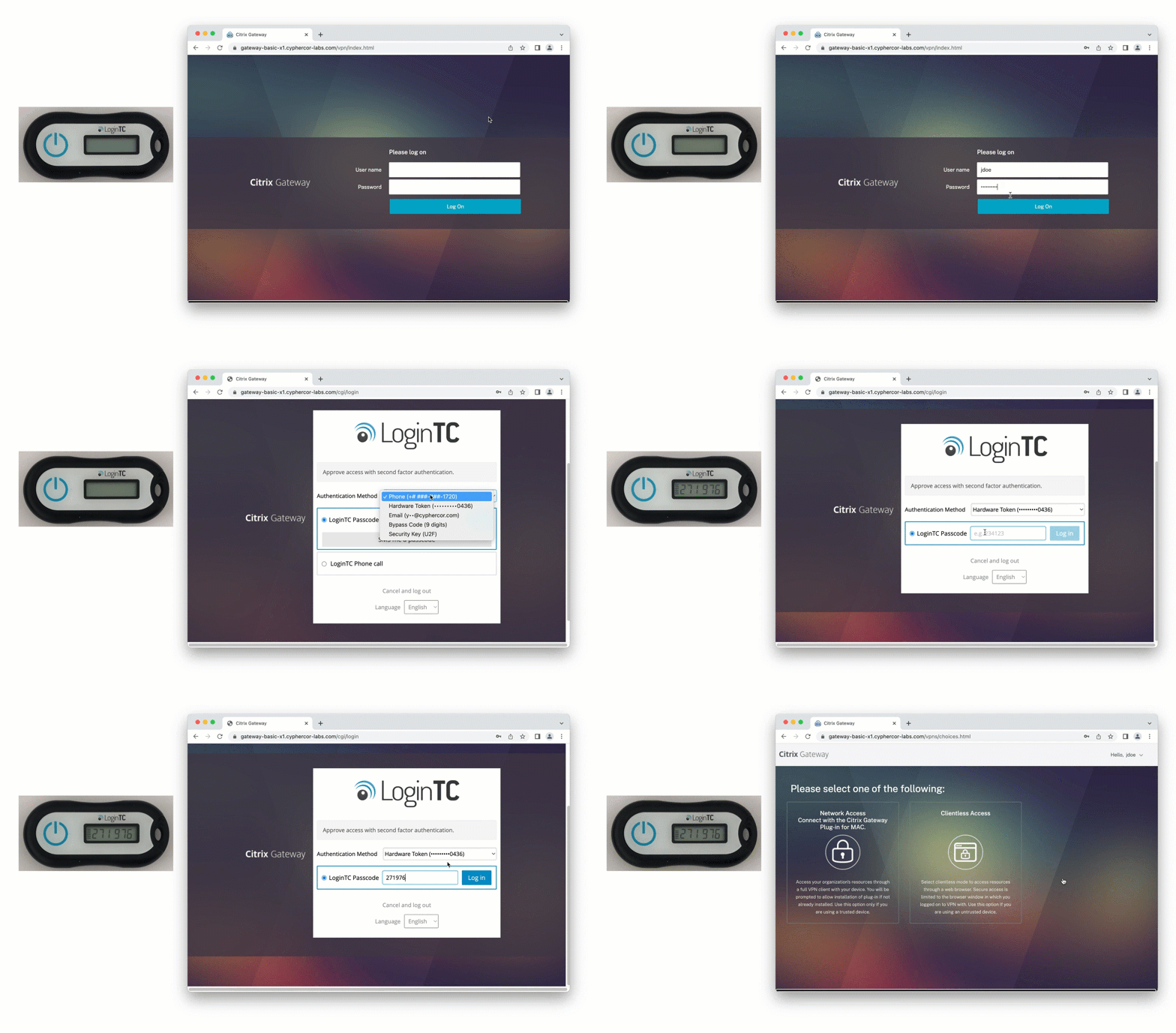
MFA with Hardware token
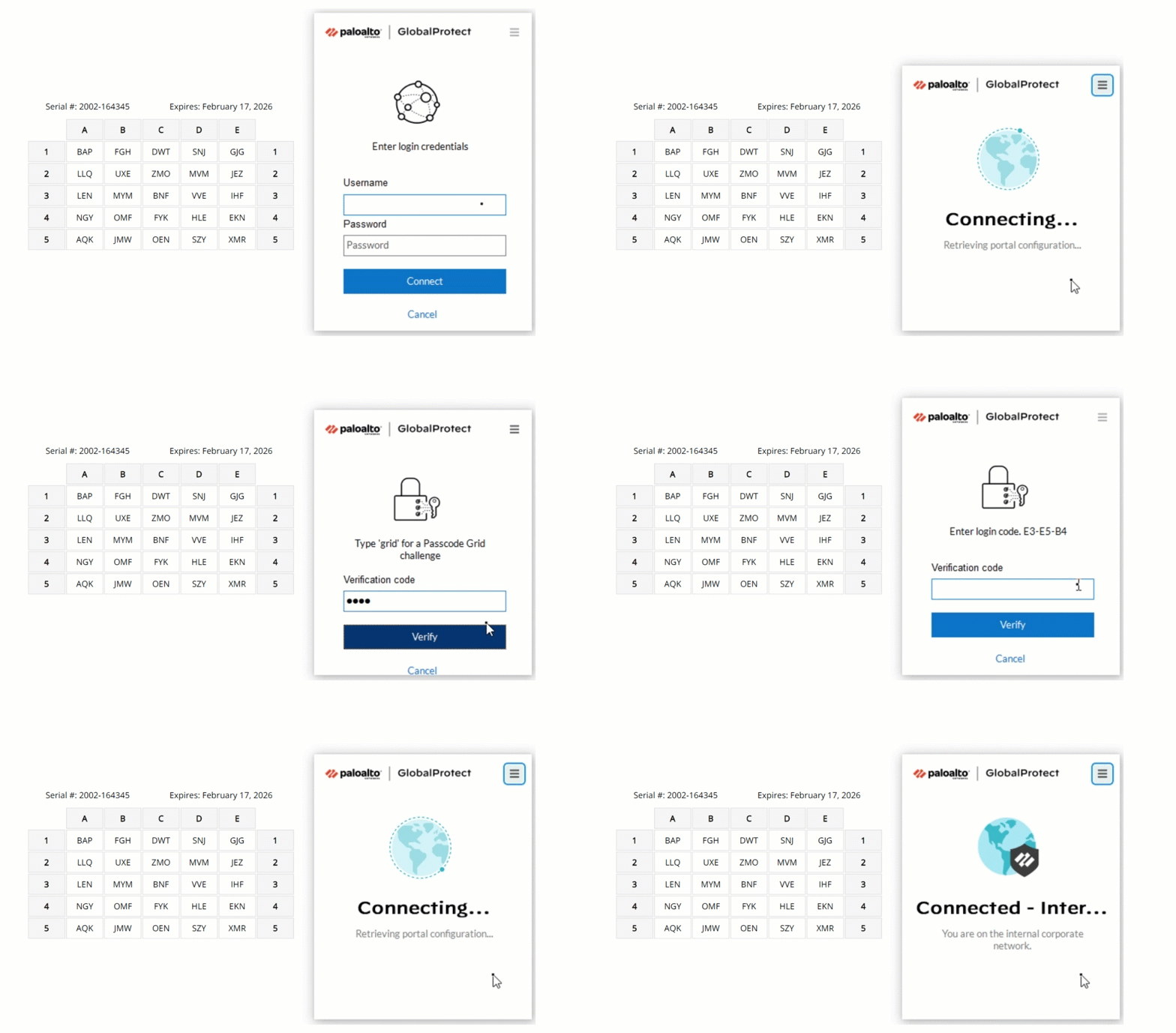
MFA with Passcode Grid
Because these methods are entirely physical and offline, they are the preferred route for MFA for SCADA in high-security zones where electronic interference is a concern.
Implementation steps for on-premises MFA
Deploying on-prem MFA for SCADA requires a structured approach that respects the “always-on” nature of Operational Technology.
Assess the current OT network architecture: Identify every entry point, from the HMI to the VPN. Determine which segments follow the “zones and conduits” model and where the authentication server can safely reside.
Integrate at the protocol level: Use RADIUS or Windows Logon connectors to “wrap” legacy applications in an MFA layer. This allows you to add security to older workstations without needing to modify the SCADA software itself.
Establish emergency bypass protocols: Ensure that “break glass” codes are available for supervisors. In a SCADA environment, security should never be the cause of an operational shutdown during an emergency.
Next Steps
Implementing MFA for SCADA is a specialized task that requires balancing the need for absolute security with the physical realities of the industrial world. As Robert discovered, the standard “cloud-push” approach isn’t enough. However, by leveraging on-premises infrastructure and flexible offline authentication methods, you can meet NERC CIP requirements and protect critical infrastructure from modern threats.
Modernizing your OT security ensures that your facility remains secure, compliant, and operational.
Want to see how LoginTC can help you meet NERC CIP requirements? Book a call with our OT security experts today.