Why Choose Third-Party MFA for Entra ID?
March 23, 2026 •
Microsoft Entra ID (formerly Azure Active Directory) serves as the identity backbone for millions of organizations, managing user identities and access to applications. While Entra ID offers native multi-factor authentication (MFA) capabilities, many IT administrators discover that these built-in options often fall short of their organization’s unique security requirements, compliance mandates, or desired user experience. This is where the strategic integration of third-party MFA for Entra ID becomes not just an option, but a critical necessity for a robust security posture.
The Evolving Landscape of Entra ID Security and MFA
Microsoft Entra ID is a comprehensive cloud-based identity and access management (IAM) service that helps employees sign in and access internal and external resources. It’s the central directory for Microsoft 365, Azure, and countless other SaaS applications. The foundational principle of modern identity security revolves around multi-factor authentication, which adds layers of verification beyond just a password.
While Entra ID’s native MFA is a significant step towards better security, its capabilities, particularly in terms of authentication method diversity and policy granularity, have inherent limitations. Organizations with specific security needs, complex user populations, or strict compliance obligations often find themselves needing more flexibility and control than Entra ID’s out-of-the-box solutions provide. This gap necessitates exploring robust third-party MFA solutions that can seamlessly integrate with Entra ID, extending its capabilities and fortifying access controls.
Why Native Entra ID MFA Falls Short for Many Organizations
Despite its broad adoption, Entra ID’s native MFA features, while continually improving, do not offer a “one-size-fits-all” solution. For many organizations, particularly those with unique operational demands or elevated security profiles, relying solely on native Entra ID MFA can expose critical vulnerabilities or create significant operational friction.
Limited Authentication Method Portfolio
Entra ID primarily supports Microsoft Authenticator push notifications, biometrics (via Authenticator or Windows Hello for Business), FIDO2 security keys, and OATH hardware/software tokens. While these are strong methods, they don’t cover the full spectrum of authentication needs for every organization. For instance:
- Deprecating Less Secure Methods: Microsoft is actively moving away from less secure methods like SMS and email passcodes for native Entra ID MFA, citing their susceptibility to phishing and SIM-swapping attacks. While this is a positive security stance, organizations that still require these methods for specific user groups (e.g., external partners, temporary accounts, or users without smartphones) are left without a native solution. Third-party providers often offer these methods with enhanced security controls, such as geo-fencing or rate-limiting, allowing for controlled use.
- Lack of Specialized Hardware Integrations: While Entra ID supports FIDO2, the depth of integration for various hardware token types (e.g., challenge-response tokens, specific programmable OATH tokens) can be limited. Organizations with existing investments in diverse hardware tokens or specific security key requirements may find native support insufficient. For example, methods like hardware tokens beyond basic OATH TOTP, or specialized security keys with advanced features, often require third-party integration.
- Absence of Passcode Grids: A notable omission from Entra ID’s native MFA portfolio is the passcode grid. This method, often used in high-security environments or by organizations with specific compliance needs (e.g., defense contractors, financial institutions), provides a robust, offline-capable authentication factor that is not susceptible to common online attacks.
Policy Granularity and Customization Challenges
Entra ID Conditional Access policies are powerful but can be restrictive in their granularity when it comes to MFA enforcement. While you can define policies based on user groups, device state, location, and application, the options for *how* MFA is performed (e.g., requiring a specific MFA method for a specific application, or dynamic risk-based method selection) are not as flexible as some third-party solutions. Organizations needing highly customized authentication flows or adaptive MFA based on real-time risk signals often find native Entra ID lacking.
Licensing and Cost Considerations
Many advanced Entra ID security features, including robust Conditional Access policies and certain MFA reporting capabilities, are tied to premium licenses (e.g., Entra ID P1 or P2). For organizations with a large user base, upgrading all users to these premium tiers solely for enhanced MFA functionality can be cost-prohibitive. Third-party MFA solutions can sometimes offer comparable or superior features at a more predictable or cost-effective price point, especially when considering specific authentication methods or integration needs.
Key Benefits of Integrating Third-Party MFA with Entra ID
The decision to implement third-party MFA for Entra ID is driven by the desire to overcome native limitations and achieve a more comprehensive, flexible, and secure authentication infrastructure. This integration typically leverages Entra ID’s External Authentication Methods (EAM) feature (formerly Custom Controls) or other federation capabilities.
Third-party MFA solutions offer a wider array of authentication methods and greater policy granularity than native Entra ID options, enhancing overall security and flexibility.
Broader Range of Authentication Factors
One of the most compelling reasons to adopt third-party MFA is the expanded choice of authentication methods. This allows organizations to cater to diverse user needs, security requirements, and regulatory mandates.
- Hardware Tokens: Beyond simple OATH TOTP, third-party solutions support a wider range of hardware tokens, including challenge-response tokens, programmable tokens, and smart cards, which are crucial for high-security environments.
- Passcode Grids: As mentioned, passcode grids offer a highly secure, offline-capable option not natively available in Entra ID, ideal for environments where mobile device reliance is a concern.
- Enhanced FIDO2 and Security Keys: While Entra ID supports FIDO2, third-party providers can offer deeper integration and management capabilities for various security keys, including those with advanced features or specific form factors.
- Flexible SMS and Email Passcodes: For specific use cases where a low-friction method is still required (e.g., guest users, temporary access, or disaster recovery), third-party solutions can provide SMS passcodes and email passcodes with additional security layers, such as rate limiting, geo-fencing, and fraud detection, mitigating some of the risks associated with these methods.
- Push Notifications and Biometrics: Many third-party solutions offer their own robust mobile authenticator apps with secure push notifications and biometric options (fingerprint, facial recognition), often with more customizable branding and policy controls.
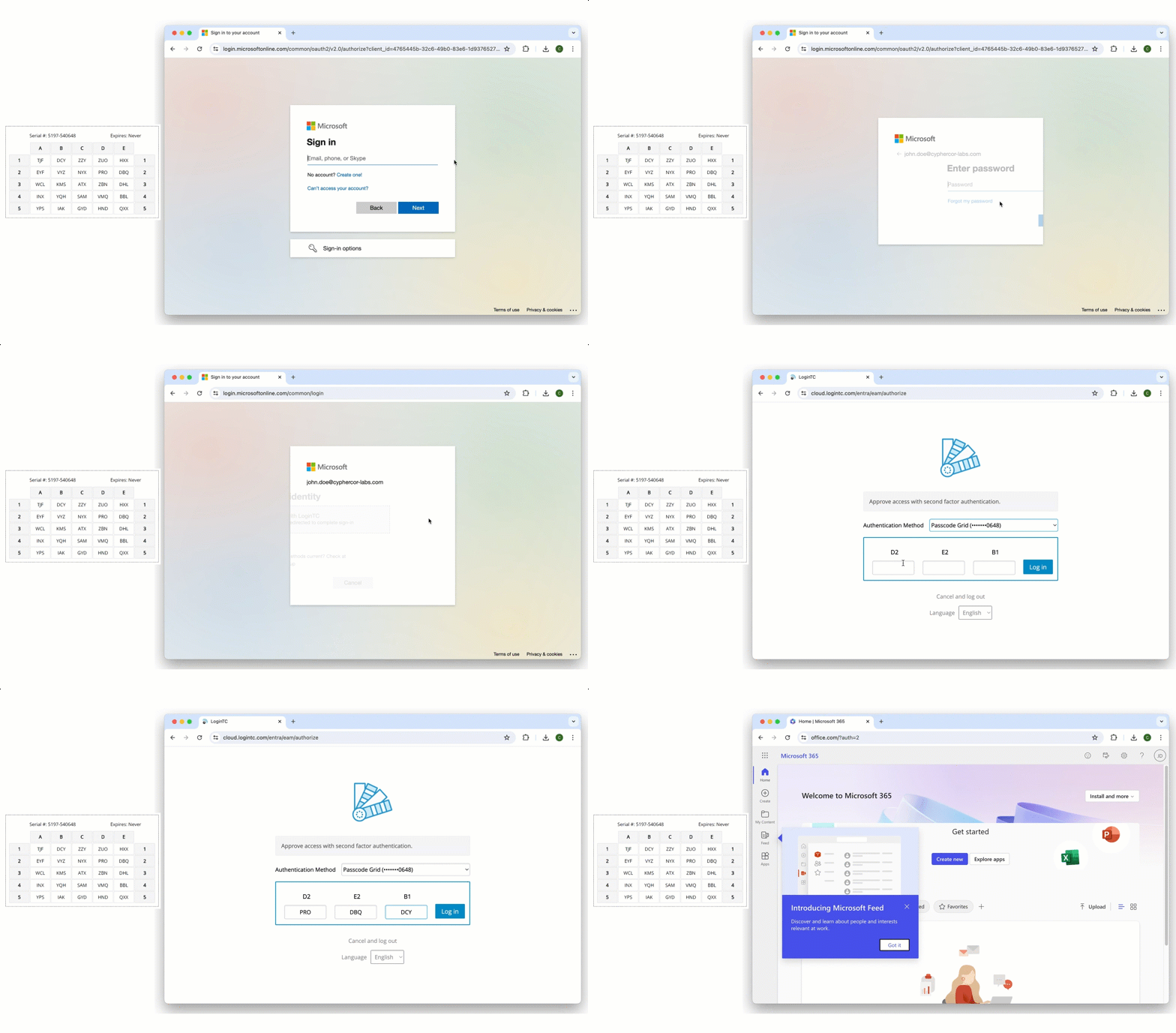
Entra ID with Third-Party LoginTC MFA using Passcode Grid
Superior Security Controls
Third-party MFA solutions can introduce advanced security features that augment Entra ID’s capabilities:
- Adaptive and Risk-Based MFA: Leverage real-time contextual data (user behavior, device posture, IP reputation, time of day) to dynamically adjust authentication requirements. A login from an unusual location might require an extra factor or a stronger method, for example.
- Fraud Detection and Prevention: Advanced analytics and machine learning to detect and block suspicious authentication attempts, such as brute-force attacks, credential stuffing, and phishing attempts.
- Granular Policy Enforcement: Define highly specific policies that dictate which MFA methods are allowed or required for different applications, user groups, or access scenarios, going beyond what native Conditional Access offers.
- Offline Authentication: Support for methods like passcode grids or certain hardware tokens that work even without an internet connection, crucial for operational continuity in isolated or disconnected environments.
Enhanced Administrative Flexibility
Integrating a third-party solution often means more control for IT administrators:
- Centralized Management: Manage all MFA methods and policies from a single console, often with more detailed logging and auditing capabilities.
- Customizable User Experience: Tailor the MFA enrollment and authentication experience to match organizational branding or specific user workflows, reducing friction and improving adoption.
- Integration with Other Systems: Seamlessly extend MFA to other on-premises applications, VPNs, VDI, or legacy systems that may not directly integrate with Entra ID, creating a unified authentication experience across the entire IT ecosystem.
Meeting Stringent Compliance Mandates
Many industries are subject to strict regulatory requirements (e.g., HIPAA, CMMC, GDPR, NIST, PCI DSS) that often dictate specific types of authentication or levels of assurance.
- Specific Authentication Method Requirements: Certain regulations might favor or mandate specific “strong” authentication methods like FIDO2, hardware tokens, or smart cards. Third-party solutions ensure these requirements can be met without compromise.
- Auditing and Reporting: Comprehensive logging and reporting features are critical for demonstrating compliance during audits. Third-party MFA providers often offer more detailed, customizable audit trails.
Optimized User Experience
While security is paramount, a poor user experience can lead to circumvention or shadow IT. Third-party solutions can offer:
- Method Choice: Allow users to choose from a wider array of approved MFA methods, catering to personal preference and device availability, leading to higher adoption rates.
- Reduced Friction: Intelligent, adaptive MFA means users are only challenged when necessary, minimizing interruptions for low-risk access attempts.
Common Use Cases and Industries Benefiting from Third-Party MFA
While the benefits of third-party MFA are broad, certain industries and operational scenarios particularly highlight its necessity when working with Entra ID.
Educational institutions frequently leverage third-party MFA to secure diverse user populations and legacy systems, making them a prime use case for enhanced Entra ID security.
Educational Institutions: A Prime Example
Education is a sector with unique challenges that make MFA for education a perfect fit for third-party solutions.
- Diverse User Base: Universities and schools manage a vast array of users: students (often with varying tech savviness and device access), faculty, staff, and alumni. A single native MFA method from Entra ID often fails to cater to all these groups effectively. Students might prefer simple, accessible methods, while faculty might require more robust options.
- Budget Constraints: Education institutions often operate on tight budgets, making the premium licensing tiers for advanced Entra ID features a significant hurdle. Third-party solutions can provide cost-effective alternatives.
- Legacy Systems: Many educational institutions still rely on older applications and systems that may not integrate seamlessly with modern Entra ID native MFA. A third-party solution can bridge this gap, providing MFA for both cloud and on-premises resources.
- Need for Offline Methods: In scenarios like computer labs or testing environments, or for users with limited smartphone access, methods like passcode grids or specific hardware tokens become invaluable, which Entra ID doesn’t offer natively.
Healthcare Organizations
Healthcare providers face stringent regulatory compliance (e.g., HIPAA, HITECH) and deal with highly sensitive patient data.
- HIPAA Compliance: Requires robust access controls, often necessitating specific types of strong authentication that might go beyond Entra ID’s native offerings.
- Clinical Workflows: Clinicians need fast, reliable, and secure access. Third-party MFA can provide adaptive authentication that minimizes friction while maintaining high security, such as push notifications or biometrics.
- Diverse Endpoints: Access from a variety of devices, including shared workstations, mobile carts, and personal devices, requires flexible and secure MFA options.
Government and Defense Contractors
These sectors operate under some of the strictest security mandates (e.g., CMMC, NIST 800-171, FIPS 201).
- High Assurance Requirements: Often demand FIPS 140-2 validated hardware, smart cards (PIV/CAC), or other high-assurance authentication methods that are better supported or managed by specialized third-party solutions.
- Air-Gapped or Disconnected Environments: The need for offline authentication methods, like passcode grids, is critical in sensitive, isolated networks.
- Supply Chain Security: Extending robust MFA to third-party contractors and partners accessing government systems, where native Entra ID solutions might not be flexible enough for external users.
Financial Services
Financial institutions handle vast amounts of monetary transactions and personal financial data, making them prime targets for cyberattacks.
- PCI DSS Compliance: Requires strong authentication for anyone accessing cardholder data environments.
- Fraud Prevention: Advanced risk-based authentication from third-party solutions can significantly bolster defenses against account takeover and transaction fraud.
- Diverse User Groups: From internal employees to external brokers and high-net-worth clients, each group may have distinct security profiles and preferred authentication methods.
Implementing Third-Party MFA for Entra ID: Best Practices
Successfully integrating a third-party MFA solution with Entra ID requires careful planning, execution, and ongoing management. The goal is to enhance security without disrupting user experience or overburdening IT staff.
A phased implementation strategy, starting with a pilot program, is crucial for successful third-party MFA deployment with Entra ID, ensuring minimal disruption and maximum adoption.
Strategic Planning and Needs Analysis
Before selecting a solution, thoroughly assess your organization’s specific requirements.
- Identify Gaps: What specific MFA methods or policy features does native Entra ID lack that your organization needs? Consider compliance, user preferences, and unique operational scenarios.
- User Personas: Map out different user groups (e.g., employees, contractors, students, administrators) and their specific authentication needs and technical capabilities.
- Existing Infrastructure: Document current identity providers, applications (cloud and on-premises), and network topology to ensure compatibility.
- Compliance Requirements: List all relevant industry regulations and internal security policies that dictate authentication standards.
Choosing the Right Solution Provider
Vendor selection is critical. Look for a provider that offers:
- Seamless Entra ID Integration: The solution must integrate smoothly with Entra ID, ideally leveraging Entra ID External Authentication Methods (EAM) (formerly Custom Controls) or other standard federation protocols. This ensures that Entra ID remains the authoritative source for user identities.
- Broad Authentication Method Support: Ensure the provider offers the specific methods identified in your needs analysis (e.g., hardware tokens, passcode grids, flexible SMS/email, FIDO2).
- Advanced Security Features: Look for adaptive MFA, risk-based policies, robust fraud detection, and comprehensive auditing.
- Scalability and Reliability: The solution should be able to scale with your organization’s growth and offer high availability.
- Ease of Management: An intuitive administration console, straightforward user enrollment, and clear reporting are essential for IT efficiency.
- Vendor Support and Documentation: Excellent technical support and comprehensive documentation are invaluable during deployment and ongoing operations. (e.g., LoginTC’s EAM documentation).
Seamless Integration with Entra ID
The technical integration process is crucial.
- Leverage EAM/Custom Controls: For the deepest integration, utilize Entra ID’s External Authentication Methods. This allows Conditional Access policies in Entra ID to invoke the third-party MFA solution when specific conditions are met.
- Test Thoroughly: Before a full rollout, conduct extensive testing in a non-production environment to ensure all integrations work as expected and that authentication flows are seamless.
Deployment and User Adoption
A well-executed rollout plan is key to success.
- Pilot Program: Start with a small group of enthusiastic users or IT staff to gather feedback and fine-tune the implementation.
- Phased Rollout: Deploy the solution in phases, starting with less critical applications or user groups, gradually expanding to the entire organization.
- User Communication and Training: Clearly communicate the benefits of MFA, provide simple, step-by-step enrollment instructions, and offer readily available support. Explain *why* this change is happening.
- Support Channels: Establish clear channels for users to get assistance with enrollment or authentication issues.
Ongoing Management and Optimization
MFA is not a set-it-and-forget-it solution.
- Monitor Performance: Regularly review logs and reports to identify any authentication failures, potential security incidents, or user experience issues.
- Review Policies: Periodically reassess your MFA policies to ensure they remain aligned with your security posture, evolving threats, and organizational changes.
- Stay Updated: Keep both Entra ID and your third-party MFA solution updated to benefit from the latest security features and patches.
Frequently Asked Questions
What is Entra ID External Authentication Methods (EAM)?
Entra ID External Authentication Methods (EAM), formerly known as Custom Controls, is a feature within Entra ID Conditional Access that allows organizations to integrate third-party MFA solutions. When a user attempts to access a resource protected by an EAM policy, Entra ID redirects the authentication request to the configured third-party MFA provider for verification.
Why would an organization need third-party MFA with Entra ID?
Organizations often need third-party MFA for Entra ID to address limitations in native Entra ID MFA, such as a restricted set of authentication methods (e.g., lack of passcode grids, specific hardware tokens, or flexible SMS/email options), more granular policy control, advanced adaptive security features, or to meet specific compliance requirements that native Entra ID cannot fulfill.
What types of authentication methods do third-party MFA solutions offer that Entra ID doesn’t?
Third-party MFA solutions can offer methods like passcode grids, a wider variety of specialized hardware tokens (e.g., challenge-response), more flexible and secure implementations of SMS and email passcodes for specific use cases, and deeper integration with specific FIDO2 security key models or biometric solutions beyond what Entra ID natively supports.
Is it complex to integrate third-party MFA with Entra ID?
Integrating third-party MFA with Entra ID using External Authentication Methods is a well-defined process, but it requires careful planning and technical expertise. Modern solutions are designed for seamless integration, often providing connectors and detailed documentation to streamline the setup, making it manageable for IT administrators.
Can third-party MFA help with compliance?
Yes, absolutely. Many compliance frameworks (e.g., HIPAA, CMMC, NIST, PCI DSS) require specific types of strong authentication or detailed auditing that native Entra ID MFA might not fully cover. Third-party MFA solutions can provide the necessary authentication methods, granular controls, and comprehensive logging to help organizations meet these stringent regulatory demands.
What are the cost implications of using third-party MFA for Entra ID?
The cost implications vary by vendor and features. While there’s an additional cost for the third-party solution, it can be more cost-effective than upgrading all users to premium Entra ID licenses solely for advanced MFA features. It also provides access to specialized authentication methods or security controls that are simply not available natively, offering a greater return on investment for specific security needs.
Next Steps to add Third-Party MFA to Entra ID
While Microsoft Entra ID provides a foundational layer of identity security, its native MFA capabilities may not always align with the diverse and evolving needs of every organization. For IT administrators facing unique compliance mandates, requiring a broader array of authentication methods (like hardware tokens, passcode grids, or secure SMS/email options), or seeking more granular control over authentication policies, integrating a robust **third-party MFA for Entra ID** solution is the strategic path forward. This approach not only fortifies your security posture against sophisticated threats but also provides the flexibility, control, and user experience necessary to thrive in today’s complex digital environment.
Ready to enhance your Entra ID security with advanced, flexible multi-factor authentication? Discover how LoginTC seamlessly integrates with Entra ID to provide a comprehensive suite of authentication methods and robust security controls.