How to Deploy MFA for Offshore Development Centers (ODCs)
March 19, 2026 •
Your offshore development center checks every box. It holds ISO 27001 certification. Access to the development floor requires biometric authentication. Cameras monitor every workstation. Employees sign NDAs on day one, and clean desk policies are strictly enforced. Your client insisted on all of it, and your ODC delivers.
But every morning, when your developers sit down to log in, they reach for a phone they are not allowed to bring into the building.
This is one of the most overlooked security gaps in enterprise IT today. The global offshore software development market is projected to exceed $280 billion by 2031, and with that growth comes an expanding attack surface. Yet MFA for offshore development centers is rarely designed with the realities of those environments in mind. Most MFA deployments are designed for a world where every employee has a smartphone within arm’s reach. In an ODC, that assumption is systematically and intentionally false.
The physical security controls that make an offshore development center trustworthy are, by design, the same controls that break the most common forms of multi-factor authentication. For IT managers responsible for securing systems that span both corporate headquarters and offshore teams, this creates a real and immediate compliance problem.
This post explains how the conflict arises, why MFA for offshore development centers is uniquely difficult, and what a proper solution looks like for ODC environments.
What Is an Offshore Development Center?
An offshore development center is a dedicated facility, typically located in a lower-cost region such as India, Eastern Europe, or Southeast Asia, that provides software development, IT operations, or business process services to a client organization. Unlike general remote work arrangements, an ODC operates as an extension of the client’s own team, with dedicated staff, infrastructure, and security protocols tailored to that client’s requirements.
ODCs are commonly used by companies in fintech, healthcare IT, enterprise SaaS, and government contracting, where the demand for skilled developers outpaces the local talent supply or where cost structures make domestic staffing impractical at scale. Because these centers handle sensitive client code, proprietary systems, and confidential data, enterprise clients typically impose rigorous security requirements as a condition of the contract.
This is the key distinction between an ODC and a typical remote team. These are not developers working from home on personal laptops. They are working inside a controlled, monitored, access-restricted facility, and the security requirements governing that facility are often more stringent than what the client enforces in its own offices.
The Physical Security Reality on the ODC Floor
What does a well-secured ODC actually look like in practice? Security at a certified, enterprise-grade offshore center operates across four interconnected layers: people, processes, policies, and physical infrastructure. Understanding all four is important, because the phone ban that creates the MFA problem is not an isolated rule. It is the output of a comprehensive security posture that clients contractually demand.
People and Access Controls
Access to the development floor at a serious ODC is tightly restricted. Entry typically requires biometric authentication or a badge system, and access rights are provisioned on a need-to-access basis. Visitors must be escorted. Background checks are a baseline requirement for any employee who touches client systems, and many enterprise contracts specify the depth of those checks. Role-based access controls govern what systems each employee can reach, and those permissions are reviewed on a scheduled basis.
This is also where the insider threat dimension becomes relevant. Multiple studies and security frameworks identify trusted insiders as one of the most significant risk vectors in offshore environments. An employee with legitimate access who exfiltrates data through a personal device is far harder to detect than an external attacker. Phone restrictions exist in large part to close this vector, not just to prevent opportunistic photography.
Processes and Monitoring
Secure ODCs maintain continuous monitoring of network activity, implement data loss prevention tools, and conduct regular security audits, often on an annual cycle for policy review and semi-annually for on-site assessments. Code repositories are access-controlled and version-tracked. Data transfer to external storage media is restricted or blocked entirely, and print activity is logged or prohibited in sensitive zones.
Policies and Compliance Frameworks
The compliance standards that govern ODC security are not optional for clients operating in regulated industries. ISO/IEC 27001 is the foundational certification most enterprise clients require. Beyond that, depending on the client’s industry and geography, an ODC may also need to demonstrate alignment with SOC 2 Type II, PCI-DSS, HIPAA, GDPR, and in some cases ITAR or export control requirements. Each of these frameworks imposes specific requirements around access control, authentication, data handling, and audit trails.
SOC 2 in particular is worth noting for IT managers. Its Trust Services Criteria for logical and physical access controls require evidence that access to systems is restricted to authorized users, that multi-factor authentication is in use, and that those controls are consistently enforced. A SOC 2 audit that finds ODC employees bypassing MFA because the standard deployment does not work in their environment is a finding, not a footnote.
Physical Infrastructure and the Phone Ban
The physical layer is where security controls meet daily workflow most visibly. The physical security measures at a certified, enterprise-grade offshore center typically include restricted floor access with badge or biometric controls, closed-circuit surveillance, clean desk policies, no-print zones, and restrictions on external storage devices such as USB drives.
Critically, personal mobile phones are frequently prohibited on the development floor. This is not a fringe policy. ISO 27001 Annex A 7.6, which governs working in secure areas, explicitly recommends that organizations install secure lockers outside the perimeter for the storage of personal mobile devices and enforce a no-photography policy at all entry points. Because enterprise clients routinely require their ODC partners to hold ISO 27001 certification, this guidance becomes operative at most serious offshore facilities.
The rationale is straightforward. A smartphone camera is one of the cheapest and hardest-to-detect data exfiltration tools available. An employee who can photograph a screen, a whiteboard, or a line of source code has effectively bypassed every network-level security control the ODC has in place. A malicious insider or a compromised employee does not need to defeat the firewall if they can simply photograph the screen. Phone bans, lockers at the entrance, and no-photography signage are not bureaucratic inconveniences. They are a recognized physical security standard with a clear threat model behind them.
This means that at the moment an ODC employee sits down to authenticate, their personal phone, the device on which most MFA solutions depend, is locked in a cabinet somewhere between the parking lot and the front desk.
Why MFA for Offshore Development Centers Fails With Standard Method
Multi-factor authentication is built on the assumption that the user has a device. Most enterprise MFA deployments default to smartphone-based methods because smartphones are nearly universal and relatively easy to enroll. In an ODC, that assumption collapses entirely.
Here is how each common MFA method breaks down in a phone-free environment:
Authenticator apps (Google Authenticator, Microsoft Authenticator, etc.) generate time-based one-time passwords on a smartphone. No phone on the floor means no OTP. There is no workaround within this method.
Push notifications, used by solutions like Duo and Microsoft Entra, send an approval request to the user’s phone. The user taps “approve” to authenticate. Again, this requires a phone present and connected to a network. In an ODC with a phone ban, this method is completely inoperable.
SMS one-time passwords are sent via text message to the user’s registered mobile number. Beyond the fact that SMS-based MFA is now widely regarded as the weakest form of second-factor authentication due to SIM-swapping and SS7 vulnerabilities, it also requires a phone to receive the message.
Personal email OTP is often proposed as a fallback. But on a locked-down ODC workstation, access to personal email accounts is typically blocked as part of the same data security policies that prohibit personal devices. Corporate email OTP is a possibility, but only if the ODC workstation has access to a corporate email account, which is not always the case for contractor or vendor staff.
The result is an uncomfortable irony: implementing proper MFA for offshore development centers is made hardest by the very security controls that make an ODC worth trusting. For IT managers, this often surfaces not as a deliberate policy decision but as a gap that nobody caught during the initial deployment. MFA is enabled on the systems, employees are enrolled, and it looks fine on paper. What it looks like in practice is employees sharing bypass codes, skipping the second factor, or using personal phones in violation of the ODC’s own security policies.
None of these outcomes are acceptable. For organizations subject to SOC 2, HIPAA, PCI-DSS, or similar frameworks, a broken MFA deployment is not a minor inconvenience. It is a compliance failure.
For a broader look at what a well-rounded MFA deployment should include, see our post on 6 must-have MFA features.
Common Workarounds and Why They Fall Short
IT teams that recognize this problem typically consider a handful of workarounds. Each has limitations that make it ill-suited as a primary solution at ODC scale.
Hardware security keys (FIDO2/YubiKey) are a strong authentication option and genuinely phone-free. The challenge in an ODC context is logistics. Provisioning physical keys to a large offshore workforce requires international shipping, customs clearance, and an inventory management process for lost, damaged, or terminated-employee keys. For a domestic office of 20 employees, this is manageable. For an ODC of 200 employees across multiple shifts in another country, it becomes a significant operational burden.
Smart cards and Windows Hello for Business provide strong, device-bound authentication without a phone. However, they require compatible hardware provisioned per workstation, which means upfront capital investment and ongoing hardware management. Smart card infrastructure also requires a PKI deployment, which adds substantial setup complexity.
VPN with IP whitelisting is sometimes treated as a substitute for user-level MFA because it restricts access to known network ranges. It is not MFA. It controls where a user can connect from, not who the user is. If credentials are compromised and used from within the whitelisted range, such as by a malicious insider at the ODC itself, IP whitelisting provides no protection.
Bypassing MFA entirely is the outcome that organizations fall into when they cannot make any of the above work. It is, of course, the worst possible outcome. Shared accounts, standing bypass codes, and MFA exemptions for ODC users effectively mean that the users with the most direct access to your systems have the weakest authentication controls.
To understand how organizations have approached authentication in other restricted or offline environments, our post on offline MFA for Windows Logon covers several scenarios that share characteristics with the ODC challenge.
MFA for Offshore Development Centers: Methods That Actually Work
Solving MFA for an offshore development center requires thinking beyond the smartphone. The good news is that phone-free authentication is a well-understood problem, and several proven methods are available. A mature MFA solution should support all of them, so that IT administrators can deploy the right method for their specific ODC environment, workforce size, and security posture.
Passcode Grid
A passcode grid is a printed or PDF-saved card containing a unique 5×5 grid of three-character tuples. When a user authenticates, they are prompted for specific cells from their grid, which they look up and enter manually. No phone, no hardware token, no network connectivity required beyond the workstation itself.
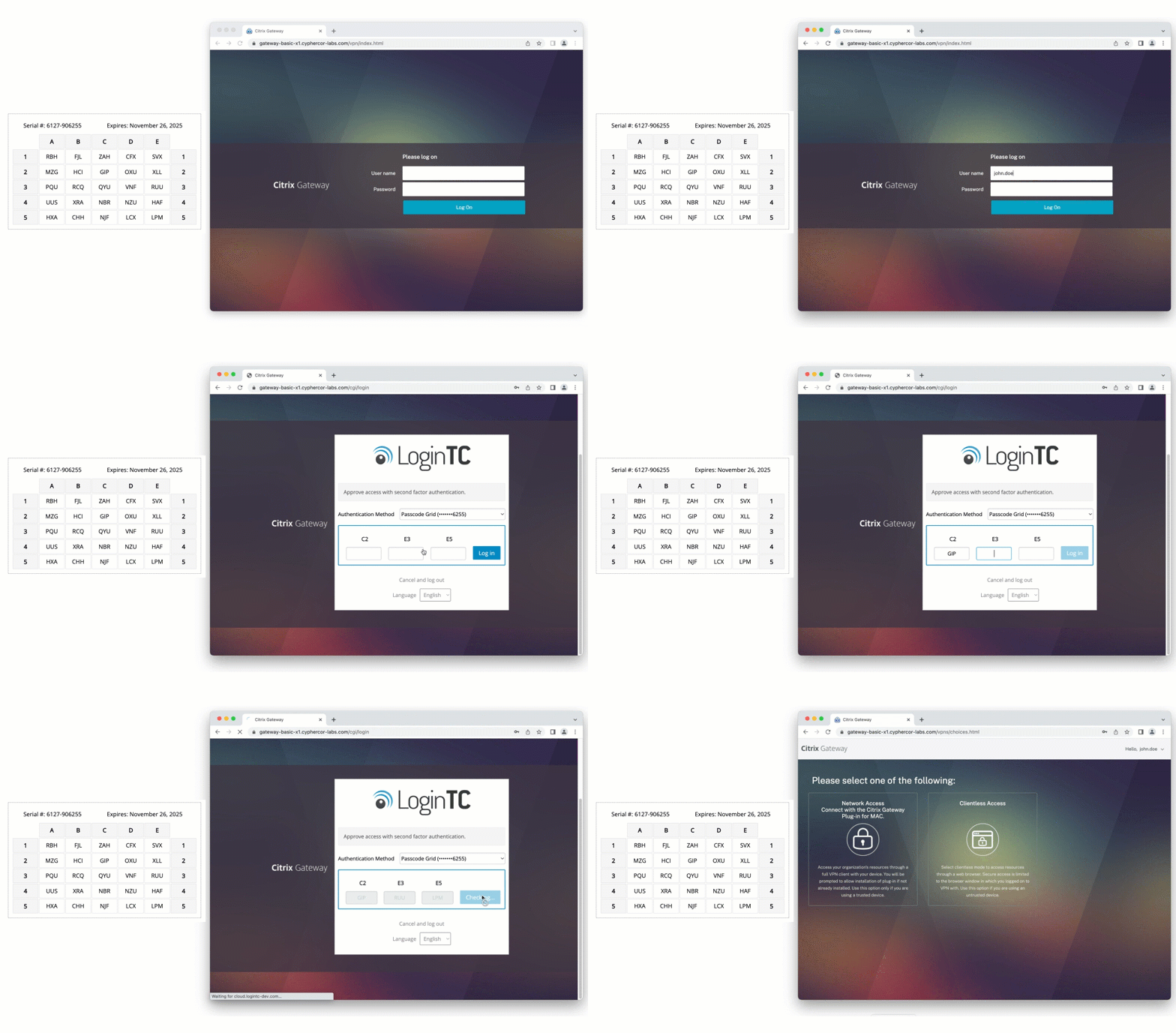
For ODC deployments, the passcode grid has a compelling combination of properties. Grids can be generated centrally by an administrator and distributed to employees as printed cards or saved files. They cost nothing beyond paper and printer ink. If a grid is lost or compromised, a new one can be generated and assigned in minutes. There is no hardware to ship internationally, no app to install, and no dependency on a device that employees are not allowed to have at their workstation.
LoginTC’s passcode grid is included at no additional cost and can be used to authenticate to any LoginTC-protected application or service, including Windows Logon, VPNs, and cloud applications via Microsoft Entra ID or Google Workspace.
Hardware Token OTP
For organizations that want a physical token but need something simpler and cheaper than FIDO2 keys, hardware token OTP is a strong option. These are small physical devices that generate a six or eight digit one-time password at the press of a button. LoginTC supports OATH-compliant hardware tokens and offers its own branded version, as well as compatibility with third-party tokens organizations may already own.
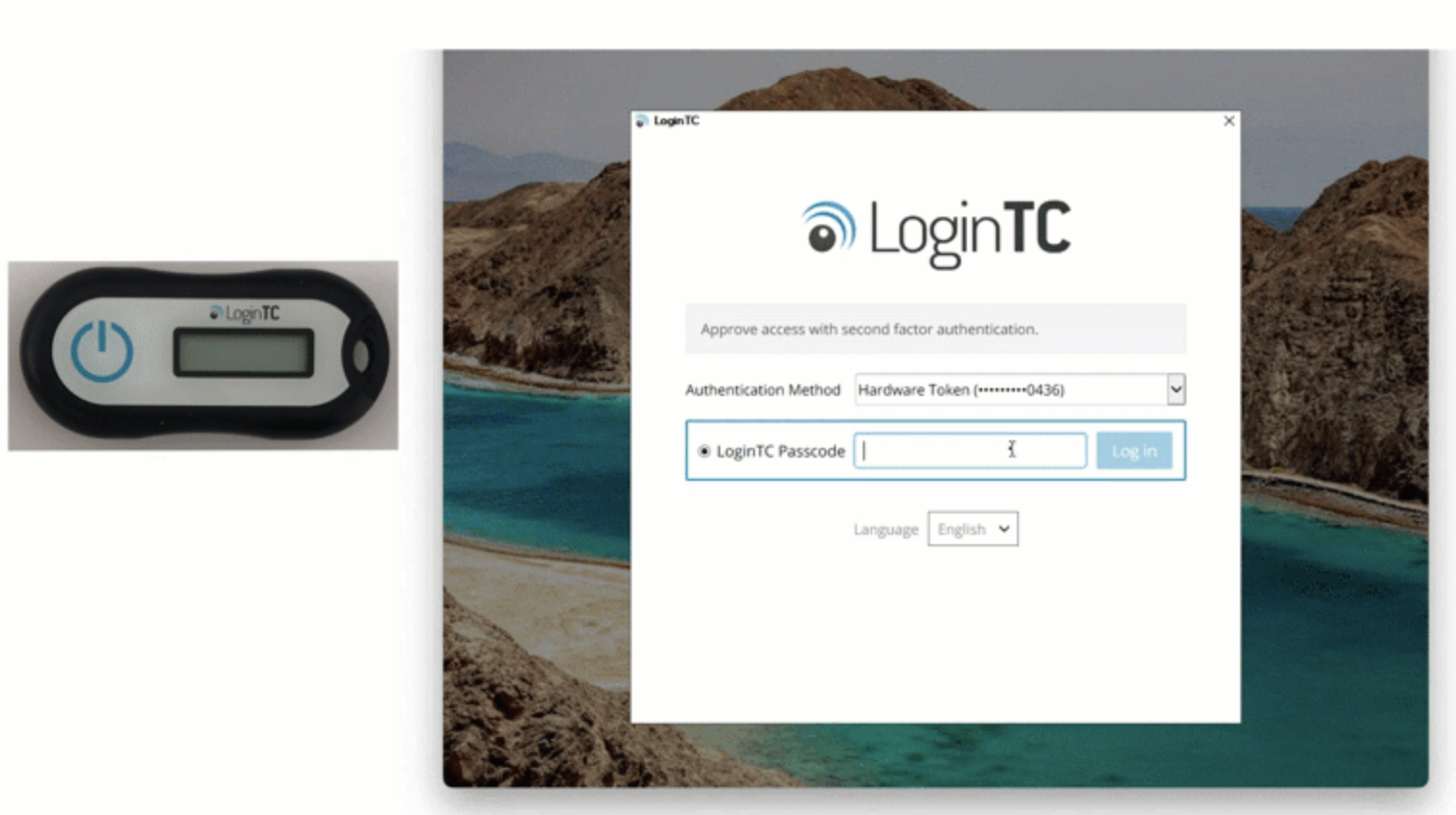
Hardware tokens work entirely offline, require no smartphone, and are straightforward for employees to use. At ODC scale, the provisioning challenge is real but manageable, particularly if tokens are treated as facility property rather than issued to individual employees, which reduces turnover-related logistics significantly.
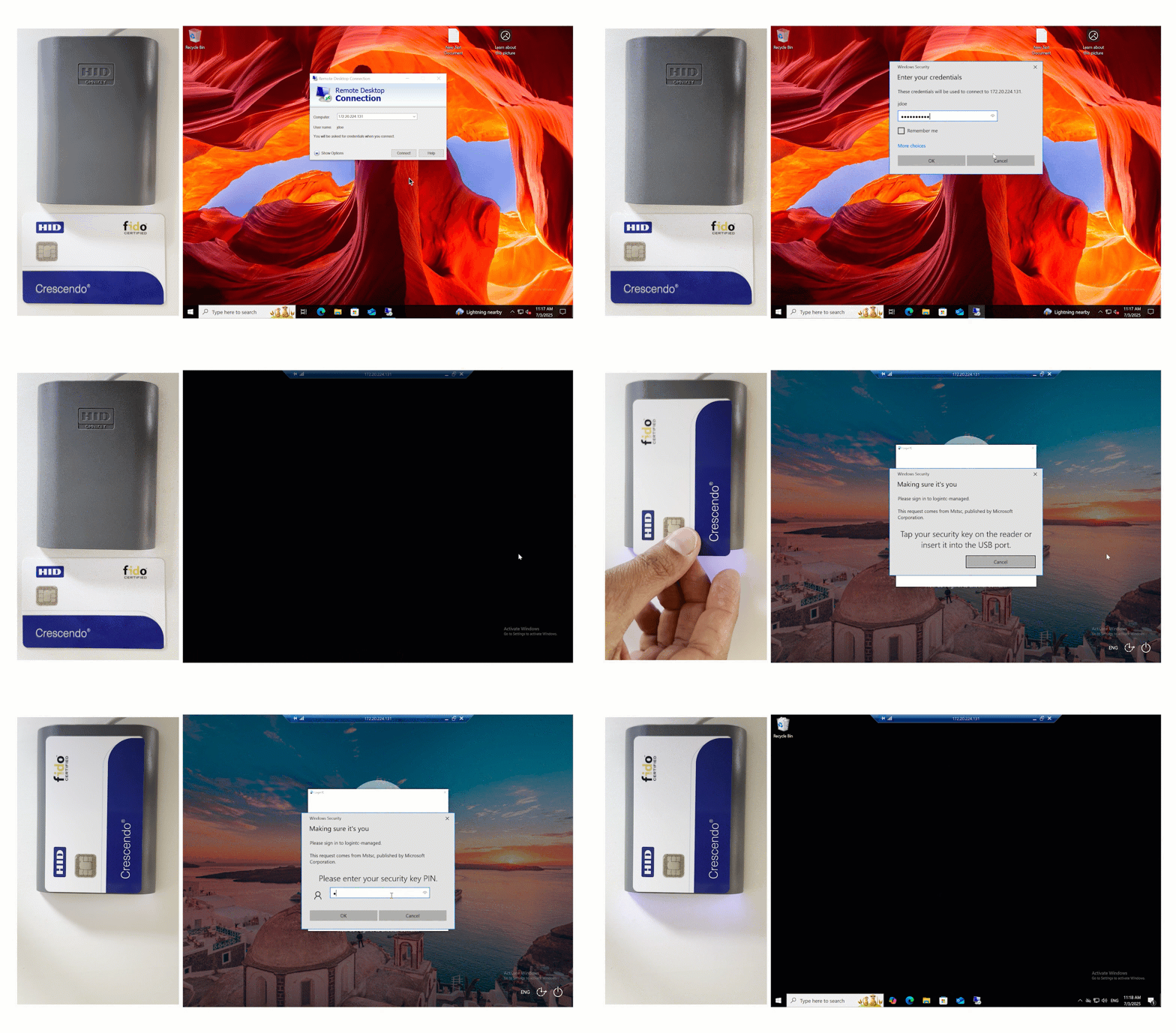
FIDO2 Security Keys
FIDO2 security keys provide phishing-resistant, passwordless-capable authentication via a USB or NFC device. The user inserts the key and taps a button to authenticate. LoginTC supports a range of FIDO2 and WebAuthn-compliant security keys, and administrators can manage enrollment and distribution through the LoginTC Admin Panel.
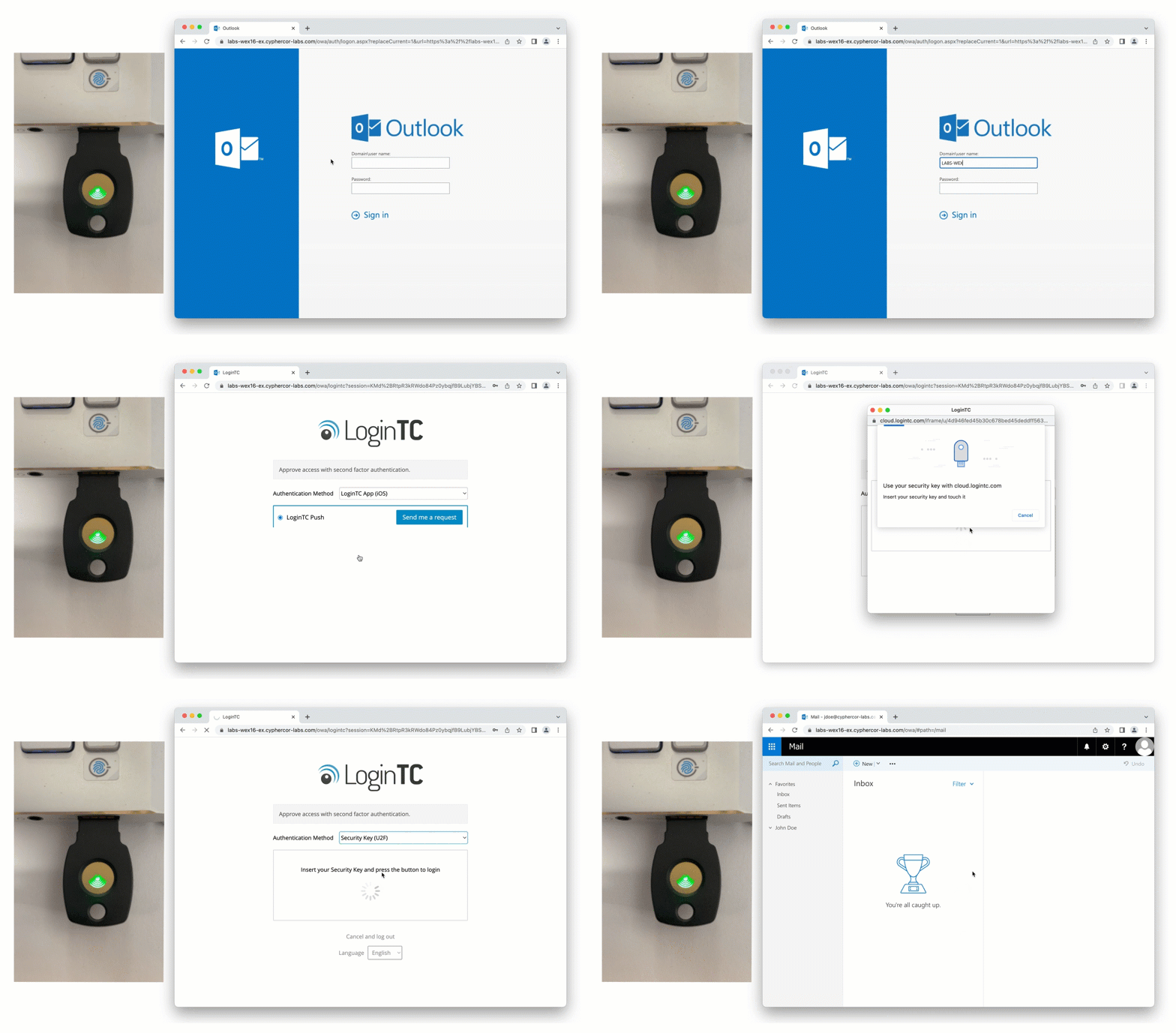
For high-security ODC environments where phishing resistance is a priority and the logistics of hardware provisioning are already in place, FIDO2 is an excellent choice. It is the strongest form of MFA available and eliminates credential-based phishing attacks entirely.
Smart Cards
Smart card authentication is well-established in government and regulated industry environments. LoginTC supports smart card-based MFA as part of its broader authentication method library. For ODCs that already have smart card infrastructure in place, or whose clients require PIV or CAC-compatible authentication, LoginTC can integrate into that environment without requiring a separate MFA stack.
Choosing the Right Mix
Most large ODC deployments are not uniform. Developers, operations staff, and management may have different device access, different workstation configurations, and different authentication needs. LoginTC is designed to support multiple authentication methods within a single deployment, so administrators can assign passcode grids to employees in phone-restricted zones, hardware tokens to those who require offline capability, and FIDO2 keys to privileged users, all managed from a single admin panel.
For a closer look at how these methods compare and how to choose between them, see our post on how to securely authenticate without a smartphone. For environments with additional constraints around network connectivity or on-premises requirements, our post on MFA for air-gapped network security explores overlapping use cases.
What This Means for IT Managers
Frequently Asked Questions
Do all offshore development centers ban personal phones?
Not all, but any ODC pursuing or holding ISO 27001 certification is guided to do so. ISO 27001 Annex A 7.6 explicitly recommends that organizations store personal mobile devices in secure lockers outside secure work areas. In practice, whether a given ODC enforces this depends on the security tier of the facility and the requirements of their client contracts. ODCs serving enterprise clients in finance, healthcare, government contracting, or any SOC 2-audited environment are far more likely to enforce strict phone restrictions than those serving smaller commercial clients.
What happens to MFA compliance if ODC employees can’t use their phones?
Without a phone-compatible fallback, MFA for offshore development centers effectively breaks down in practice. One of several things tends to happen: employees are granted MFA exemptions, shared accounts or bypass codes circulate informally, or employees bring their phones onto the floor in violation of the ODC’s own security policy. All three outcomes create compliance gaps. For organizations subject to SOC 2, HIPAA, or PCI-DSS, a finding that MFA is not consistently enforced for users with access to sensitive systems is a material audit issue.
Are hardware tokens a viable solution for large ODC deployments?
They can be, but logistics are the limiting factor. Provisioning physical tokens to a large distributed workforce across international borders involves shipping, customs, inventory tracking, and a replacement process for lost or damaged devices. For smaller ODC teams or high-privilege users, hardware tokens are entirely reasonable. For general-purpose MFA across hundreds of users in multiple shifts, the operational overhead is significant. Passcode grids are often a better fit at scale because they require no hardware provisioning at all.
Can LoginTC work alongside existing MFA infrastructure?
Yes. LoginTC integrates with Active Directory, Microsoft Entra ID, Google Workspace, RADIUS-based VPNs, and Windows Logon, which means it can be deployed as the MFA layer for ODC users without replacing the broader authentication stack. Organizations can use LoginTC’s passcode grids or hardware tokens for ODC staff while keeping push notification or authenticator app authentication for corporate office employees, all managed from the same admin panel.
What is the easiest phone-free MFA method to deploy quickly?
Passcode grids have the lowest deployment overhead. An administrator generates a grid for each user, which can be distributed as a printed card or a saved PDF. No hardware shipment, no app installation, and no dependency on any device the employee is not allowed to have at their workstation. LoginTC’s passcode grids can be provisioned and distributed to an ODC workforce in a matter of hours, making them the fastest path to compliant MFA in a phone-restricted environment.
What This Means for IT Managers
If your organization uses an ODC and your current MFA deployment assumes that employees have a phone, there is a reasonable chance your ODC users are either not completing the second factor or are using a method that violates the ODC’s own security policies. Neither scenario is defensible during a compliance audit.
The fix does not require replacing your entire MFA infrastructure. LoginTC integrates with the systems you are already using, including Active Directory, Microsoft Entra ID, Google Workspace, VPNs, and Windows Logon, and extends them to support phone-free authentication methods. Passcode grids can be deployed immediately, at no additional hardware cost, with minimal change management for employees.
Getting MFA for offshore development centers right is not just a technical checkbox. It is evidence that your security strategy accounts for how your people actually work, including the ones sitting in a room where their phone is in a locker at the front door.
To learn more about how LoginTC supports flexible authentication across complex environments, explore our full range of authentication methods or start a free trial today.