HOTP Authentication: How Counter-Based One-Time Passwords Work (+ HOTP Hardware Token Support in LoginTC Managed 2.1.12)
July 02, 2026 •
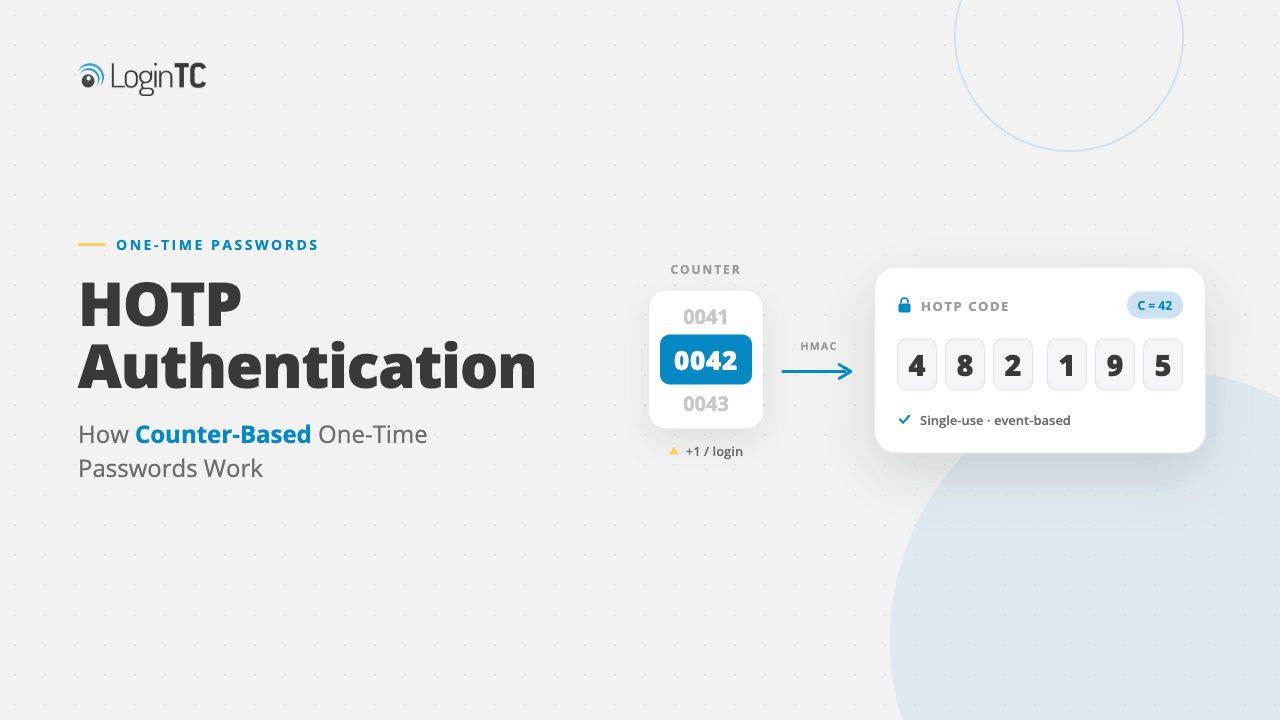
HOTP (HMAC-Based One-Time Password) is an authentication method defined by RFC 4226 that generates one-time passwords using a shared secret key and an incrementing counter. Unlike TOTP, which uses time-based intervals, HOTP advances each time a token is used. HOTP is widely deployed in hardware tokens used by financial services, government, healthcare, and air-gapped environments. As of version 2.1.12, LoginTC Managed now natively supports HOTP hardware tokens, making it easier than ever to deploy reliable MFA in environments where time-synchronization is impractical.
What is HOTP?
HOTP, which stands for HMAC-Based One-Time Password, is a one-time password (OTP) algorithm published by the Internet Engineering Task Force (IETF) in 2005 as RFC 4226. It was the first standardized OTP algorithm and laid the foundation for modern multi-factor authentication (MFA).
The core idea behind HOTP is simple: every time a user needs to authenticate, the token generates a new, unpredictable 6-digit (or 8-digit) one-time password. This password is derived from two values: a shared secret key (known only to the token and the authentication server) and a counter that increments with each use.
The cryptographic engine behind HOTP is HMAC-SHA-1 (hash-based message authentication code using the SHA-1 algorithm). When a user presses the button on a HOTP hardware token, it combines the secret key with the current counter value, hashes the combination using HMAC-SHA-1, truncates the result to a 6-digit number, and displays the OTP for the user to enter. The counter is then incremented for the next use.
The server, knowing the same secret key and expected counter value, performs the same computation. If the OTP matches, the user is authenticated and the server advances its counter accordingly.
How HOTP Works (Step by Step)
The HOTP authentication flow has five key stages:
1. Provisioning
During setup, the authentication server and the HOTP hardware token are both initialized with the same shared secret key and starting counter value (typically zero). This pairing happens once, usually at the factory or during deployment, and the secret is imported into the authentication server by an administrator.
2. OTP Generation
When the user needs to authenticate, they press the button on their HOTP token. The token computes HMAC-SHA-1(secret_key, counter_value), truncates the result, and displays a 6-digit code.
3. OTP Verification
The user enters the OTP into the login form. The server independently computes its own expected OTP using the same secret and the current counter. If the OTPs match, authentication succeeds.
4. Counter Advancement
Both the token and the server increment their counters. On the next use, a different OTP is generated.
5. Look-Ahead Window
Because the user might accidentally press the button without authenticating, most servers implement a “look-ahead window” to accept OTPs from counter values slightly ahead of the server’s current counter (typically 10-20 codes ahead) that prevents synchronization issues from breaking authentication.
HOTP vs TOTP — Key Differences
HOTP and TOTP (Time-Based One-Time Password, RFC 6238) are closely related. TOTP is just an extension of HOTP, but they differ in one critical way: how the OTP changes between uses.
| Feature | HOTP | TOTP |
|---|---|---|
| Defined by | RFC 4226 | RFC 6238 |
| Counter mechanism | Event-based (increments per use) | Time-based (changes every 30 or 60 seconds) |
| Requires time sync | No | Yes, the token and server clocks must match |
| OTP validity | Valid until accepted, or until outside the server’s counter window | 30-60 seconds |
| Suitable for offline tokens | Yes | Limited (clock drift becomes an issue) |
| Common in hardware tokens | Yes, widely deployed | Yes, also widely deployed |
| Common in mobile apps | Less common | Standard (Google Authenticator, Microsoft Authenticator) |
Why This Matters for On-Premises + Air-Gapped Environments
LoginTC Managed already leads in on-premises MFA — supporting native Active Directory, RADIUS, RDP, and Windows Logon authentication. Adding HOTP hardware token support extends our hardware token authentication options to organizations where:
- Smartphones aren’t practical or permitted (healthcare clinicians, classified environments)
- Time-synchronization isn’t reliable (air-gapped, OT/ICS, critical infrastructure)
- Hardware token preference is set by procurement policy (financial services, government)
- Legacy HOTP tokens are already in use and need to be supported alongside modern MFA
HOTP is particularly well-suited to air-gapped environments because it doesn’t depend on time at all as it only needs a counter. TOTP tokens require synchronized clocks between the token and the authentication server, which means they need access to a reliable NTP (Network Time Protocol) server. Air-gapped, classified, and isolated OT/ICS environments often can’t reach external NTP servers, and internal NTP infrastructure can drift over months or years. HOTP is a way to sidestep the problem: the token and server just need to agree on a counter value. No clock, no NTP, no synchronization headaches.
Combined with our existing authentication solutions, LoginTC Managed now provides one of the broadest hardware token + passkey + biometric + push authentication solution on the market that is deployable on-premise.
Who Uses HOTP?
HOTP remains widely deployed in secure environments:
- Finance: Banks issue HOTP hardware tokens to customers for online banking authentication, especially in Europe under PSD2 strong customer authentication (SCA) requirements
- Government: HOTP tokens are used for classified network access where smartphone-based authentication isn’t permitted
- Air-gapped / OT environments: Operational technology (OT), industrial control systems (ICS), and critical infrastructure often deploy HOTP because time-synchronization with external NTP servers is unreliable
- Healthcare: Clinicians who can’t use smartphones during patient care often carry HOTP hardware tokens
- Legacy enterprise: Organizations with MFA deployments built before TOTP became dominant continue to use their installed HOTP infrastructure
HOTP Hardware Tokens Common Form Factors
HOTP hardware tokens are physical devices that are typically small, with a button and LCD display that generate HOTP codes. Common form factors include:
- Key fob tokens: Small, portable, battery-powered devices that fit on a keychain
- Display cards: Credit-card-sized tokens with built-in displays, often used in financial services
- USB tokens with display: Devices that plug into a computer and generate OTPs on-screen
- Smart cards with displays: Particularly common in healthcare and government environments where clinician/officer ID functions and HOTP are integrated
Most HOTP hardware tokens are configured at the factory with their secret key. The IT administrator imports this key into the authentication server when deploying the tokens. After deployment, the token requires no further configuration and no internet connectivity.
HOTP Hardware Token Support in LoginTC Managed 2.1.12
LoginTC Managed 2.1.12, our latest release, now natively supports HOTP hardware tokens. This means you can deploy any RFC 4226-compliant HOTP hardware token alongside the existing authentication methods supported by LoginTC including push notifications, passkeys, FIDO2 hardware keys, biometric authentication, and Grid Card offline codes.
What is LoginTC Managed?
LoginTC Managed is the on-premises deployment of LoginTC, designed for organizations that need to keep authentication infrastructure inside their own network. Unlike cloud MFA platforms, LoginTC Managed runs authentication servers inside your perimeter, supporting Active Directory, RADIUS-based VPN, Windows Logon and Remote Desktop (RDP), and Exchange Server integrations. It’s the right choice when data sovereignty, regulatory compliance, or air-gapped environments require authentication to stay on-premises.
How HOTP Tokens Work in LoginTC
The HOTP authentication flow in LoginTC is straightforward:
- User attempts to log in to their VPN, RDP session, Windows endpoint, or AD-joined service
- LoginTC prompts for the HOTP one-time password
- User presses the button on their HOTP hardware token
- Token displays the 6-digit OTP
- User enters the OTP into the login form
- LoginTC verifies the OTP against the user’s enrolled HOTP secret + counter
- Authentication is granted
Administrators can provision HOTP tokens via the LoginTC admin console by importing the token’s secret key (typically from a CSV file provided by the token manufacturer) and assigning it to a user. In most cases, from the user’s perspective, HOTP authentication is identical to any other one-time password flow: press button, enter code.
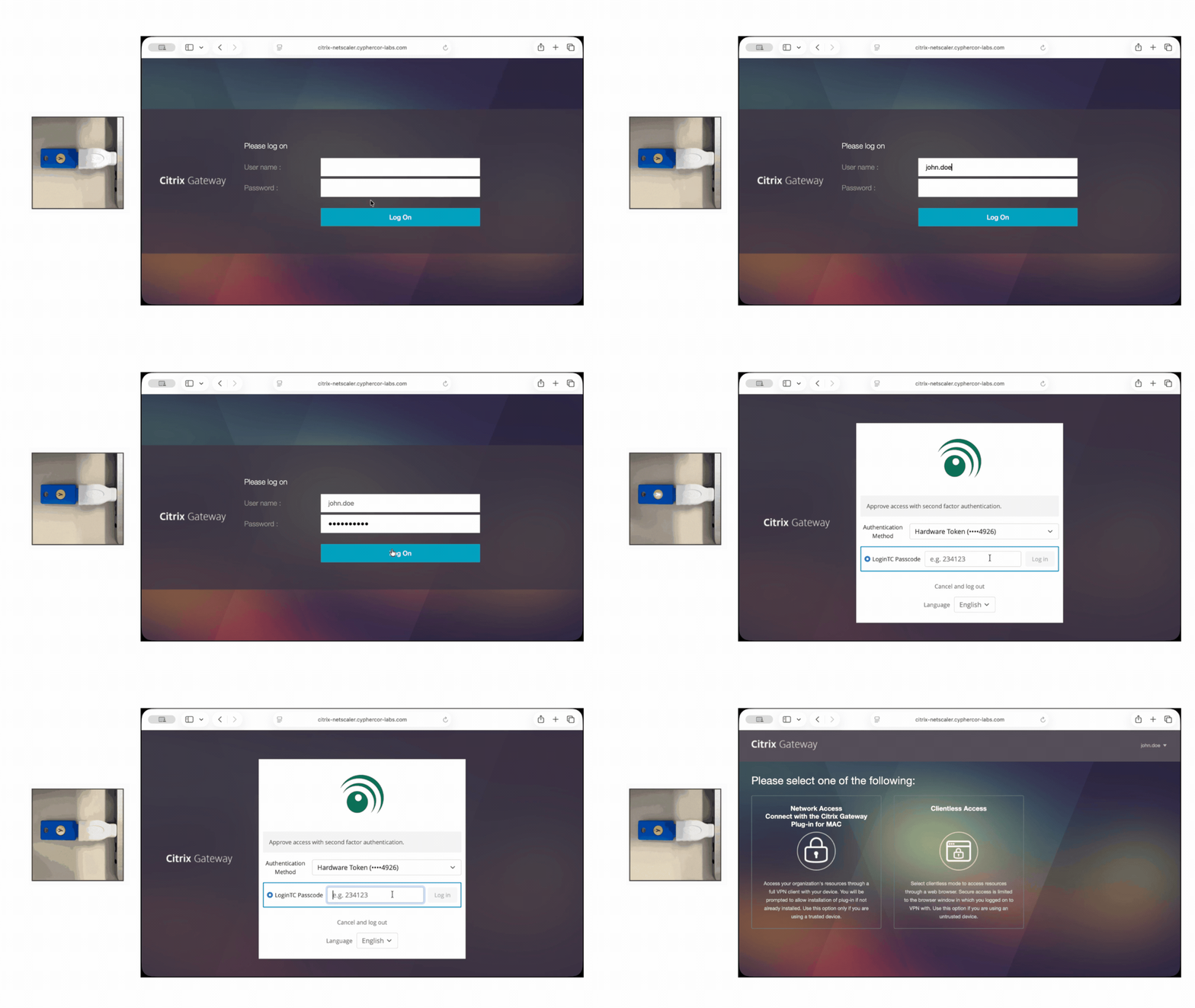
HOTP tokens can also be loaded into some FIDO2-based security keys. With this format, the token enters the HOTP code once the user has pressed the button on the security key. Watch how it works with logging into Citrix below:
Get Started with HOTP in LoginTC Managed
Existing LoginTC Managed customers can deploy HOTP hardware tokens immediately after upgrading to 2.1.12. See your administrator console for upgrade instructions and HOTP provisioning documentation.
New to LoginTC? Contact our team for a demo or visit our pricing page to get started with a free trial.
Frequently Asked Questions About HOTP
What is HOTP authentication?
HOTP (HMAC-Based One-Time Password) is an authentication algorithm defined by RFC 4226 that generates one-time passwords using a shared secret key and an incrementing counter. Each time the user presses the button on their HOTP token, a new 6-digit code is generated. The server verifies the code against its own computation of the expected value.
What is the difference between HOTP and TOTP?
HOTP uses an event-based counter and the OTP changes each time the token is used. TOTP (Time-Based One-Time Password) uses a time-based counter where the OTP changes every 30 or 60 seconds. HOTP works in offline environments without time synchronization; TOTP requires both the token and the server to have synchronized clocks.
Is HOTP still secure?
Yes. HOTP, defined by RFC 4226 in 2005, remains a secure authentication method when implemented correctly. It uses HMAC-SHA-1 cryptography and properly randomized secret keys. HOTP is widely deployed in financial services, government, and healthcare which are all sectors where security requirements are strict and audits are routine.
Who uses HOTP authentication?
HOTP is commonly used in finance (especially in Europe under PSD2) government, and defense, healthcare (clinics, Dr. offices), air-gapped and operational technology (OT/ICS) environments, and any organization with legacy MFA deployments built around HOTP.
Does LoginTC Managed support HOTP hardware tokens?
Yes. As of LoginTC Managed 2.1.12, native HOTP hardware token support is included. Any RFC 4226-compliant HOTP token can be enrolled and used for authentication across LoginTC’s Active Directory, RADIUS, RDP, Windows Logon, and Exchange Server integrations.
Can I use HOTP tokens in air-gapped environments?
Yes, this is one of HOTP’s primary use cases. HOTP doesn’t require time synchronization (unlike TOTP), so it works reliably in air-gapped or low-connectivity environments. LoginTC Managed, being on-premises, also doesn’t require internet connectivity for authentication, making the combination ideal for air-gapped deployments.
Do I need internet connectivity to use HOTP with LoginTC?
No. Both the HOTP hardware token and LoginTC Managed operate without internet connectivity. The token generates OTPs locally using its onboard secret key and counter. The LoginTC Managed server verifies OTPs against its locally-stored secret keys and counters which is what makes the combination a top choice for air-gapped, classified, and OT/ICS environments.
Can HOTP tokens be used alongside other authentication methods in LoginTC?
Yes. LoginTC supports mixed-credential environments. Different users can authenticate with different factors. For example, your administrators might use FIDO2 hardware keys (highest assurance), most workforce users might use passkeys or push notifications, and clinicians or air-gapped users might use HOTP hardware tokens. All managed from one central admin console.