MFA for Water Utilities: What US and Canadian Guidance Recommends, and Where MFA Fits
October 26, 2026 •
In a water treatment facility, keeping water flowing safely is usually the top priority. If a storm takes out the internet link, a fibre line is cut, or the network is isolated during an incident, operators still need to reach the human-machine interface (HMI) to deal with an alarm, such as a chemical dosing issue, especially since public health often depends on it. That’s why we suggest planning MFA a little differently at a plant than in an office. MFA that relies on a cloud service needs an internet connection to approve each sign-in, which can turn that connection into a single point of failure for operator access. US and Canadian guidance increasingly recommends MFA on remote and privileged access, and the goal is to add it in a way that never locks out the people running the plant.
Why more water utilities are taking systems off the internet (2026)
This summer, a wave of attacks on internet-connected control equipment pushed many water and wastewater utilities to disconnect equipment, fall back to manual operations, and review how they handle remote access. To make it easier to follow, below is a summary table, with links, of what federal agencies and researchers have reported:
| Source | Date | What it reported |
|---|---|---|
| FBI and EPA public service announcement | July 30, 2026 | Since July 27, utilities in at least seven states reported attacks on internet-exposed PLCs. Attackers changed IP addresses and passwords, causing loss of monitoring and control; reported impacts included loss of pressure and flooding. The FBI suggests removing PLCs from direct internet exposure, routing access through a secure gateway (jump host), and being ready to operate manually. |
| CISA Internet Exposure Reduction Guidance | August 21, 2026 | In July 2026, CISA observed malicious activity targeting internet-exposed systems at more than 100 water and wastewater entities, commonly PLCs connected directly to a cellular modem. Its advice includes: “Implement and enforce multifactor authentication (MFA) where possible, even if only at the jump host level.” |
| City of Braham, Minnesota (reported by MPR News) | July 27, 2026 | The city said a cyberattack shut down operating controls and took its well and treatment plant offline. Water quality wasn’t affected, and the system was back online later that day. |
| Pew Charitable Trusts | September 2026 | More than 30 Minnesota communities were affected by the July attacks, and some systems had to “go offline, disconnect equipment, or rely on manual operations.” |
| EPA Office of Inspector General, report 25-N-0004 | November 2024 | A passive scan of 1,062 drinking water systems found 97 systems, serving about 26.6 million people, with critical or high-risk cybersecurity vulnerabilities. |
| SpyCloud research | September 2026 | Of 10,000 water organizations analyzed, 1,787 showed active infostealer exposure, and 258 had stolen credentials for OT or remote-access systems. |
| NIST SP 1800-45 | June 24, 2026 | “Some facilities may choose to operate on-site only.” Where remote access stays, “Remote access to the OT environment should use MFA.” |
Taking equipment off the internet reduces exposure, and CISA notes that reducing exposure doesn’t have to mean removing remote access that operations really need. The access that remains, whether that’s a vendor VPN, a jump host or an engineering workstation, is where we’d suggest adding MFA and because LoginTC Managed runs inside your network, you can add that second factor without reconnecting the plant to the internet.
What US and Canadian guidance says about MFA for water utilities (October 2026)
While much of the cybersecurity framework for the water sector remains advisory rather than legally mandated, recent guidance is unified and clear regarding multi-factor authentication (MFA) requirements. To assist with your Risk and Resilience Assessment or board reporting, the details provided by each key source are summarized below.
| Source | Date | What it says about MFA and access |
|---|---|---|
| EPA Guidance on Improving Cybersecurity at Drinking Water and Wastewater Systems (EPA 817-B-23-001) | Revised August 2024 | Item 2.H, a priority practice: require MFA wherever possible, and “at a minimum, MFA should be used for remote access to the OT network.” Related items: change default passwords (2.A), separate user and administrator accounts (2.E), segment OT from IT (2.F), collect and protect security logs (2.T, 2.U). |
| EPA fact sheet for item 2.H | Published July 2024 with the checklist | Enable MFA on remotely accessible accounts and systems, including vendor and maintenance accounts, user and engineering workstations, and HMI applications. “All remote users or vendors should require MFA.” |
| CISA, EPA and FBI: Top Cyber Actions for Securing Water Systems | February 2024 | Action 1: reduce exposure to the public-facing internet. Action 3: change default passwords and “implement multifactor authentication (MFA) where possible.” |
| America’s Water Infrastructure Act (AWIA) / SDWA Section 1433 | Fact sheet updated July 2024 | Community water systems serving more than 3,300 people must assess “electronic, computer, or other automated systems” in a Risk and Resilience Assessment and keep an Emergency Response Plan, recertified every five years. Systems serving 3,301 to 49,999 people: assessment by June 30, 2026, plan by December 31, 2026. |
| EPA enforcement alert | May 2024 | Over 70% of systems EPA inspected since September 2023 violated basic Section 1433 requirements. Common findings: default passwords not changed and “single logins for all staff.” |
| Joint advisory AA25-343A (FBI, CISA, NSA, EPA and partners including Canada’s Cyber Centre) | December 9, 2025 | Pro-Russia hacktivists are making opportunistic attacks on critical infrastructure, including water and wastewater systems. Mitigations include “Implement MFA where possible.” |
| CISA Cross-Sector Cybersecurity Performance Goals, goal 2.H | 2023 edition | Phishing-resistant MFA. “Within OT environments, MFA is enabled on all accounts and systems that can be accessed remotely.” |
| NIST SP 1800-45, Cybersecurity for the Water and Wastewater Sector | Final, June 24, 2026 | Reference architectures that show water utilities of different sizes how to securely enable remote access to OT, and states that remote access to the OT environment should use MFA. |
| New York State, 10 NYCRR Appendix 5-E | Effective March 11, 2026 | Binding state rule for community water systems serving more than 3,300 people: a cybersecurity program with access control procedures, incident reporting within 24 hours, and vulnerability reporting within 48 hours. |
| Canadian Centre for Cyber Security: cyber threat to Canada’s water systems | November 2025 | “Implement phishing-resistant multi-factor authentication (MFA) for access to assets,” citing Cyber Security Readiness Goal (CRG) 2.7. |
| Cyber Centre bulletin: non-state activity targeting Canadian OT | July 28, 2026 | Recommends phishing-resistant MFA (CRG 2.7) on all accounts and systems that can be accessed remotely. |
| Cyber Centre alert AL25-016 | October 29, 2025 | Hacktivists tampered with water pressure values at a Canadian water facility, degrading service. Remote access should go through VPNs “with two-factor authentication.” |
Key Takeaway: The guidance across all sources consistently emphasizes implementing multi-factor authentication for remote plant access, vendor and maintenance accounts, and operator workstations accessing process controls.
Where MFA fits in a water or wastewater utility
Multi-factor authentication (MFA) does not require direct installation on programmable logic controllers (PLCs) or modifications to certified control hardware and HMI software. Instead, MFA safeguards the entry points that operators, third-party vendors, and staff use to reach these control systems. Below is a summary mapping the specific access pathways detailed in the EPA’s 2.H fact sheet to corresponding LoginTC integration connectors:
| Access path | Why it is targeted | Where LoginTC can help |
|---|---|---|
| Vendor and integrator remote access (VPN) | Standing vendor accounts with only a password are a common way in, and the accounts least likely to be watched | A second factor on the VPN through LoginTC RADIUS or a dedicated connector for Fortinet, Cisco, Palo Alto, SonicWall or WatchGuard |
| Operator and on-call remote access | Night and weekend logins from home, often from personal devices | The same VPN MFA, plus MFA on the RDP session to the plant |
| HMI and engineering workstations (Windows) | The last step before setpoints, alarms and logic | LoginTC for Windows Logon and RDP: local console logins, RDP sessions and Run as administrator |
| Jump hosts and remote desktop gateways | One compromised password can open every system behind it, and CISA suggests MFA “even if only at the jump host level” | Windows Logon and RDP MFA on the jump host, RADIUS MFA on the gateway |
| Shared control-room consoles | “Single logins for all staff” was a top EPA inspection finding | Each operator carries their own token, so every login is tied to a person, even on a shared console |
If your supervisory control and data acquisition (SCADA) servers and HMIs are domain-joined, the Windows login is often a natural place to add MFA. Protecting the Windows layer that operators use to reach the controller helps protect the controller without touching it. For more on rolling this out in control systems, see how to deploy MFA for SCADA environments.
Cloud, on-premises or both: choosing where your MFA runs
Each utility can choose based on its own requirements and preferred security posture, and many use a mix. Cloud MFA works well for email and office apps, where people have reliable internet. For plant networks, some utilities prefer MFA that keeps working with no internet connection at all, especially as more control systems are taken off the internet.
| If this matters to you | Cloud MFA | On-premises MFA (LoginTC Managed) |
|---|---|---|
| Microsoft 365, email and office apps | A good fit (LoginTC also adds MFA to Microsoft Entra ID) | Also possible |
| Sign-in keeps working during an internet outage | Windows logins can fall back to offline methods | Doesn’t need the internet |
| Plant or OT networks kept off the internet | Needs a path to the cloud service | Runs inside the plant network or an OT DMZ |
| Staff directory and authentication data stay on your own systems | Stored with the MFA provider | Stays on infrastructure you control |
Our cloud vs. on-premises MFA comparison and hybrid MFA pages go into more detail on how the two can work together.
Choosing options for the plant floor
| Situation | LoginTC options to consider | Why |
|---|---|---|
| Phones not allowed in process areas | Hardware token | No phone or signal needed, 3 to 5 year battery |
| Gloves, shared consoles, shift handovers | Hardware token and/or passcode grid per operator | Every login tied to a named person |
| Administrators and engineers who can change logic | FIDO2 security key | Phishing-resistant, as CISA goal 2.H and CRG 2.7 recommend |
| Contractors and seasonal staff | Passcode grid or a bypass code set to expire | No hardware to buy or recover, and access can end when the work does |
| Remote pumping stations and field laptops | Hardware token and/or passcode grid | Both work offline at the Windows login |
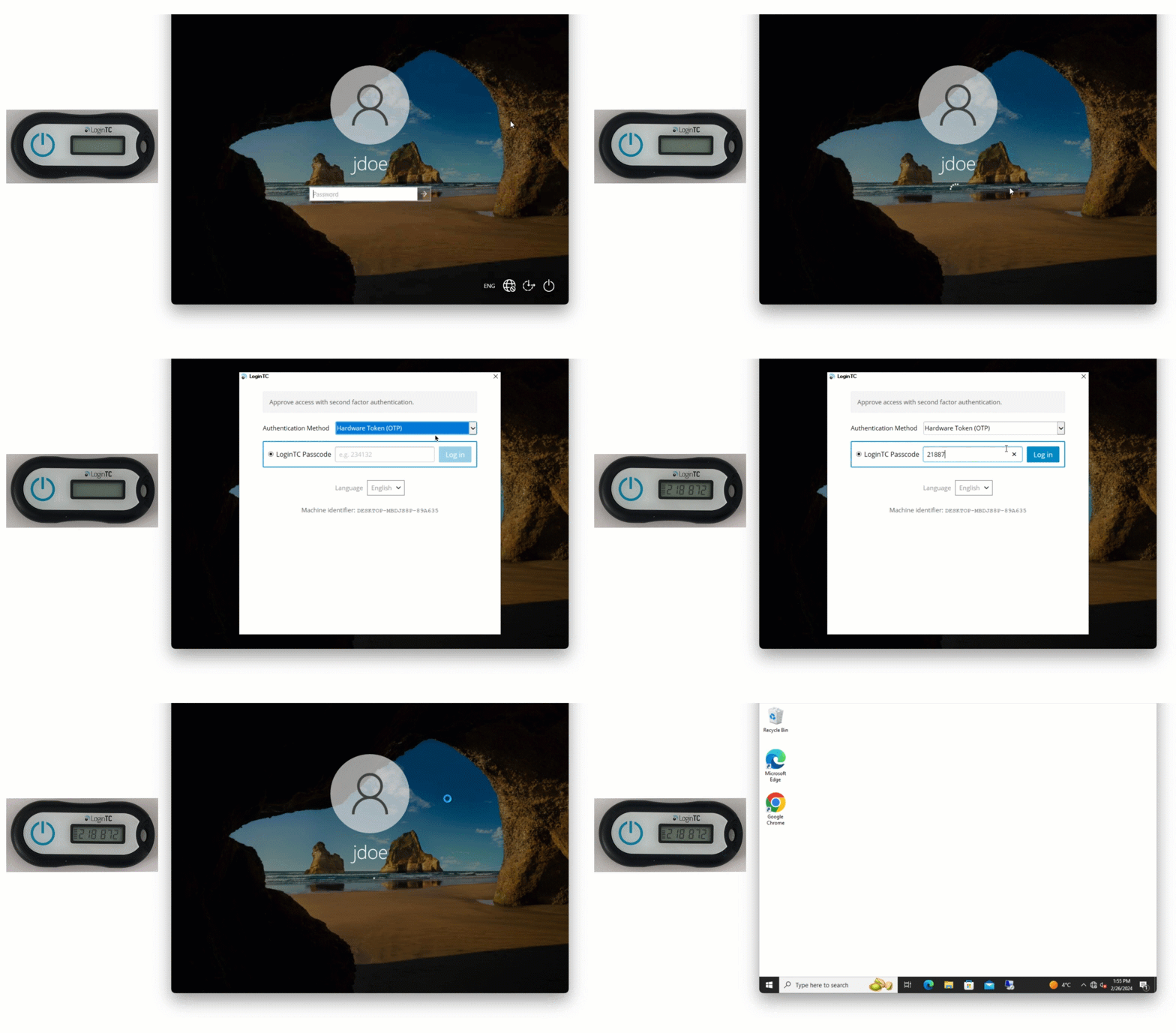
Offline sign-in at the Windows login with a LoginTC hardware token: press the button, type the code, and you’re in, even at a pump station with no network. The step-by-step setup is in how to use offline MFA for Windows logon and RDP.
Common challenges for water IT staff and how LoginTC can help
We know selecting the right option and configuration for your specific needs can be a challenge. The table below highlights some of the common concerns raised by water and wastewater IT staff, plant superintendents, and public works directors, along with recommendations on how LoginTC can help. If you prefer to speak with us directly, our team is happy to walk you through the best solution for your needs and you can book a call with us here.
| The concern (select one to jump to the full answer) | How LoginTC can help |
|---|---|
| HMI and SCADA consoles share one operator login | Individual Windows logins, each with the operator’s own LoginTC token |
| Technicians lose cell signal at tanks and pump stations | Offline MFA at the Windows login: hardware token, passcode grid and/or FIDO2 key |
| The cyber insurer wants MFA on all remote access by renewal | Start with the VPN through RADIUS, with no change to plant systems |
| The municipal directory can’t be synced to an outside cloud | LoginTC Managed, on-premises, with no external dependencies |
| Operator workstations run older Windows | The current connector for Windows 10 and Server 2016 or later, the legacy connector for 8.1 and 2012 R2, and MFA on the access path for anything older |
| Staff won’t use, or can’t be required to use, a personal phone | Hardware tokens, passcode grids and/or FIDO2 keys |
| You’d like YubiKey-style security keys at the Windows login, offline too | FIDO2 security keys with the LoginTC Windows Logon and RDP connector |
| Vendors reach the plant through a Fortinet, Cisco, Palo Alto or SonicWall VPN | LoginTC RADIUS MFA on the gateway, with contractor access that can expire |
“Our HMI and SCADA consoles use one shared operator login. How can we address that before a cybersecurity review?”
Why it matters. “Single logins for all staff” was one of the most common findings when EPA inspected water systems, and EPA’s checklist recommends separate user and administrator accounts (2.E) and MFA on remote and privileged access (2.H). A review may come from your state (New York now requires a cybersecurity program with access control procedures under Appendix 5-E), from your AWIA Risk and Resilience Assessment, or from your insurer. EPA withdrew its 2023 plan to add cybersecurity to sanitary surveys after litigation, but it still encourages states to review water system cybersecurity programs voluntarily.
How we can help. We suggest giving each operator their own Windows login on the console and their own LoginTC token. Our Windows Logon and RDP connector adds the second factor at the console and for RDP, and every sign-in is recorded against a named person in LoginTC’s authentication logs. LoginTC Managed can also send those logs to your own syslog server. Shift handover stays quick: each operator taps a key or types a code from their own token.
“If we roll out MFA to our plant laptops, will technicians be locked out at remote tanks with no cell reception?”
How we can help. LoginTC offline authentication keeps the second factor working at the Windows login with no network at all. The technician can use a hardware token, a passcode grid or a FIDO2 security key, and MFA is never skipped. One setup step to plan for: offline methods become available after the user’s first online sign-in, so we suggest having each technician sign in once at the plant before heading out. The full list of methods is in offline MFA for Windows logon and RDP.
“Our cyber insurance provider wants MFA on all remote access by our next renewal. How can we do it without disrupting plant operations?”
How we can help. A good place to start is where insurers usually look first (see why MFA is required for cyber insurance): remote access. LoginTC adds MFA to your existing VPN through RADIUS or a dedicated connector, so the VPN works as before with one extra step, and nothing inside the plant changes. From there, you can add MFA to RDP and the Windows logins that reach the SCADA layer. Installing the Windows connector typically takes under an hour per server.
“Is there an MFA provider that lets us manage tokens locally, without syncing our employee directory to an external web server?”
How we can help. LoginTC Managed runs as a virtual appliance inside your own network with no external dependencies. It checks users against your own Active Directory or LDAP, keeps authentication data inside your network, and can send logs to your own syslog server. Hardware token seeds are imported and stored on the LoginTC Managed appliance. If you’d like tokens to work offline on Windows machines, a policy can sync them to those machines; this is off by default.
“Our operator workstations run older Windows that’s tied to treatment equipment. Can they still have MFA?”
How we can help. Our current Windows Logon and RDP connector supports Windows 10 (version 1607 or later), Windows 11 and Windows Server 2016 to 2025. Windows 8.1 and Windows Server 2012 R2 are supported by the legacy connector (version 1.4.x). For machines older than that, we suggest adding the second factor on the path to them: MFA on the VPN and on the RDP session or jump host operators use to reach the machine, so it can only be reached after MFA, even if it can’t run the connector itself.
“Our technicians would rather not install an app on their personal phones, and our policy (or union agreement) says they don’t have to.”
How we can help. LoginTC doesn’t need a phone. You can issue hardware tokens ($10 USD each, 3 to 5 year battery), printed passcode grids (no hardware cost) and/or FIDO2 security keys. The same token works on the VPN, at the Windows login and for RDP. There are more options in how to authenticate without a smartphone.
“We’d like to use YubiKeys at the Windows login on our plant PCs. Do they work offline?”
How we can help. YubiKeys and other standard FIDO2 security keys work with our Windows Logon and RDP connector, and FIDO2 also works offline at the Windows login. One detail to plan for: security keys aren’t supported at User Account Control (Run as administrator) prompts, so we suggest giving administrators a hardware token or passcode grid for elevation as well.
“We need RADIUS MFA on the VPN gateway our vendors use.”
How we can help. LoginTC RADIUS adds a second factor to any appliance with configurable RADIUS authentication, including Cisco, Palo Alto GlobalProtect and SonicWall, and we have dedicated connectors for Fortinet and WatchGuard. Each vendor gets their own LoginTC login, so you can see who connected and when. For contractors, a passcode grid or a bypass code with an expiry date lets their access end when the work does.
How LoginTC helps water utilities of every size
Water districts and regional water services already use LoginTC to protect their networks, and we also protect public-sector and utility networks such as the Village of Skokie and Holy Cross Energy, an electric cooperative serving 55,000 members. If you also run power assets under NERC CIP, see MFA for energy and the NERC CIP MFA guide. Government-run utilities may also find MFA for government helpful.
Protect your plant’s remote access without depending on the internet
We’d be glad to show your operations and IT teams how LoginTC Managed protects a VPN, an HMI login and an offline workstation in a short demo.
Frequently asked questions about MFA for water utilities
Does the EPA require MFA for water utilities?
The U.S. Environmental Protection Agency (EPA) cybersecurity checklist for drinking water and wastewater systems (EPA 817-B-23-001, revised August 2024) recommends multi-factor authentication wherever possible and, at a minimum, for remote access to OT and IT networks (item 2.H, marked as a priority practice). It is guidance rather than a stand-alone federal rule, but it is the checklist EPA uses for water-sector cybersecurity, and Section 1433 of the Safe Drinking Water Act requires community water systems serving more than 3,300 people to assess the security of their electronic and computer systems in their Risk and Resilience Assessment.
Does AWIA compliance require multi-factor authentication?
Not by name. America’s Water Infrastructure Act (AWIA), through Safe Drinking Water Act Section 1433, requires community water systems serving more than 3,300 people to complete a Risk and Resilience Assessment that covers electronic, computer and other automated systems, and an Emergency Response Plan, and to recertify both every five years. Systems serving 3,301 to 49,999 people recertify the assessment by June 30, 2026 and the plan by December 31, 2026. Weak remote access is something that assessment would usually capture, and MFA is the control EPA’s checklist names for it.
Why are water utilities taking systems off the internet?
In July 2026, attackers targeted internet-exposed programmable logic controllers (PLCs) at water and wastewater utilities. The FBI and EPA reported incidents in at least seven states, with loss of monitoring and control, and CISA observed activity at more than 100 water and wastewater entities, commonly PLCs connected directly to cellular modems. Both agencies suggest reducing direct internet exposure and securing the remote access that remains; CISA recommends MFA where possible, even if only at the jump host. LoginTC Managed runs inside your network, so you can add that MFA without reconnecting the plant to the internet.
Can MFA be installed on a PLC or HMI?
Usually not, and it doesn’t need to be. MFA protects the access paths into the control system: the VPN a vendor uses, the Windows engineering workstation or human-machine interface (HMI) an operator signs in to, and the RDP session or jump host in between. LoginTC adds a second factor at the Windows login and RDP layer and at the VPN through RADIUS, so the PLC, its firmware and the HMI software stay unchanged.
Will operators be locked out if the internet goes down?
Not with LoginTC Managed. It runs as a virtual appliance inside your network and doesn’t need the internet, so a WAN outage doesn’t stop authentication. If a workstation can’t reach the LoginTC server at all, the Windows Logon and RDP connector falls back to offline methods such as a hardware token, passcode grid or FIDO2 security key. MFA is still enforced, and the operator can still sign in.
What MFA works for operators who can’t carry a smartphone?
Hardware tokens, passcode grids and FIDO2 security keys. A LoginTC hardware token shows a 6- or 8-digit code every 30 or 60 seconds, needs no phone or signal, and has a 3 to 5 year battery. A passcode grid is a printed card with no hardware cost. FIDO2 keys are phishing-resistant and a strong option for administrator and engineering accounts. All three work with LoginTC Managed.
Does Canada require MFA for water utilities?
Canada’s Cyber Centre recommends it. Its guidance on the cyber threat to Canada’s water systems (November 2025) and its July 2026 bulletin on non-state activity targeting Canadian operational technology both point to Cyber Security Readiness Goal 2.7: implement phishing-resistant multi-factor authentication for access to assets, including all accounts and systems that can be accessed remotely. Provincial drinking water regulations focus on water quality and don’t set cybersecurity controls.
Is an air-gapped treatment plant safe without MFA?
Isolation reduces exposure but doesn’t remove it. Vendors still connect, maintenance laptops still move between networks, and the link from the business network into the plant can be a path for attackers. LoginTC Managed is built to run inside an isolated or air-gapped network with no external connection, so you can add a second factor on those paths without opening the plant to the internet.
Sources (16, all linked in the post above)
FBI and EPA, Malicious cyber actors targeting water and wastewater sector internet-facing PLCs, July 30, 2026; CISA, Internet Exposure Reduction Guidance, revised August 21, 2026; CISA, EPA and FBI, Top Cyber Actions for Securing Water Systems, February 2024; US EPA, Guidance on Improving Cybersecurity at Drinking Water and Wastewater Systems, EPA 817-B-23-001, revised August 2024; US EPA, Protect: Phishing-Resistant Multi-Factor Authentication (2.H); US EPA, AWIA Section 2013 / SDWA 1433 fact sheet, updated July 2024; US EPA, Enforcement alert: drinking water systems to address cybersecurity vulnerabilities, May 2024; US EPA Office of Inspector General, Report 25-N-0004, November 2024; FBI, CISA, NSA, EPA and partners, AA25-343A, December 9, 2025; CISA, Cross-Sector Cybersecurity Performance Goals, v1.0.1; NIST, SP 1800-45, June 24, 2026; New York State Department of Health, Cybersecurity requirements for public water systems (Appendix 5-E); Canadian Centre for Cyber Security, Cyber threat to Canada’s water systems, bulletin on non-state activity targeting Canadian OT, AL25-016 and Cyber Security Readiness Goals; Pew Charitable Trusts, America’s Water Systems Face a Growing Cybersecurity Threat (republished by Governing), September 2026; MPR News, Braham officials say cyberattack knocked water system offline, July 27, 2026; SpyCloud, Water utility identity exposure, September 20, 2026.