Microsoft Is Retiring SMS and Voice MFA in Entra ID: The Dates, the Scope, and What to Do Before February 2027
August 28, 2026 •
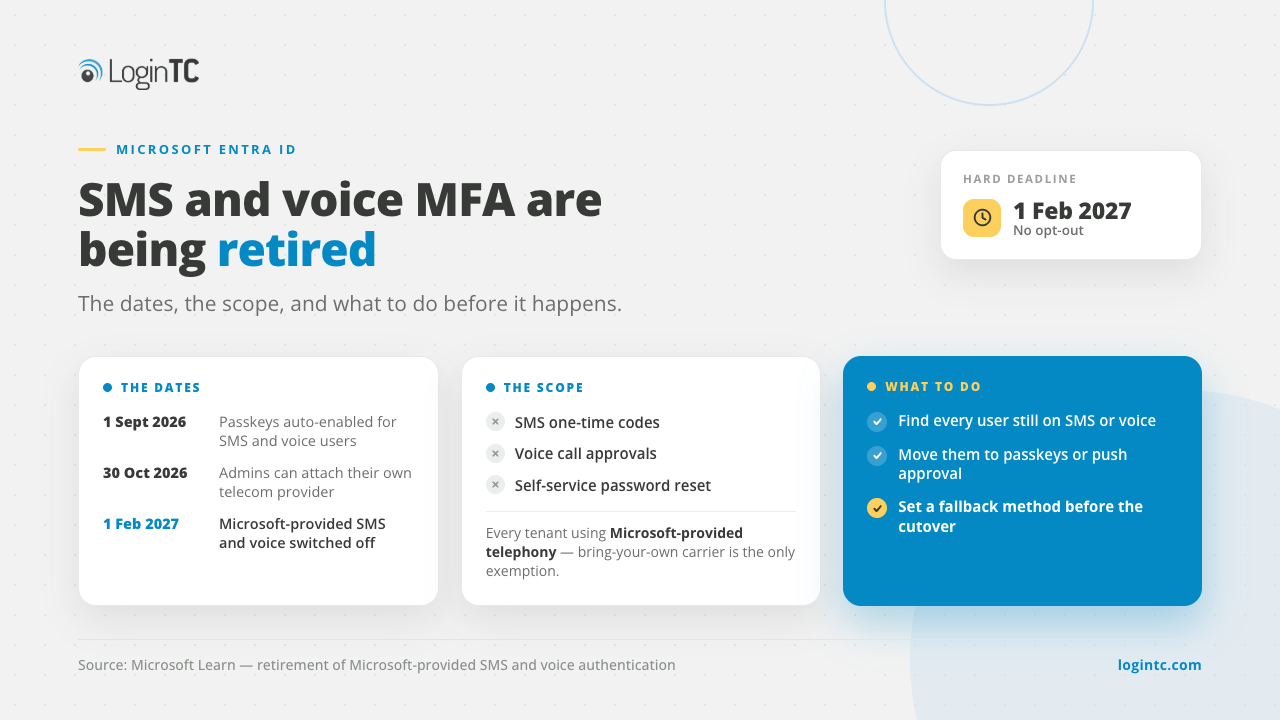
What replaces SMS MFA in Entra ID? Microsoft’s own SMS and voice MFA in Entra ID reaches end of life on 1 February 2027, and on 1 July 2027 for Global Administrators and external users. After that, anyone whose only method is SMS or voice must register a passkey before they can sign in. Replace SMS with:
- Passkeys or the Microsoft Authenticator app for staff with a smartphone or a supported device.
- LoginTC for users without a smartphone: frontline and shift workers, shared workstations and phone-restricted sites. LoginTC connects to Entra ID as an external MFA provider, which the retirement does not cover, and signs users in with a hardware token, passcode grid or FIDO2 security key. The same token also works for VPN, Remote Desktop and Windows logon.
- A paid telecom provider from Microsoft Security Store, only if you must keep SMS or voice.
Last reviewed: 30 October 2026, against Microsoft’s retirement page and FAQ.
Microsoft announced the change on 13 July 2026 and notified tenants as Message Center post MC1426371. This post covers what is actually being retired, the four dates that matter, how to work out who in your tenant is affected, what to move them to, and how to plan the migration without breaking sign-in for thousands of people at once.
What Microsoft is actually retiring, and what it is not
Before you plan anything, be precise about the scope. A lot of the coverage has flattened this into “Microsoft is killing SMS MFA”, which is not what the documentation says.
What is being retired
- Microsoft-provided SMS one-time passcodes for Entra ID multi-factor authentication
- Microsoft-provided automated voice call verification for Entra ID multi-factor authentication
- The same methods where they are used for self-service password reset. Microsoft’s FAQ confirms the change applies across Entra, including SSPR
What is not being retired
- External authentication methods. Microsoft’s FAQ states that external MFA users are not in scope unless they are also enabled for SMS or voice, and that clause matters, as explained below
- SMS or voice delivered by a provider other than Microsoft. Microsoft is retiring its own delivery pipeline, not the method category
- Microsoft Authenticator push notifications and passwordless phone sign-in
- FIDO2 security keys and passkeys registered in Entra ID
- Certificate-based authentication
- Azure AD B2C, which is explicitly out of scope. Microsoft Entra External ID gets a separate announcement next year
The distinction is who sends the message. If your users receive a code from a Microsoft phone number, you are affected. If they receive it from a third-party MFA provider you already pay for, this particular change does not touch you.
One related change that is not part of this retirement: Conditional Access custom controls are being retired on their own timeline, and can already no longer be created or edited. The dates and the migration path are in Microsoft is retiring Conditional Access custom controls.
The four dates that matter
| Date | What happens | What you decide |
|---|---|---|
| 1 September 2026 | Passkeys become the default experience. Every user enabled for SMS or voice, in either the Authentication Methods Policy or legacy MFA settings, is automatically enabled for passkeys. A registration campaign in the Microsoft managed state prompts them, with unlimited snoozes by default. | Accept the automatic enablement, or apply the temporary opt-out. |
| 18 September 2026 | Information about customer-managed telecom providers becomes available in the Microsoft Security Store. | Whether bringing your own telecom provider is worth pricing. |
| 30 October 2026 | Administrators can select and configure a telecom provider from the Security Store. | Procurement time, if you are taking that route. |
| 1 February 2027 | Microsoft-provided SMS and voice delivery is retired and enforcement begins. A user whose only available method is SMS or voice must register a passkey during sign-in. | Nothing. There is no opt-out. |
Dates from Microsoft Learn, “Passkeys by default and retirement of Microsoft-provided SMS and voice authentication”, and the Microsoft Security Blog announcement of 13 July 2026.
One exception to the February date. Microsoft’s retirement FAQ splits it by user type: 1 February 2027 for all users except Global Administrators and external users, and 1 July 2027 for Global Administrators and external users. Plan to February regardless. The five extra months apply to the accounts you least want to leave on a text message, not to the bulk of your users.
Why Microsoft is doing this
SMS has been the weakest widely deployed second factor for years, and the reasoning is not controversial.
SIM-swapping lets an attacker move your phone number to a device they control, after which every code sent to that number goes to them. The FBI’s Internet Crime Complaint Center reported roughly $68 million in losses from SIM-swap complaints in 2021. Beyond SIM swapping, SMS codes are exposed to SS7 protocol attacks and to real-time phishing kits that relay a code to the legitimate site faster than the user can finish reading it. NIST has designated SMS a restricted authenticator in SP 800-63B since 2017.
Microsoft’s own stated reason is that these methods rely on shared secrets and channels attackers intercept, phish or manipulate. In the announcement it cites threat intelligence showing AI-enabled phishing campaigns reaching click-through rates as high as 54 percent, against roughly 12 percent for more traditional campaigns, and notes that SIM swapping and MFA bypass have become more accessible and repeatable.
Work out your exposure first
The population that depends on SMS or voice is usually smaller than people assume and concentrated in predictable places.
Step 1. Run the authentication methods report. In the Microsoft Entra admin center, go to Protection, then Authentication methods, then User registration details. Filter for users who have only SMS or voice registered with no other method. Those are your highest-priority targets.
Step 2. Check your authentication methods policy. Under Protection, then Authentication methods, then Policies, check whether SMS and voice are enabled and which groups are in scope.
Step 3. Check legacy per-user MFA settings separately. Users enabled through legacy settings rather than the Authentication Methods Policy are in scope too, and legacy settings are exactly where forgotten configurations survive.
Step 4. Check SSPR on its own. Self-service password reset is often configured by a different team at a different time. Under Protection, then Password reset, then Authentication methods, check whether mobile phone or office phone are enabled as reset options.
Microsoft also publishes a read-only PowerShell script for this, the Entra SMS and voice usage analyzer. The tool is published on GitHub as entra-sms-voice-usage-analyzer. It is read-only: it reports which of your users have SMS or voice registered and changes nothing. If you have seen it referred to as the Entra SMS voice usage analyzer, this is the same script.
It reports your registration campaign state and your SMS and voice policy scope, and exports the targeted users and groups to CSV. It needs the Policy.Read.All and Group.Read.All Graph scopes and a role of Global Reader, Authentication Policy Administrator or Security Reader.
Segment your users before you plan the rollout
Not all users are equal in a migration, and the plan falls apart if you treat them as one population.
- Corporate device users. The easiest group. Push the replacement method through Intune or your MDM and most of them will never file a ticket.
- BYOD users. Need clear communication and self-service enrolment. Plan for support volume during the rollout rather than after it.
- Frontline and shared-device workers. Often have no personal smartphone available at the point of login. Security keys and hardware tokens are the realistic options here, not an app.
- External guests and partners. Depends on whether they authenticate into your tenant directly. Identify them early, because you control their behaviour least.
- High-privilege accounts. Migrate first, and to a phishing-resistant method rather than app-based push. Smallest population, largest consequence.
What to replace SMS MFA with in Entra ID
| Option | Best for | What it costs you |
|---|---|---|
| Passkeys | Staff with a supported device or a security key, on modern platforms. | Communication and help desk effort, plus hardware if you issue keys. The path Microsoft has optimised for and the strongest security outcome. |
| Another native Entra method | Users who can install an authenticator app. | Lowest change cost if they were on SMS out of habit. Does nothing for anyone who cannot use a smartphone. |
| Certificate-based authentication | Organizations with existing PKI, particularly government and defence contractors already on smart cards. | Only viable if the PKI already exists. Not a project to start because of this deadline. |
| Bring your own telecom provider | Organizations with a documented regulatory or operational need for SMS or voice specifically. | A vendor selection and contract from 30 October 2026, plus per-message charges. Microsoft states customers are responsible for telecom costs charged by the telecom partners. |
| An external MFA provider, such as LoginTC | Users who cannot use a smartphone or passkey (frontline, shift and phone-restricted staff), and organizations that also need MFA on VPN, Remote Desktop and Windows logon. | A per-user subscription and an integration to configure. Requires Conditional Access, which requires Microsoft Entra ID P1 or higher. |
Where LoginTC fits: the users a passkey does not reach
Passkeys and the Authenticator app will cover most staff, but the retirement gets hard for the people they cannot cover. These are the groups LoginTC is built for:
| Who | Why the default plan stalls | What they use with LoginTC |
|---|---|---|
| Staff who will not, or may not, use a personal phone | No company phone, and no way to require an app on their own | Hardware token, passcode grid or FIDO2 security key |
| Frontline and shift workers on shared stations | No personal device to hold a passkey | A hardware token or passcode grid each person carries |
| Phone-restricted areas: clinical floors, plants, secure rooms | Phones are not allowed where people sign in | Hardware token (no phone, no signal needed) |
| Contractors outside device management | You cannot enrol their devices | Passcode grid (no hardware cost) or hardware token |
| Teams that also need MFA on VPN, Remote Desktop or Windows logon | Entra MFA does not reach on-premises systems | The same LoginTC user and token on those systems too |
How it works in Entra ID. LoginTC is added in the Entra admin center as an external authentication method, and a Conditional Access policy requires MFA. At sign-in the user chooses LoginTC and completes it with their LoginTC method. It needs Microsoft Entra ID P1 or P2 and a LoginTC Business or Enterprise plan. The setup is in how to use LoginTC for Entra ID external authentication methods.
Which LoginTC methods work in Entra ID. LoginTC supports hardware tokens, passcode grids, FIDO2 security keys, push, software OTP and authenticator apps, email OTP, SMS and phone calls through Entra ID, subject to the authentication policy you set. For users who cannot move to a passkey, we suggest starting with the phone-free options: hardware tokens, passcode grids and FIDO2 security keys. FIDO2 security keys give the strongest phishing resistance; hardware tokens and passcode grids are phone-free alternatives for people who cannot use one. One LoginTC deployment protects both Entra ID and your on-premises applications, such as VPN, Remote Desktop and Windows logon.
Telephony provider or external MFA provider? If you are weighing a telephony provider from Microsoft Security Store to keep SMS, Microsoft says the main cost is what the provider charges for SMS and voice messages, based on its pricing and your usage, plus Azure consumption for a routing function (Microsoft’s telephony provider FAQ). With LoginTC as an external MFA provider, most users sign in with no messages at all, using hardware tokens, passcode grids or FIDO2 security keys under a per-user subscription, and you can keep SMS for a documented group if you need it.
One step people miss. Microsoft states that external MFA users are not in scope for the retirement unless they are also still enabled for SMS or voice. When you move a group to LoginTC, remove them from the SMS and voice authentication method policy as well.
Password reset. Self-service password reset does not accept external MFA. LoginTC hardware tokens are standard OATH TOTP tokens and LoginTC provides the seed files, so they can also be registered in Entra as hardware OATH tokens, which Microsoft lists as an SSPR method (currently in preview). See LoginTC hardware tokens.
Need an alternative for users who cannot move to a passkey?
In 30 minutes we will show LoginTC inside your Entra sign-in, including the users without a phone.
The trap: mixed enablement
One configuration will likely surprise people in February. Microsoft’s FAQ says external MFA users are not in scope unless they are also enabled for SMS or voice.
Being covered by another method does not remove a user from the retirement if SMS or voice is still switched on for them, in the Authentication Methods Policy or in legacy settings. So whichever route you take, part of the work is turning the old methods off for the people who have moved. Treat “the user has a new method” and “the old method is disabled for them” as two tasks with two verification steps.
A migration plan that does not break sign-in
Phase 1. Enable the replacement methods now. Turn them on in the Authentication Methods Policy today. If you are adding an external provider, register it and pilot with a small group. Early enablement buys you time to find problems while they are still small.
Phase 2. Communicate before you enforce. A user who gets an unexpected prompt to register a credential will either call the help desk or report it as phishing, and the security-aware ones will do the second. Explain what is changing and set a deadline several weeks before your internal one, so the buffer absorbs stragglers.
Phase 3. Drive registration with Conditional Access. A Conditional Access policy requiring registration before access moves a population faster than a manual campaign. One caution if you are using an external authentication method: Microsoft’s guidance is that external MFA is not currently compatible with authentication strengths, so build those policies on the standard Require multifactor authentication grant rather than Require authentication strength.
Phase 4. Disable SMS and voice for migrated groups. As each group completes registration, turn the old methods off for them. Do not wait for February. Removing the weaker method improves your position immediately and shrinks the population exposed to a last-minute failure.
Phase 5. Handle exceptions with a process. Some users will have a real reason they cannot use the default replacement. Define the exception route before you enforce, not during. Hardware security keys and hardware tokens cover most of these cases, and Temporary Access Passes help users stuck mid-transition. Document every exception and review the list quarterly, because an exception granted in October is how someone is locked out in March.
Addressing Key Rollout Challenges
Every deployment encounters a common hurdle: accommodating users unable to enroll a passkey. This often includes field personnel without corporate devices, shift workers sharing workstations, bedside clinical staff, unmanaged contractors, and employees operating in phone-restricted environments.
Hardware tokens, security keys, and offline authentication options deliver reliable secondary authentication without reliance on a mobile phone. By integrating with Entra ID as an external authentication method, LoginTC seamlessly supports these alternatives alongside push notifications, authenticator apps, and passcode grids, all while extending protection to legacy on-premises systems under a single subscription. The setup is documented in how to use LoginTC for Microsoft Entra ID external authentication methods, the framework itself in external authentication methods in Microsoft Entra ID, and the wider case in why choose third-party MFA for Entra ID.
If the plan is to replace Microsoft-delivered SMS with someone else’s SMS and change nothing else, you have solved a delivery problem rather than a security one. Text messages are still the weakest widely deployed second factor. The defensible use of SMS after February 2027 is as a documented, time-limited fallback for a named group while everyone else moves to phishing-resistant methods.
The full method list on authentication solutions, hardware-based sign-in on the FIDO2 authentication page, and the options for users without a phone in how to securely authenticate without a smartphone.
Working out what to do with the users who cannot move to a passkey?
Talk to our team about adding LoginTC to Entra ID as an external authentication method, or start a free trial today. We support cloud, on-premises and hybrid deployments.
Frequently asked questions
What is the exact retirement date for Microsoft-provided SMS and voice MFA in Entra ID?
1 February 2027. On that date Microsoft-provided SMS and voice delivery is retired and enforcement begins across Entra, including self-service password reset. Before that, on 1 September 2026, passkeys become the default experience and users enabled for SMS or voice are automatically enabled for passkeys and prompted to register. Microsoft announced the change on 13 July 2026 and notified tenants as Message Center post MC1426371.
Does this affect third-party MFA providers that send SMS to users?
No. The retirement applies only to Microsoft-provided SMS and voice delivery. If your users receive codes from a third-party MFA provider connected to Entra ID through external authentication methods, that setup is not in scope. Microsoft is retiring its own delivery pipeline, not the method category. One clause is worth reading carefully though: Microsoft’s FAQ says external MFA users are not in scope unless they are also enabled for SMS or voice, so a user who has an external method assigned but still has SMS switched on for them is still affected. Disabling the old method for migrated users is a separate task from assigning them a new one.
Can I keep SMS or voice after February 2027?
Yes, by two routes. You can configure a customer-managed telecom provider through the Microsoft Security Store, with information available from 18 September 2026 and configuration from 30 October 2026, noting that Microsoft states customers are responsible for the telecom costs charged by the telecom partners. Or you can use an external MFA provider that delivers its own SMS and voice, such as LoginTC, which is not in scope for Microsoft’s retirement. Either way, treat SMS as a documented and time-limited fallback for a named group rather than a destination, because the SIM-swap and phishing weaknesses are properties of the channel and do not change with the sender.
Can I delay the change?
Partly. A tenant-level opt-out is available from 1 September 2026 until 1 February 2027, set through Microsoft Graph by patching the authentication methods policy with optOutSettings.passkeyDynamicMigration set to true, using the Policy.ReadWrite.AuthenticationMethod permission. It excludes the tenant from the automatic passkey enablement and the registration campaign during that window only. There is no mechanism to delay the 1 February 2027 retirement, and Microsoft’s documentation states there is no opt out from that behaviour and that it will be enforced for all tenants. If the reason to delay is users who cannot register a passkey, an alternative is to move them to an external MFA provider such as LoginTC and remove them from the SMS and voice policy, which takes them out of scope of the retirement.
What should users with no smartphone use instead?
A different strong method rather than a weaker one. FIDO2 hardware security keys work with any device that has a USB or NFC port and need no smartphone. Windows Hello for Business provides a device-bound passkey experience on Windows machines. Hardware one-time passcode tokens, passcode grids and offline-capable methods cover users that neither of those reaches. Certificate-based authentication is an option for organizations that already run a PKI, though it is not a project worth starting because of this deadline alone.
Will self-service password reset be affected?
Yes. Microsoft’s FAQ states the retirement applies across Entra, including SSPR. If mobile phone or office phone is configured as a verification option for password reset in your tenant, review that separately from your MFA policy, because the two are often configured by different teams at different times. Note also that SSPR is subject to a second, earlier change requiring explicitly registered authentication methods, with its own date in November 2026. Check which methods your users can reset with: Microsoft’s authentication methods table lists passkeys (FIDO2) and external MFA as not usable for SSPR, while hardware OATH tokens (in preview), software OATH tokens, Microsoft Authenticator push and email one-time passcodes are. If your users sign in with an external MFA provider such as LoginTC, a LoginTC hardware token registered in Entra as a hardware OATH token can cover password reset as well, and we provide the seed files.
How do I find out how many of my users depend on Microsoft-provided SMS or voice?
In the Microsoft Entra admin center, go to Protection, then Authentication methods, then User registration details. Filter for users who have only SMS or voice registered with no secondary method. Check legacy per-user MFA settings as well as the Authentication Methods Policy, because users enabled through legacy settings are in scope too. Microsoft also publishes a read-only PowerShell script, the Entra SMS and voice usage analyzer, which exports the affected users and groups to CSV and needs only the Policy.Read.All and Group.Read.All Graph scopes.
Does this affect Azure AD B2C or Microsoft Entra External ID?
Azure AD B2C is explicitly out of scope and unaffected. For Microsoft Entra External ID, Microsoft’s FAQ indicates changes are coming next year under a separate announcement, with no immediate impact from this one. Track customer-facing identity separately from your workforce tenant.
What should replace SMS MFA in Microsoft Entra ID?
Replace it with passkeys or the Microsoft Authenticator app for staff who have a smartphone, and with an external MFA provider such as LoginTC for users who do not. LoginTC connects to Entra ID as an external MFA provider, which the retirement does not cover, and signs users in with a hardware token, passcode grid or FIDO2 security key, so frontline workers, shared workstations and phone-restricted sites keep working. The third alternative, a paid telecom provider from Microsoft Security Store, keeps SMS and voice at your cost and with the same weaknesses as before.
How do I keep users without a smartphone signing in after February 2027?
Give them a method that needs no phone before their retirement date, then remove them from the SMS and voice policy. In Entra that can be a FIDO2 security key, or, through an external MFA provider, a hardware token or passcode grid. With LoginTC, users without a phone sign in to Entra with a hardware token or passcode grid, and the same token works for VPN, Remote Desktop and Windows logon. Microsoft states that external MFA users are not in scope unless they are also still enabled for SMS or voice.